




Skip to content
View in the app

A better way to browse. Learn more.

Unraid

A full-screen app on your home screen with push notifications, badges and more.

To install this app on iOS and iPadOS
  1. Tap the Share icon in Safari
  2. Scroll the menu and tap Add to Home Screen.
  3. Tap Add in the top-right corner.
To install this app on Android
  1. Tap the 3-dot menu (⋮) in the top-right corner of the browser.
  2. Tap Add to Home screen or Install app.
  3. Confirm by tapping Install.

MythX1

Members
  • Joined

  • Last visited

Everything posted by MythX1

  1. @JorgeB Omg, i think you're right. I have nothing attached to the "power" part of the cable (see attached image). I should be attaching a regular sata power cable to this, correct?
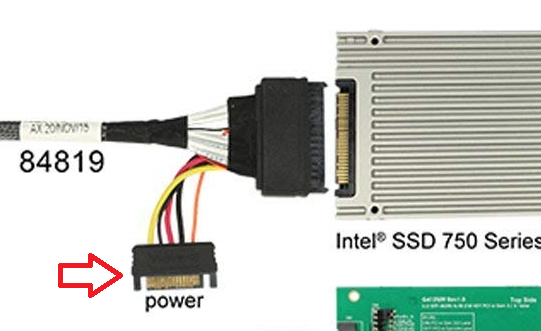
  2. Hey y'all, I am trying to setup my first unraid server. Unraid detects all the drives i have setup currently except the U.2 SSD that I have. The drive in question is this - 3.84TB 3D TLC PCIe 3.0 x4 NVMe U.2 SSD. I have it connected using this adapter and a SFF-8643 to SFF-8639 cable. Should unraid automatically detect this? Or is there no support for a u.2 to m.2 device? I am also going to check for a replacement cable to see if the cable is faulty. I wanted to get your guys' thoughts. Any help would be appreciated, thanks! ❤️ rserver-diagnostics-20240214-1103.zip
Account

Navigation

Search

Search

Configure browser push notifications

Chrome (Android)
  1. Tap the lock icon next to the address bar.
  2. Tap Permissions → Notifications.
  3. Adjust your preference.
Chrome (Desktop)
  1. Click the padlock icon in the address bar.
  2. Select Site settings.
  3. Find Notifications and adjust your preference.