UgurcanG
Members
-
Joined
-
Last visited
-
Ok I finally worked, thank you ❤️ The main problem I had were the directory permissions, but running “Docker Safe New Perms” like you said worked fine and solved this major problem. I also fixed the Paths and changed capital letters to small letters, just in case something is case-sensitive and to eliminate this kind of silly mistakes. Everything works fine now. The last thing I have to do is configure Plex itself, so it finds the media files and configure the transcoding stuff.
-
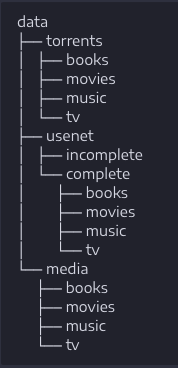
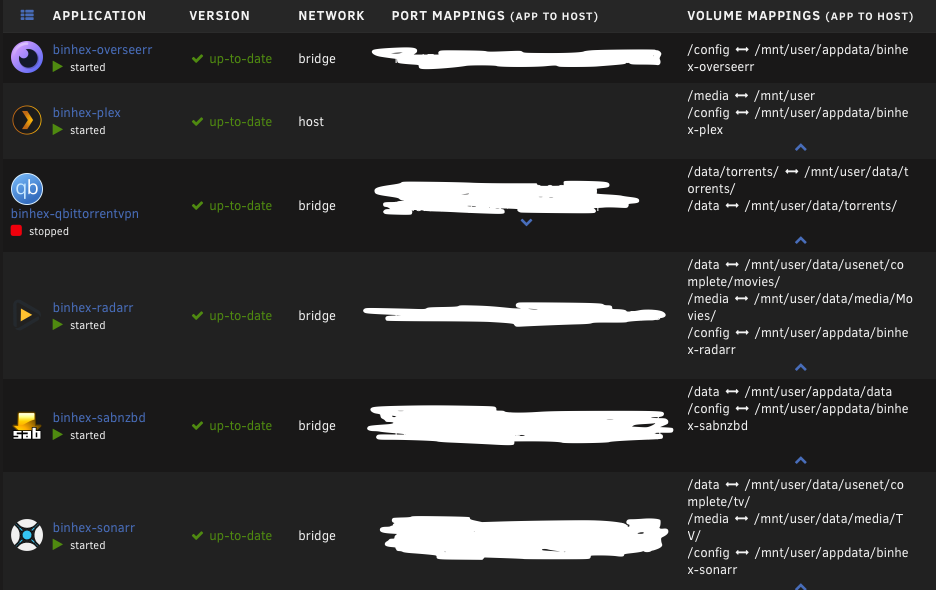
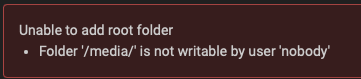
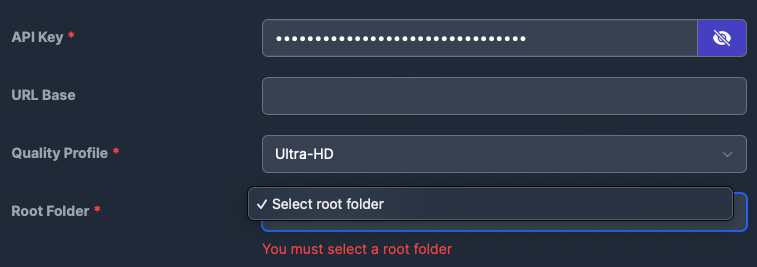
Hi, I want to use Plex and feed it with movies and TV shows. I installed all the docker containers. Everything is the binhex version, I don't know if it matters, but I wanted to make sure all the containers are from the same source. I also created a share for all of my containers, like this: The paths of my containers look like this: I have several problems, it seems I messed up the paths between the containers. My first issue is, I can't add a root folder to my radarr or sonarr. Radarr gives me an error like this: My folders are empty at the moment, I don't have any movies or TV shows yet. But I tried to fill it with some .mp4 files. It still don't work. Unfortunately, I can't add sonarr or radarr to overseerr. When I press test it says it connected successfully, so it means IP address, port, and API key is right, but I can't add the server, because I need to select a Root folder. But there is no root folder to choose. My media folder should have the right rights to do something with the path. Radarr also can't find the SABnzbd downloads path, but I configured it. But maybe I am wrong. I read many forums and posts and watched many videos, but nobody has this exact software stack like me. Maybe it doesn't matter, but I still couldn't bring it o work. I used this website as a guideline, but unfortunately it did not work. I wanted to use the hardlinks because I want to take advantage of atomic-moves. https://trash-guides.info/Hardlinks/How-to-setup-for/Unraid/ I should mention, I'm new to the unraid world, but I love it and want to keep using it. So if anyone can help a newcomer with this problem, I would be very happy. If you need more information, I'm happy to share it.