nm63
Members
-
Joined
-
Last visited
Everything posted by nm63
-
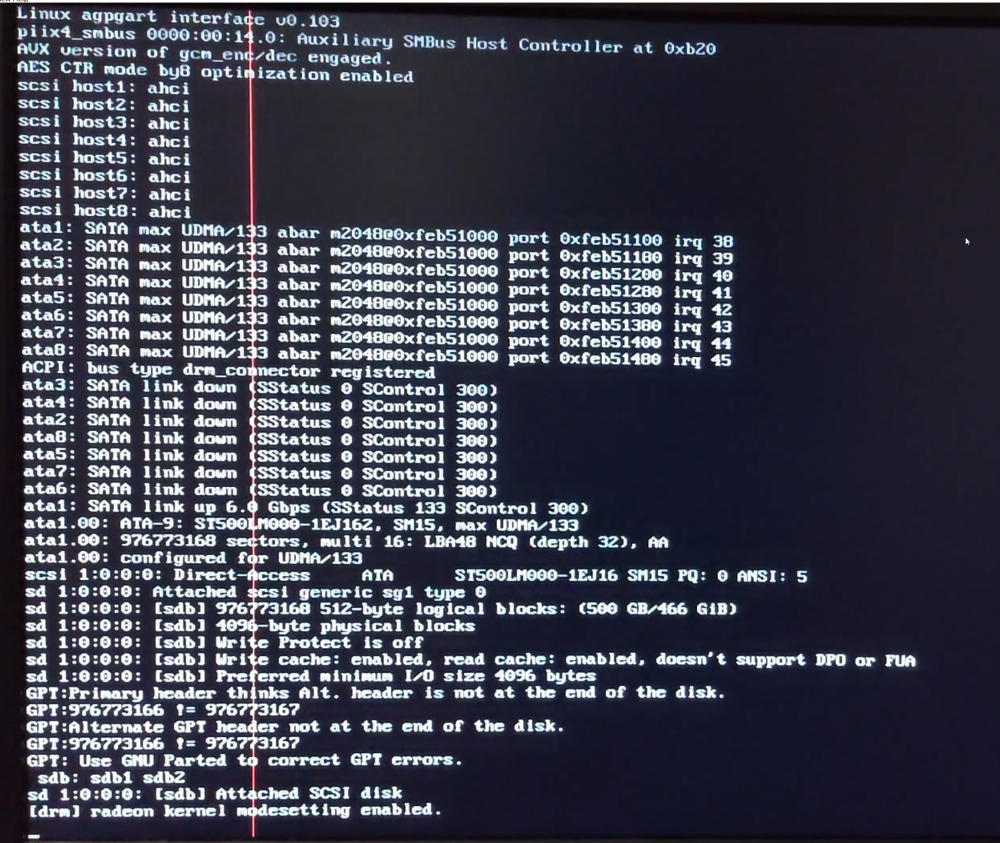
To close this off. I tried blacklisting the radeon GPU and that did not fix my issue. So I undid that change and then tired installing an old graphics card that I had lying around, which also happened to be a radeon. Presto! It worked! Thank you @JorgeB for putting me on the right path. I don't think I would have figured it out otherwiese.
-
Thank you for the suggestion, I will give this a try.
-
Hello, I am trying to setup UNRAID and I can't get it to boot on my server. It gets part way through the boot sequence and then goes to a black screen and reboots. The Server has a MSI A88XM motherboard with 8GB of ram. It was and can still run Windows without issue. I am using the onboard graphics adapter and is connected to the monitor vie DVI. I have attached a picture of the boot screen right before it crashes. As a troubleshooting measure I tested the boot USB flash drive on an old laptop and Unraid started up without issue. Video of the boot sequence: https://u.pcloud.link/publink/show?code=XZcK3qVZdIJCmREQHmXl6AnIYFnlf0m9Jr87 I am stumped, please help. Thanks!