Skip to content
View in the app

A better way to browse. Learn more.

Unraid

A full-screen app on your home screen with push notifications, badges and more.

To install this app on iOS and iPadOS
  1. Tap the Share icon in Safari
  2. Scroll the menu and tap Add to Home Screen.
  3. Tap Add in the top-right corner.
To install this app on Android
  1. Tap the 3-dot menu (⋮) in the top-right corner of the browser.
  2. Tap Add to Home screen or Install app.
  3. Confirm by tapping Install.

Verpz

Members
  • Joined

  • Last visited

  1. I get an error saying it is already unmounted. Still says device or resource is busy
  2. I have the same issue, how do I unmount the share?
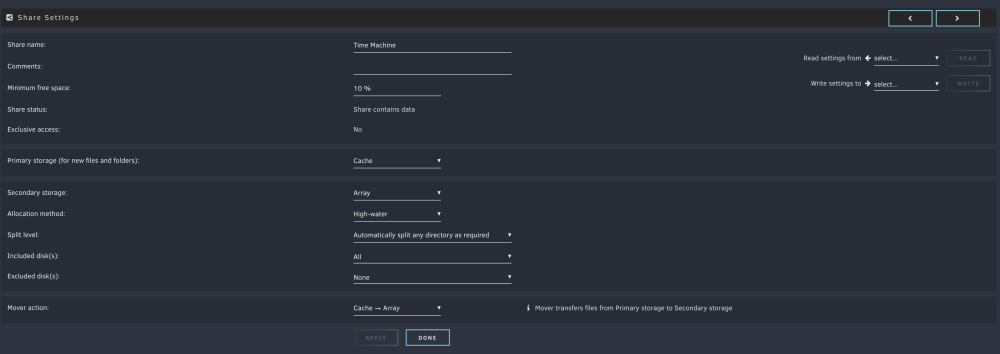
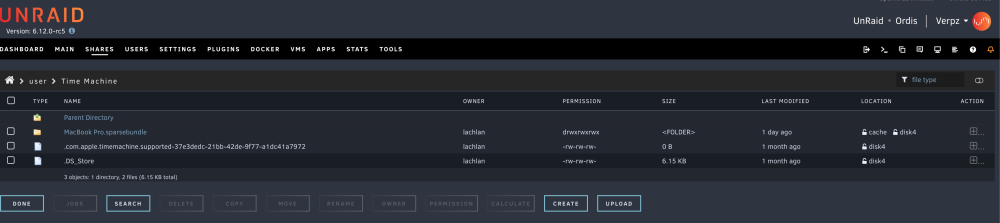
  3. Hey everyone, I moved my Time Machine share files off my ZFS pool to my normal Array and Cache drive. Unraid thinks there are still files present on the ZFS pool but I have confirmed with Krusader and File Manager that this is not the case. All that exists on the pool is an empty Time Machine parent folder for the share that was once there. What am I doing wrong? How do I clear this error? The ZFS Pool is called "Z" for reference. Thank you, everyone!

Account

Navigation

Search

Search

Configure browser push notifications

Chrome (Android)
  1. Tap the lock icon next to the address bar.
  2. Tap Permissions → Notifications.
  3. Adjust your preference.
Chrome (Desktop)
  1. Click the padlock icon in the address bar.
  2. Select Site settings.
  3. Find Notifications and adjust your preference.