





vincheezel
Members
-
Joined
-
Last visited
-
While I understand it's not polite to bump a very old thread, I'd like to update anyone in the future who may have found this post via a search engine. The issue was actually the drives I purchased. I bought 12 6TB SAS drives, and a large number of them were defective, not being able to read or write past 30-45mbps. Due to the sheer number of faulty drives I was sent, this issue took a really long time to figure out. As someone in IT, you really don't want to believe that it's possible that this many drives fail in the same exact way. Let it be a warning against buying a large number of the exact same model of drives from the same supplier. This was much harder for me to diagnose than it would have been if the drives were SATA. I have no SAS hardware other than my server I could use to perform testing, and I couldn't easily drop a drive, for obvious reasons. After a very long and drawn out warranty replacement process, along with refunding a few of them that they could no longer supply (I replaced them with regular SATA drives from a PC shop), everything is now working normally. In the end, I was supplied 20 drives, and of those drives, only 10 of them worked properly. Never seen such a case before in my career in IT, and hopefully next time I do it's someone else's problem. Cheers all :)
-
That did it, thankyou!
-
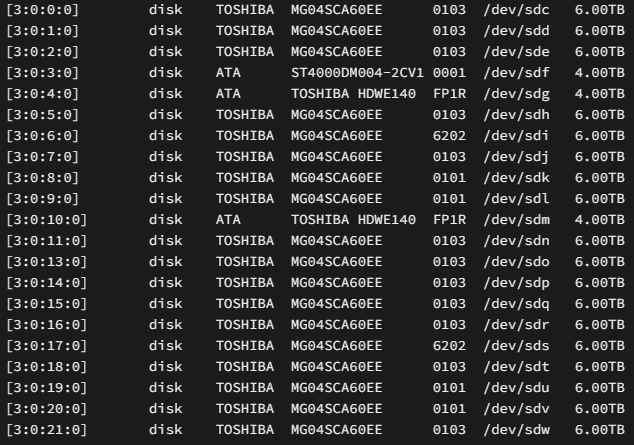
My system has 12 disk drives plugged into a HBA card. Unraid system devices shows me 22: Does anyone have any idea why this happens? unraid-diagnostics-20231006-2254.zip
-
I disagree, judging by the sheer volume of Lenovo enterprise hardware out there. Though my moneys already been put on the Unraid Pro license, so what am I really going to do about it
-
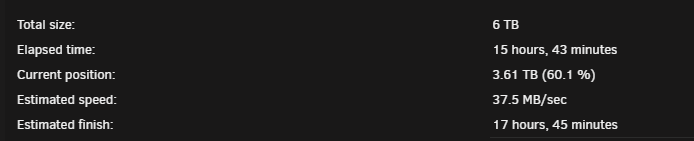
Well, some time has passed, and I've learned more about this particular problem. It seems it's not a disk problem, after testing 2 more disks that showed this read queuing, they are perfectly normal. It seems to be the case that if I perform a data rebuild on one disk, performance degrades to roughly 1/3rd expected A random disk will have a high read queue, but usually one of the higher letters If I instead rebuild two disks at the same time, speeds return to the 160MB/s area. The HBA card, storage shelf and cables are all first party and compatible with the server. The firmwares up to date. I'm really thinking I've hit a bug in Unraid, or some super weird platform issue. I don't expect I'll be upgrading past 6TB disks if this is how rebuilds look. It sucks at the moment to take my docker containers and shares down for the 2 days needed for a single disk rebuild. If I wanted, say, 20TB disks, I'd be out of commission for a week for each disk! I can't do it! If anyones got any brainwaves, let me know unraid-diagnostics-20231005-1134.zip
-
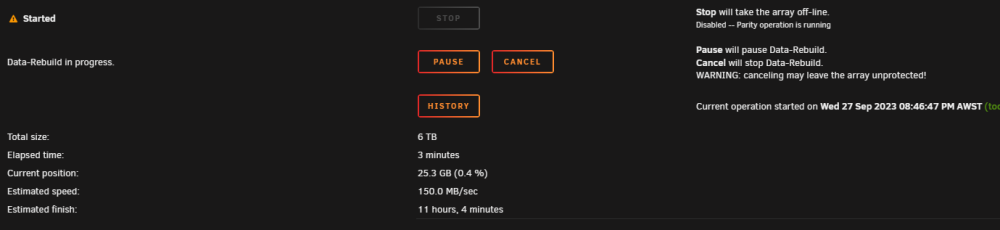
Replacing that disk sorted it out! Genuinely ecstatic rn: wish me luck boys while I yolo this 2 disk rebuild
-
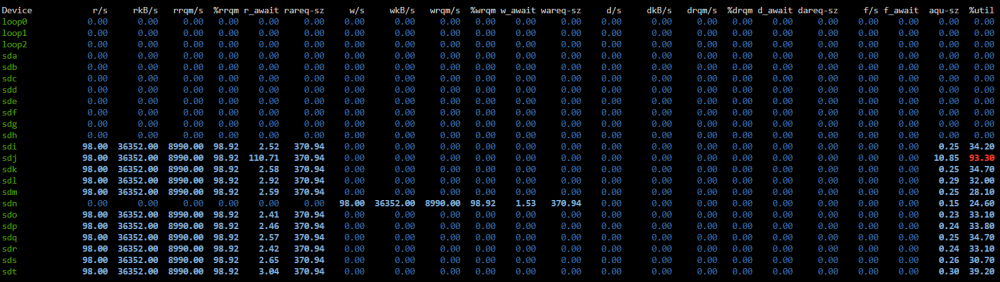
After more digging I did identify that one disk has a rather high queue time: Anyone know if that's normal? It happens to be my emptiest disk so I wonder if its just.. NOOPing for lack of a better term. If it looks abnormal I'm going to try and replace it on the next rebuild
-
In my case, just copying one 20gb file is enough to degrade it for 12 hours (to the point where I can't shut it down, as its permanently busy)
-
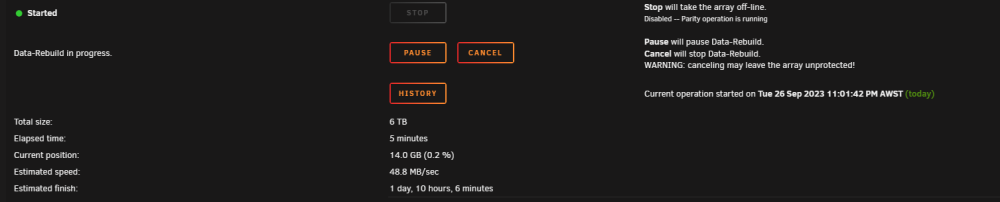
After that drive rebuilt (after 3 days) I did another one after a restart, with no docker images running at all (no r/w to the array) and its still sitting at about half or slightly less than half of what I have seen it run. As it stands, if I try to actually use the share while it rebuilds, its going to completely tank the performance for days, even if I only use it a few hours. I'm still sure there's an issue here somewhere, but I really don't know what it could be. I've updated the HBA card firmware just to be safe, and swapped out the mini-SAS cables. Is there some kind of middle ground I can tune to where I can use the share without fear while I rebuild? I have 6 drives to go. Lol Thanks for the ongoing help here. I appreciate it unraid-diagnostics-20230926-2303.zip
-
Replaced a drive with a bigger one and the rebuilds slowed to a crawl unraid-diagnostics-20230921-2158.zip
-
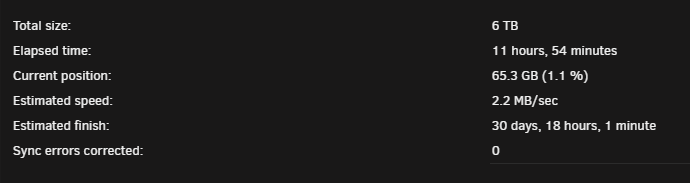
It did it again this morning with no browser windows open. It had started a scheduled parity check so I went to take a screenshot and cancel it, no difference made. Files are still being accessed at a fraction of the drives normal speed and are unusable for practical purposes. Anything else I should check? iotop shows a repeated burst of drive activity followed by nothing, then another burst, over and over.
-
Thanks, I really hope it wasn't a coincidence, but it started working around the time I closed the browser tabs. I'm surprised that it could have been something simple like that
-
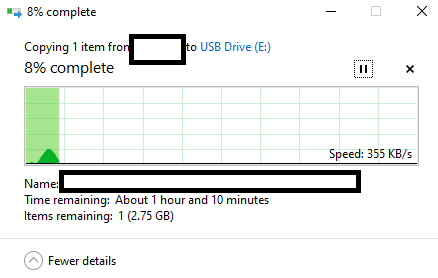
Hi All I am suffering from a random issue that seems to hit my server where all file reads slow to a crawl (making PLEX unusable) and a shutdown/restart becomes impossible until I wait an extended amount of time. I've waited upwards of 5 hours before it will finally restart. My hardware is Lenovo SR550 server 256gb ECC ram 12 HDD on storwise disk shelf (these contain media). 2 parity 3 SSD front bays (these contain docker appdata, and my personal NAS) When the issue hits, playing media is slow, SMB copies are slow (and when I say slow I mean 1 to 500kb/s, all file operations are slow) Any ideas? More information needed? The unraid install itself is quite old but I keep it up to date Thanks all unraid-diagnostics-20230918-2105.zip
-
Thanks for the info. That's rather hectic. The share came straight back up but I'll have to work on docker to get it back the way it was Are there any more reserved names I need to be aware of
-
I had 5 shares last I checked, and I just noticed today that one of them is just straight up gone. It's completely accessible from docker though and my data is intact.. I didn't notice for ages since I mainly use Plex, I only occasionally will use the SMB shares for something. Share was named "unraid" and the path was /mnt/user/unraid/ Is there a way to remake the share? Is it safe to do so? Does anyone know why it vanished? Thanks gang!



