





llm
Members
-
Joined
-
Last visited
-
-
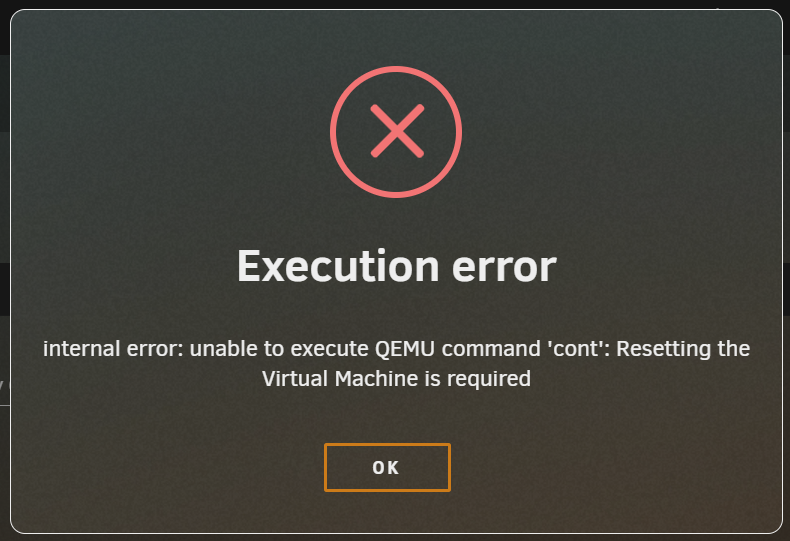
最好是傻瓜一点的,开启ipv6后qb的docker无法启动了😭今天突然发现plex服务器停了,尝试启动提示server error,最后发现应该是我在参数里设置调用核显,现在可能是核显驱动掉了? cannot access '/dev/dri/': No such file or directory 我试了 modprobe i915 还是不行I found that the problem is associated with the Sound Card. The VM would not be "paused" if I remove it in VM's setting (of course the VM cannot be used as a gaming VM without sound). Then I add the sound card and the VM was paused very soon after start. But I am confused again. Without the sound card, I can install the newest version of Nvidia driver (565.90), but the gaming performance is very bad. I use the same setting but I can only get 1 FPS in Black Myth (RTX4080, 2560x1440, no Ray Tracing).I tried to change the xml from <hostdev mode='subsystem' type='pci' managed='yes'> <driver name='vfio'/> <source> <address domain='0x0000' bus='0x01' slot='0x00' function='0x0'/> </source> <rom file='/mnt/user/isos/ROM/Zotac4080-20230910.rom'/> <address type='pci' domain='0x0000' bus='0x04' slot='0x00' function='0x0' multifunction='on'/> </hostdev> <hostdev mode='subsystem' type='pci' managed='yes'> <driver name='vfio'/> <source> <address domain='0x0000' bus='0x01' slot='0x00' function='0x1'/> </source> <address type='pci' domain='0x0000' bus='0x04' slot='0x00' function='0x1'/> </hostdev> to <hostdev mode='subsystem' type='pci' managed='yes'> <driver name='vfio'/> <source> <address domain='0x0000' bus='0x01' slot='0x00' function='0x0'/> </source> <rom file='/mnt/user/isos/ROM/Zotac4080-20230910.rom'/> <address type='pci' domain='0x0000' bus='0x04' slot='0x00' function='0x0'/> </hostdev> <hostdev mode='subsystem' type='pci' managed='yes'> <driver name='vfio'/> <source> <address domain='0x0000' bus='0x01' slot='0x00' function='0x1'/> </source> <address type='pci' domain='0x0000' bus='0x05' slot='0x00' function='0x0'/> </hostdev> It seems that the VM works looger. I watch videoes for about 10 minutes. But it still paused about 2 minutes after I started a Game (God of War). But this time I get something new from the log: -sandbox on,obsolete=deny,elevateprivileges=deny,spawn=deny,resourcecontrol=deny \ -msg timestamp=on char device redirected to /dev/pts/0 (label charserial0) qxl_send_events: spice-server bug: guest stopped, ignoring 2024-10-06T13:19:33.731078Z qemu-system-x86_64: libusb_release_interface: -99 [OTHER] 2024-10-06T13:19:33.731112Z qemu-system-x86_64: libusb_release_interface: -99 [OTHER] 2024-10-06T13:19:33.731115Z qemu-system-x86_64: libusb_release_interface: -99 [OTHER] 2024-10-06T13:19:35.761051Z qemu-system-x86_64: libusb_release_interface: -99 [OTHER] 2024-10-06T13:19:35.761068Z qemu-system-x86_64: libusb_release_interface: -99 [OTHER] 2024-10-06T13:19:35.761073Z qemu-system-x86_64: libusb_release_interface: -99 [OTHER] 2024-10-06T13:32:51.266412Z qemu-system-x86_64: vfio_err_notifier_handler(0000:01:00.0) Unrecoverable error detected. Please collect any data possible and then kill the guest 2024-10-06T13:32:51.346018Z qemu-system-x86_64: vfio_err_notifier_handler(0000:01:00.1) Unrecoverable error detected. Please collect any data possible and then kill the guestI had a Win11 VM for gaming and I passed though a 4080. Everything was good in August. Acturally I finished BMW on it. I remember I updated Geforce Game Ready in Aug. 22 (560.94) and then the VM still worked well for about a week. Then one day suddenly the VM was "paused". And if I click "resume", it reports: so I have to "force stop" it. The log of the VM is like: -vnc 0.0.0.0:0,websocket=5700,audiodev=audio1 \ -k en-us \ -device '{"driver":"qxl-vga","id":"video0","max_outputs":1,"ram_size":67108864,"vram_size":67108864,"vram64_size_mb":0,"vgamem_mb":16,"bus":"pcie.0","addr":"0x1e"}' \ -device '{"driver":"vfio-pci","host":"0000:01:00.0","id":"hostdev0","bus":"pci.3","multifunction":true,"addr":"0x0","romfile":"/mnt/user/isos/ROM/Zotac4080-20230910.rom"}' \ -device '{"driver":"vfio-pci","host":"0000:01:00.1","id":"hostdev1","bus":"pci.3","addr":"0x0.0x1"}' \ -device '{"driver":"vfio-pci","host":"0000:05:00.0","id":"hostdev2","bus":"pci.4","addr":"0x0"}' \ -device '{"driver":"usb-host","hostdevice":"/dev/bus/usb/001/004","id":"hostdev3","bus":"usb.0","port":"2"}' \ -device '{"driver":"usb-host","id":"hostdev4","bus":"usb.0","port":"3"}' \ -device '{"driver":"usb-host","id":"hostdev5","bus":"usb.0","port":"4"}' \ -device '{"driver":"usb-host","id":"hostdev6","bus":"usb.0","port":"5"}' \ -sandbox on,obsolete=deny,elevateprivileges=deny,spawn=deny,resourcecontrol=deny \ -msg timestamp=on char device redirected to /dev/pts/0 (label charserial0) qxl_send_events: spice-server bug: guest stopped, ignoring 2024-10-06T12:31:28.074101Z qemu-system-x86_64: vfio_err_notifier_handler(0000:01:00.0) Unrecoverable error detected. Please collect any data possible and then kill the guest 2024-10-06T12:31:28.114218Z qemu-system-x86_64: vfio_err_notifier_handler(0000:01:00.1) Unrecoverable error detected. Please collect any data possible and then kill the guest 2024-10-06T12:31:28.200916Z qemu-system-x86_64: vfio_err_notifier_handler(0000:01:00.0) Unrecoverable error detected. Please collect any data possible and then kill the guest 2024-10-06T12:31:28.200973Z qemu-system-x86_64: vfio_err_notifier_handler(0000:01:00.1) Unrecoverable error detected. Please collect any data possible and then kill the guest I have been trying to fix it these days, and now I am quite sure that the problem comes from nvidia driver Geforce Game Ready. The VM will keep working for minutes after updating and then be "paused". Sometimes the VM usually can not be started again. Both win10 VM and win11 VM have the same problem. I have create a new VM and it works with no probem with its builtin nvidia driver (536.23 for win10VM) untill I update the nvidia driver to 560.81 or newer (I have not tried older version because I am quite sure the VM have been run on it for weeks). And today I tried to update nvidia driver through windows update. The VM reboot successfully, so I can check the nvidia driver version which shows to be 560.94. Then it "paused" without surprise.
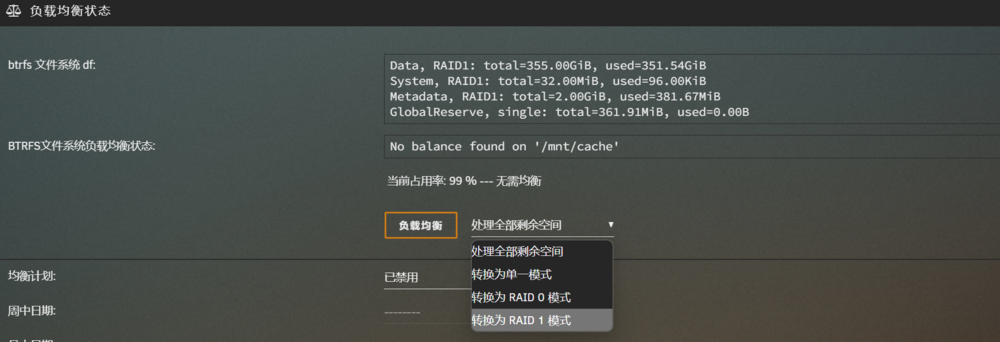
 我用一个1T的nvme致钛TiPlus5000建了一个fast池,用来存储appdata、domains、isos、system,cache池用来作为下载、appdata备份以及阵列的中转使用。 我有两个SATA固态,分别是1T和2T,暂时没啥别的需求,就用来作为cache了,想请教一下cache的负载均衡选项都是什么意思。 现在是默认状态,似乎是把磁盘分成多块然后组成的双重备份,这种状态下对性能有什么影响?对数据的保护能力如何?我之前尝试过在这种状态下移除一个cache里的硬盘,启动阵列后unraid无法读取cache。 另外,转换为单一模式和raid0有什么区别?单一模式下好像还是从两块硬盘同时读写
 原来是因为还没有把nvme固态从cache里撤出来,搞定了,比直通SATA固态简单多了我想直通一块nvme固态给虚拟机玩游戏用,但是在VFIO里前面的框是灰色的,可能是因为这个nvme是南桥出来的,和sata共用了通道 请问这样还能直通吗?实在不行我换成直通SATA固态吧试试这样设置
 上面是虚拟机暂停后的日志,报错的0000:01:00.0和0000:01:00.1是我直通给虚拟机的显卡和对应声卡,比较奇怪的是我进行操作是在22点,信息里显示的是14点,不知道有没有影响2024-08-31T13:47:43.685134Z qemu-system-x86_64: libusb_release_interface: -4 [NO_DEVICE] 2024-08-31T14:04:07.346818Z qemu-system-x86_64: libusb_release_interface: -4 [NO_DEVICE] 2024-08-31T14:04:07.346837Z qemu-system-x86_64: libusb_release_interface: -4 [NO_DEVICE] 2024-08-31T14:04:07.346840Z qemu-system-x86_64: libusb_release_interface: -4 [NO_DEVICE] 2024-08-31T14:04:07.346842Z qemu-system-x86_64: libusb_release_interface: -4 [NO_DEVICE] 2024-08-31T14:05:58.878094Z qemu-system-x86_64: vfio_err_notifier_handler(0000:01:00.0) Unrecoverable error detected. Please collect any data possible and then kill the guest 2024-08-31T14:05:58.951992Z qemu-system-x86_64: vfio_err_notifier_handler(0000:01:00.1) Unrecoverable error detected. Please collect any data possible and then kill the guest 2024-08-31T14:08:05.576277Z qemu-system-x86_64: terminating on signal 15 from pid 17156 (/usr/sbin/libvirtd) 2024-08-31 14:08:06.577+0000: shutting down, reason=destroyed 2024-08-31 14:08:26.355+0000: Starting external device: TPM Emulator /usr/bin/swtpm socket --ctrl 'type=unixio,path=/run/libvirt/qemu/swtpm/6-Windows 11-swtpm.sock,mode=0600' --tpmstate dir=/var/lib/libvirt/swtpm/c5f2778b-e58b-f2f0-8baa-6dcd7fdd44f2/tpm2,mode=0600 --log 'file=/var/log/swtpm/libvirt/qemu/Windows 11-swtpm.log' --terminate --tpm2 2024-08-31 14:08:26.393+0000: starting up libvirt version: 8.7.0, qemu version: 7.2.0, kernel: 6.1.99-Unraid, hostname: MediaServer LC_ALL=C \ PATH=/bin:/sbin:/usr/bin:/usr/sbin \ HOME='/var/lib/libvirt/qemu/domain-6-Windows 11' \ XDG_DATA_HOME='/var/lib/libvirt/qemu/domain-6-Windows 11/.local/share' \ XDG_CACHE_HOME='/var/lib/libvirt/qemu/domain-6-Windows 11/.cache' \ XDG_CONFIG_HOME='/var/lib/libvirt/qemu/domain-6-Windows 11/.config' \ /usr/local/sbin/qemu \ -name 'guest=Windows 11,debug-threads=on' \ -S \ -object '{"qom-type":"secret","id":"masterKey0","format":"raw","file":"/var/lib/libvirt/qemu/domain-6-Windows 11/master-key.aes"}' \ -blockdev '{"driver":"file","filename":"/usr/share/qemu/ovmf-x64/OVMF_CODE-pure-efi-tpm.fd","node-name":"libvirt-pflash0-storage","auto-read-only":true,"discard":"unmap"}' \ -blockdev '{"node-name":"libvirt-pflash0-format","read-only":true,"driver":"raw","file":"libvirt-pflash0-storage"}' \ -blockdev '{"driver":"file","filename":"/etc/libvirt/qemu/nvram/c5f2778b-e58b-f2f0-8baa-6dcd7fdd44f2_VARS-pure-efi-tpm.fd","node-name":"libvirt-pflash1-storage","auto-read-only":true,"discard":"unmap"}' \ -blockdev '{"node-name":"libvirt-pflash1-format","read-only":false,"driver":"raw","file":"libvirt-pflash1-storage"}' \ -machine pc-q35-7.2,usb=off,dump-guest-core=off,mem-merge=off,memory-backend=pc.ram,pflash0=libvirt-pflash0-format,pflash1=libvirt-pflash1-format \ -accel kvm \ -cpu host,migratable=on,hv-time=on,hv-relaxed=on,hv-vapic=on,hv-spinlocks=0x1fff,hv-vendor-id=none,host-cache-info=on,l3-cache=off \ -m 32768 \ -object '{"qom-type":"memory-backend-ram","id":"pc.ram","size":34359738368}' \ -overcommit mem-lock=off \ -smp 12,sockets=1,dies=1,cores=6,threads=2 \ -uuid c5f2778b-e58b-f2f0-8baa-6dcd7fdd44f2 \ -no-user-config \ -nodefaults \ -chardev socket,id=charmonitor,fd=35,server=on,wait=off \ -mon chardev=charmonitor,id=monitor,mode=control \ -rtc base=localtime \ -no-hpet \ -no-shutdown \ -boot strict=on \ -device '{"driver":"pcie-root-port","port":8,"chassis":1,"id":"pci.1","bus":"pcie.0","multifunction":true,"addr":"0x1"}' \ -device '{"driver":"pcie-root-port","port":9,"chassis":2,"id":"pci.2","bus":"pcie.0","addr":"0x1.0x1"}' \ -device '{"driver":"pcie-root-port","port":10,"chassis":3,"id":"pci.3","bus":"pcie.0","addr":"0x1.0x2"}' \ -device '{"driver":"pcie-root-port","port":11,"chassis":4,"id":"pci.4","bus":"pcie.0","addr":"0x1.0x3"}' \ -device '{"driver":"pcie-root-port","port":12,"chassis":5,"id":"pci.5","bus":"pcie.0","addr":"0x1.0x4"}' \ -device '{"driver":"pcie-root-port","port":13,"chassis":6,"id":"pci.6","bus":"pcie.0","addr":"0x1.0x5"}' \ -device '{"driver":"pcie-root-port","port":14,"chassis":7,"id":"pci.7","bus":"pcie.0","addr":"0x1.0x6"}' \ -device '{"driver":"qemu-xhci","p2":15,"p3":15,"id":"usb","bus":"pcie.0","addr":"0x7"}' \ -device '{"driver":"virtio-serial-pci","id":"virtio-serial0","bus":"pci.2","addr":"0x0"}' \ -blockdev '{"driver":"file","filename":"/mnt/user/domains/Windows 11/vdisk1.img","node-name":"libvirt-4-storage","cache":{"direct":false,"no-flush":false},"auto-read-only":true,"discard":"unmap"}' \ -blockdev '{"node-name":"libvirt-4-format","read-only":false,"cache":{"direct":false,"no-flush":false},"driver":"raw","file":"libvirt-4-storage"}' \ -device '{"driver":"virtio-blk-pci","bus":"pci.3","addr":"0x0","drive":"libvirt-4-format","id":"virtio-disk2","bootindex":1,"write-cache":"on","serial":"vdisk1"}' \ -blockdev '{"driver":"file","filename":"/mnt/user/domains/Windows 11/vdisk2.img","node-name":"libvirt-3-storage","cache":{"direct":false,"no-flush":false},"auto-read-only":true,"discard":"unmap"}' \ -blockdev '{"node-name":"libvirt-3-format","read-only":false,"cache":{"direct":false,"no-flush":false},"driver":"raw","file":"libvirt-3-storage"}' \ -device '{"driver":"virtio-blk-pci","bus":"pci.4","addr":"0x0","drive":"libvirt-3-format","id":"virtio-disk3","write-cache":"on","serial":"vdisk2"}' \ -blockdev '{"driver":"file","filename":"/mnt/user/isos/zh-cn_windows_11_business_editions_version_23h2_updated_aug_2024_x64_dvd_6ca91c94.iso","node-name":"libvirt-2-storage","auto-read-only":true,"discard":"unmap"}' \ -blockdev '{"node-name":"libvirt-2-format","read-only":true,"driver":"raw","file":"libvirt-2-storage"}' \ -device '{"driver":"ide-cd","bus":"ide.0","drive":"libvirt-2-format","id":"sata0-0-0","bootindex":2}' \ -blockdev '{"driver":"file","filename":"/mnt/user/isos/virtio-win-0.1.229-1.iso","node-name":"libvirt-1-storage","auto-read-only":true,"discard":"unmap"}' \ -blockdev '{"node-name":"libvirt-1-format","read-only":true,"driver":"raw","file":"libvirt-1-storage"}' \ -device '{"driver":"ide-cd","bus":"ide.1","drive":"libvirt-1-format","id":"sata0-0-1"}' \ -netdev tap,fd=36,id=hostnet0 \ -device '{"driver":"virtio-net","netdev":"hostnet0","id":"net0","mac":"52:54:00:5f:c1:5c","bus":"pci.1","addr":"0x0"}' \ -chardev pty,id=charserial0 \ -device '{"driver":"isa-serial","chardev":"charserial0","id":"serial0","index":0}' \ -chardev socket,id=charchannel0,fd=34,server=on,wait=off \ -device '{"driver":"virtserialport","bus":"virtio-serial0.0","nr":1,"chardev":"charchannel0","id":"channel0","name":"org.qemu.guest_agent.0"}' \ -chardev 'socket,id=chrtpm,path=/run/libvirt/qemu/swtpm/6-Windows 11-swtpm.sock' \ -tpmdev emulator,id=tpm-tpm0,chardev=chrtpm \ -device '{"driver":"tpm-tis","tpmdev":"tpm-tpm0","id":"tpm0"}' \ -device '{"driver":"usb-tablet","id":"input0","bus":"usb.0","port":"3"}' \ -audiodev '{"id":"audio1","driver":"none"}' \ -vnc 0.0.0.0:0,websocket=5700,audiodev=audio1 \ -k en-us \ -device '{"driver":"qxl-vga","id":"video0","max_outputs":1,"ram_size":67108864,"vram_size":67108864,"vram64_size_mb":0,"vgamem_mb":16,"bus":"pcie.0","addr":"0x1e"}' \ -device '{"driver":"vfio-pci","host":"0000:01:00.0","id":"hostdev0","bus":"pci.5","multifunction":true,"addr":"0x0","romfile":"/mnt/cache/isos/ROM/Zotac4080-20230910.rom"}' \ -device '{"driver":"vfio-pci","host":"0000:01:00.1","id":"hostdev1","bus":"pci.5","addr":"0x0.0x1"}' \ -device '{"driver":"usb-host","id":"hostdev2","bus":"usb.0","port":"1"}' \ -device '{"driver":"usb-host","id":"hostdev3","bus":"usb.0","port":"2"}' \ -device '{"driver":"usb-host","hostdevice":"/dev/bus/usb/001/004","id":"hostdev4","bus":"usb.0","port":"4"}' \ -device '{"driver":"usb-host","id":"hostdev5","bus":"usb.0","port":"5"}' \ -sandbox on,obsolete=deny,elevateprivileges=deny,spawn=deny,resourcecontrol=deny \ -msg timestamp=on char device redirected to /dev/pts/0 (label charserial0) qxl_send_events: spice-server bug: guest stopped, ignoring 2024-08-31T14:08:54.739631Z qemu-system-x86_64: vfio_err_notifier_handler(0000:01:00.0) Unrecoverable error detected. Please collect any data possible and then kill the guest 2024-08-31T14:08:54.872165Z qemu-system-x86_64: vfio_err_notifier_handler(0000:01:00.1) Unrecoverable error detected. Please collect any data possible and then kill the guest 2024-08-31T14:08:54.872196Z qemu-system-x86_64: vfio_err_notifier_handler(0000:01:00.0) Unrecoverable error detected. Please collect any data possible and then kill the guest


