





Pimche
Members
-
Joined
-
Last visited
-
Omg it work! i was sure i select xfs for this one. Perfect thank you for your time. =D have a great day.
-
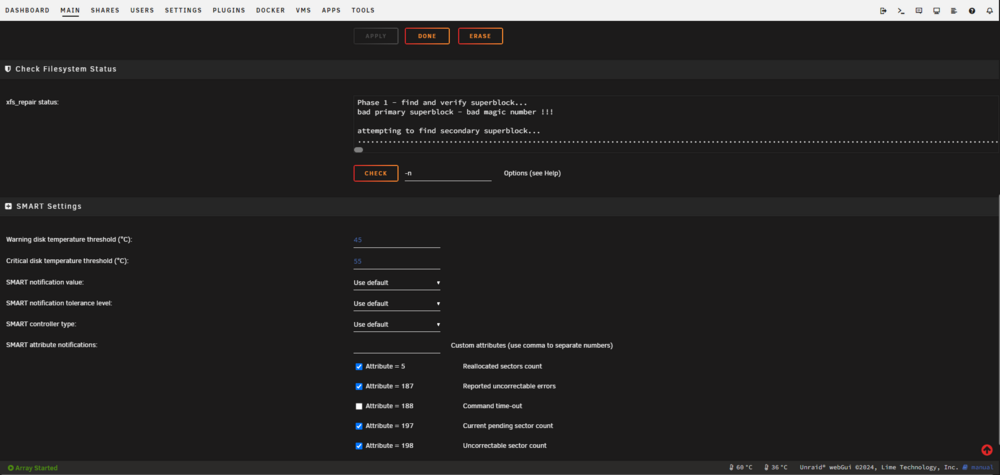
i let it run all the night and the sxf_repair -n finish with "............................................................................................................................................................Sorry, could not find valid secondary superblock Exiting now." Thank you for the reply, should i stay in maintenance mode? (if yes here the result) blkid /dev/sdb1: LABEL_FATBOOT="UNRAID" LABEL="UNRAID" UUID="8C09-F088" BLOCK_SIZE="512" TYPE="vfat" PARTUUID="7652be63-01" /dev/sda1: UUID="e81065be-3d8c-472c-bb9d-fb3f75f8ab49" BLOCK_SIZE="512" TYPE="xfs" /dev/loop1: TYPE="squashfs" /dev/sdf1: LABEL="vault" UUID="2359975039589267301" UUID_SUB="7316306948520351044" BLOCK_SIZE="4096" TYPE="zfs_member" PARTUUID="151572ec-260a-4511-a733-0c42e2b35e27" /dev/sdd1: LABEL="vault" UUID="2359975039589267301" UUID_SUB="3641995157815460059" BLOCK_SIZE="4096" TYPE="zfs_member" PARTUUID="1c6863ec-0cc5-4ee4-a63a-b1cd25855fcb" /dev/sdi1: LABEL="dockernshit" UUID="15501961814176301661" UUID_SUB="1090421879665586030" BLOCK_SIZE="4096" TYPE="zfs_member" /dev/md1p1: UUID="e81065be-3d8c-472c-bb9d-fb3f75f8ab49" BLOCK_SIZE="512" TYPE="xfs" /dev/sdg1: UUID="1762e3d8-08d2-486f-abfe-bc9e0929163e" BLOCK_SIZE="4096" TYPE="xfs" PARTUUID="6683bde0-a821-4ce3-b7a3-88647d03ad40" /dev/loop0: TYPE="squashfs" /dev/sde1: LABEL="vault" UUID="2359975039589267301" UUID_SUB="66249137583253894" BLOCK_SIZE="4096" TYPE="zfs_member" PARTUUID="153c7372-8150-4dd4-b37f-d58149fb2360" /dev/sdc1: LABEL="vault" UUID="2359975039589267301" UUID_SUB="18101248871428392101" BLOCK_SIZE="4096" TYPE="zfs_member" PARTUUID="13fc6355-4711-436a-8eb9-67c2d7abd569" /dev/sdj1: LABEL="dockernshit" UUID="15501961814176301661" UUID_SUB="7755549404293351727" BLOCK_SIZE="4096" TYPE="zfs_member" /dev/sdh1: UUID="8ea19b6f-816e-4b9d-b742-2a3712740ee0" UUID_SUB="8a69b12f-fbe2-4f38-8e96-c9286475160b" BLOCK_SIZE="4096" TYPE="btrfs" PARTUUID="2b241b4b-bf05-4b32-87cb-785d07fcf51a"
-
Pimche changed their profile photo
-
it is somehow reassuring for me to know that. Again, thank you for your time and i hope mr jorgeB will se my topic. 😃
-
i think i understant. So here the result for the fdisk -l /dev/sdh " fdisk -l /dev/sdh Disk /dev/sdh: 10.91 TiB, 12000138625024 bytes, 23437770752 sectors Disk model: ST12000NM0127 Units: sectors of 1 * 512 = 512 bytes Sector size (logical/physical): 512 bytes / 4096 bytes I/O size (minimum/optimal): 4096 bytes / 4096 bytes Disklabel type: gpt Disk identifier: 75342285-4307-4D0B-B776-42B73DA6E9FD Device Start End Sectors Size Type /dev/sdh1 64 23437770718 23437770655 10.9T Linux filesystem "
-
Good, thank you, i let it run until...something good happen i hope and i let you know if i got anything. I am not sure to understand why i should select the partition. I use this disk for storage, he is alone in the pool. I this something that unraid do when i put the disk for the first time? it create the "dev" partition and anything else? If this is too long to explain for you don't bother.
-
On the webUI the first try i just click on the check button, with the -n on the box. At this moment i was able to see the hard drive reading something on the main page. but into the cheking status windows, under "Phase 1 - find and verify superblock... bad primary superblock - bad magic number !!! attempting to find secondary superblock..." Only point was writen. and after some hour, it was kind of slow, and even some button disappear like it was glitchy to show all the dot. And now i use on the terminal this time the "xfs_repair -n /dev/sdh" (i copy/past it, from another topic, i just change the name of the hdd, in my case it is the sdh i have a problem with) It run again but my terminal only show lot and lot and lot of dot....but the hdd on the main page, didn't "read" something this time.
-
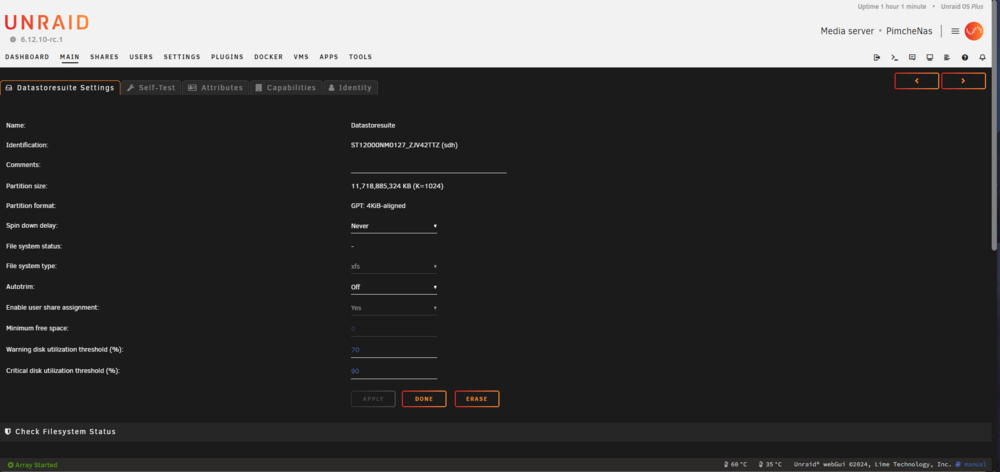
Thank you for the reply. Is this what you need? i am still in mainenance mode. i start another xfs_repair on the terminal page this time, it was super slow on the hdd page to see.
-
Good day to you. i'm not an english speaker, and never realy use linux i must precise that before i start. So yesterday and i don't know why i lost for a second the electricty, i didn't even see that but both my computer and my unraid restart. After that, one of my plex media hard drive show as "Unmountable: Unsupported or no file system" I follow two topic and the unraid manual and try to repaire it with the xfs_repair -n but it run over the night and read over 22.000.000 what ever the unit is, and i decide tu stop it and try to ask help (as the manual say ^^). I know this is not very important data, its only for plex but 12to is a lot. So here i am....please help me. This is the diag. And if i'm doing something wrong or missing something telle me everything. Thank you. pimchenas-diagnostics-20240504-1437.zip



