




Skip to content
View in the app

A better way to browse. Learn more.

Unraid

A full-screen app on your home screen with push notifications, badges and more.

To install this app on iOS and iPadOS
  1. Tap the Share icon in Safari
  2. Scroll the menu and tap Add to Home Screen.
  3. Tap Add in the top-right corner.
To install this app on Android
  1. Tap the 3-dot menu (⋮) in the top-right corner of the browser.
  2. Tap Add to Home screen or Install app.
  3. Confirm by tapping Install.

NAS-TOne

Members
  • Joined

  • Last visited

Everything posted by NAS-TOne

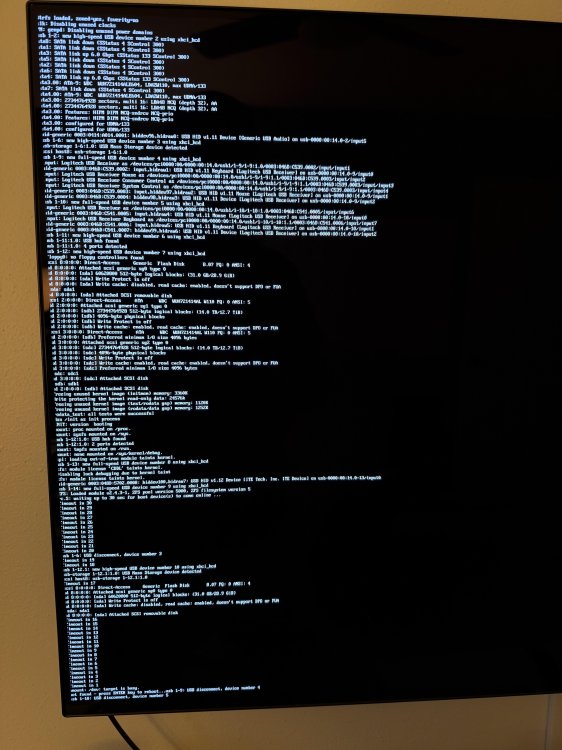
  1. Hello ya'll. I recently powered down my server to clean it out from dust. I have not made any hardware or large software changes to it other than maybe a plug-in update or docker update and have a recent USB backup. I have tried to plug in/out the USB during time out. I have tried recreating the USB using my backup, I tried to make sure the BIOS was reset to default just in case but I can't seem to get it to load up, I even tried a different USB drive. Any help in the right direction would be appreciated.
Account

Navigation

Search

Search

Configure browser push notifications

Chrome (Android)
  1. Tap the lock icon next to the address bar.
  2. Tap Permissions → Notifications.
  3. Adjust your preference.
Chrome (Desktop)
  1. Click the padlock icon in the address bar.
  2. Select Site settings.
  3. Find Notifications and adjust your preference.