endeavour
Members
-
Joined
-
Last visited
Everything posted by endeavour
-
Dear everyone, I wanted to share some exciting news with you all. A friend from Discord was able to solve the problem I was facing. The solution was quite simple: I changed the volume from "mnt/user" to "mnt/cache". Surprisingly, this small adjustment caused the host Docker container to outperform the old volume place container by eight times! It's an essential tip for those of you seeking better performance. Depending on where your Docker volume is mounted, it can significantly impact your performance compared to a VM environment. Thank you all for your support. Best regards,

-
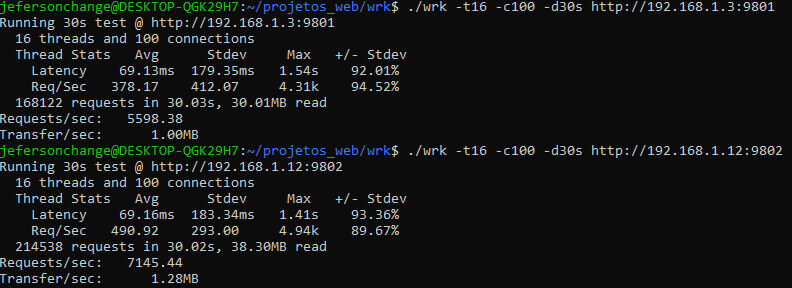
I just realize the VM was assigned to just use 4 HT cores, and now things gets really worse when i assigned all the cores to the host docker container and did the VM: What can explain such performance difference?
-
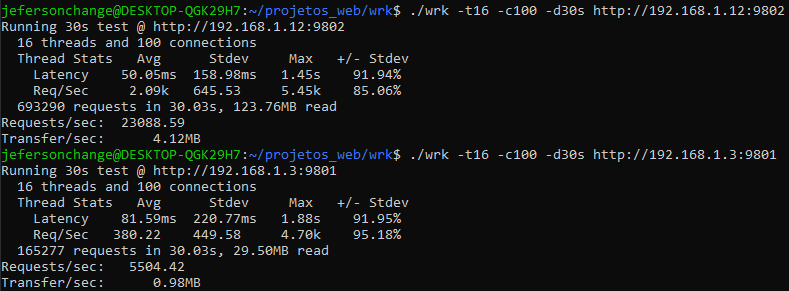
I conducted the same tests again, this time taking advice from a friend. I ensured that both Docker Engines were on the same version: 20.10.21. However, the results remained unchanged. I believe it is crucial to determine whether this issue is related to my environment or if it is a genuine problem. The performance difference compared to a virtual machine (VM) is significant, which emphasizes the importance of resolving this matter. If anyone could assist me by performing a test, it would be greatly appreciated. The VM image I am using is Ubuntu 20.04.6 LTS (GNU/Linux 5.4.0-148-generic x86_64) with 4GB of RAM and 4 cores. The command I used is: "docker run --name=performance_test -v $(pwd):/var/www/html --workdir=/var/www/html -p 9802:80 php:8.1-apache". To conduct the test within my local area network (LAN), I employed wrk on an Ubuntu machine at my home. In the image the above result is from my host server, while the results below are from the VM inside of it. Best regards.
-
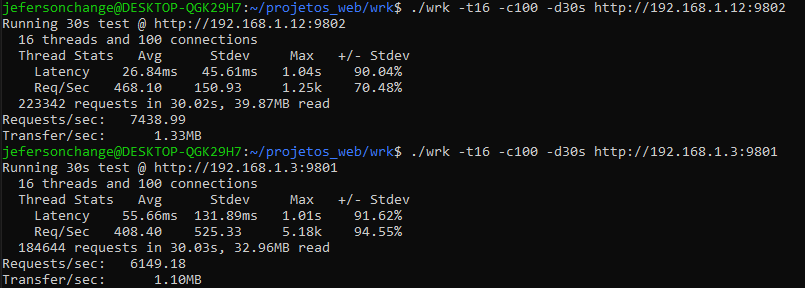
Hey there, i'm running docker through a Ubuntu server VM in my Unraid, i started a apache container on the VM, and runned a wrk benchmark and get something about 7400 RPS, when i tried to run the same container in the host it gives something like 6100 RPS, there's some reason for that? How can the host be slower than the VM inside of it? Thank you all in advance. 192.168.1.12 --> VM --> 4 cores 8GB 192.168.1.3 --> HOST -> 48 cores 32GB