trallae
Members
-
Joined
-
Last visited
-
Also please note, as far as I understand, that even if you use only one size drives (to get the most out oof the space) UnRAid ZFS doesn't support running all drivers in one big ZFS pool so to say. You still need to have i non ZFS pool driver in your "array". Now you can have this drive formatted as ZFS and you can have a parity drive with it but it sure looks like you cant go with just a ZFS raidz pool. As far as I understand the "array" in the case of UnRaid is a name for a sort of wrapper that start end stops services , disk shares and application alike. If you run with just a raidz pool the Unraid "array" wont start , you can of course start your zfs pool and your applications manually but it sure looks like UnRaid is not built for that scenario.
-
Wow, that successfully resolved the issue! Performing a stop of the "array", then an export of my three pools and restarting the "array" again. Everything is back to normal now. I appreciate your speedy assistance very much!
-
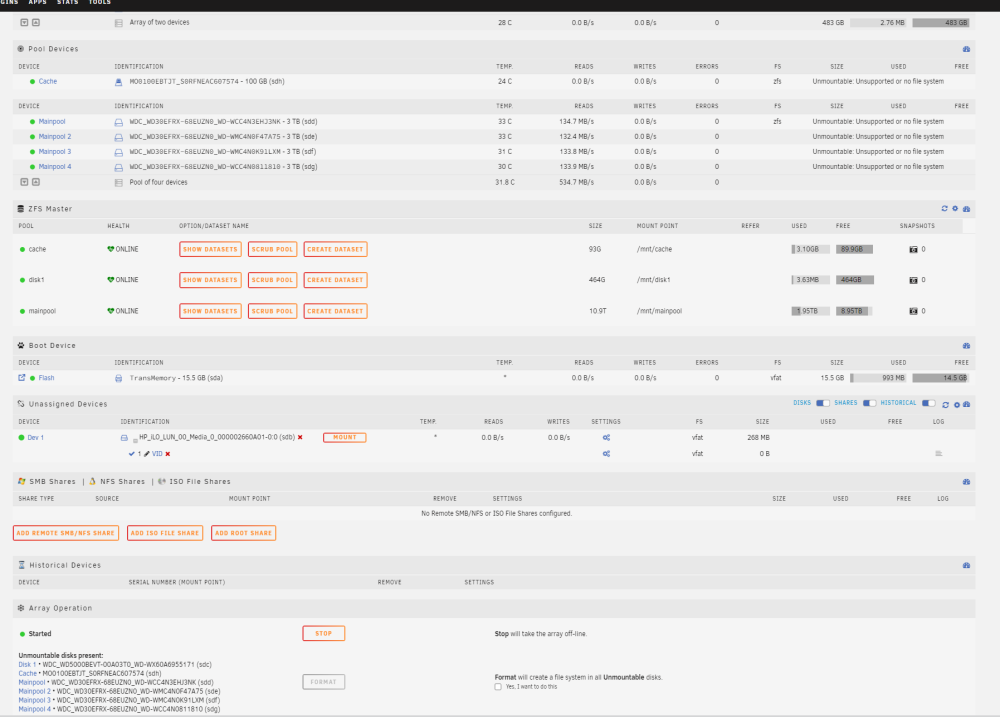
Hi, since I am new to Unraid I jumped straight into running ZFS that I setup ona late rc build and now 6.12 So I have set up a small zpool with 4 drivers as well as a standalone zfs drive for "disk1" and a single cache drive, created shares and exported with SMB, and I also installed docker and it all worked. But today something odd happened and now in the web GUI on the "Main" page all my ZFS disks show as "Unmountable: Unsupported or no file system" and it wants me to format all the drivers. However, all the zfs pool are infact online and I can access all the data, I can stopp and start the "array" and it goes back to this state. I can scrub the pools and it also fine, and yes, there is no problems accesing to docker contains or the SMB shares. Exempel status: root@gen8:~# zpool list NAME SIZE ALLOC FREE CKPOINT EXPANDSZ FRAG CAP DEDUP HEALTH ALTROOT cache 93G 3.10G 89.9G - - 0% 3% 1.00x ONLINE - disk1 464G 2.76M 464G - - 0% 0% 1.00x ONLINE - mainpool 10.9T 1.95T 8.95T - - 0% 17% 1.00x ONLINE - root@gen8:~# zpool status -v disk1 pool: disk1 state: ONLINE scan: scrub repaired 0B in 00:00:02 with 0 errors on Fri Jun 16 19:38:03 2023 config: NAME STATE READ WRITE CKSUM disk1 ONLINE 0 0 0 md1p1 ONLINE 0 0 0 errors: No known data errors In the log file from when starting the array I get lines like these : Jun 16 19:19:17 gen8 emhttpd: mounting /mnt/mainpool Jun 16 19:19:17 gen8 emhttpd: shcmd (144133): mkdir -p /mnt/mainpool Jun 16 19:19:17 gen8 emhttpd: shcmd (144134): /usr/sbin/zpool import -N -o autoexpand=on -d /dev/sdd1 -d /dev/sde1 -d /dev/sdf1 -d /dev/sdg1 2891254868560730082 mainpool Jun 16 19:19:17 gen8 root: cannot import '2891254868560730082': no such pool available Jun 16 19:19:17 gen8 emhttpd: shcmd (144134): exit status: 1 Jun 16 19:19:17 gen8 emhttpd: mainpool: import error Jun 16 19:19:17 gen8 emhttpd: /mnt/mainpool mount error: Unsupported or no file system Jun 16 19:19:17 gen8 emhttpd: shcmd (144135): rmdir /mnt/mainpool Jun 16 19:19:18 gen8 emhttpd: shcmd (144136): /usr/sbin/zfs mount -a And if I check with lsblk I can see that the "cannot import 'diskuuid' actually match with already mounted diskuuid's because yes they are already mounted and working: root@gen8:~# mount | grep zfs mainpool on /mnt/mainpool type zfs (rw,noatime,xattr,posixacl) disk1 on /mnt/disk1 type zfs (rw,noatime,xattr,posixacl) cache on /mnt/cache type zfs (rw,noatime,xattr,posixacl) mainpool/backup on /mnt/mainpool/backup type zfs (rw,noatime,xattr,posixacl) cache/appdata on /mnt/cache/appdata type zfs (rw,noatime,xattr,posixacl) cache/system on /mnt/cache/system type zfs (rw,noatime,xattr,posixacl) disk1/isos on /mnt/disk1/isos type zfs (rw,noatime,xattr,posixacl) cache/test on /mnt/cache/test type zfs (rw,noatime,xattr,posixacl) root@gen8:~# df -h Filesystem Size Used Avail Use% Mounted on rootfs 7.8G 639M 7.2G 9% / tmpfs 32M 316K 32M 1% /run /dev/sda1 15G 947M 14G 7% /boot overlay 7.8G 639M 7.2G 9% /lib overlay 7.8G 639M 7.2G 9% /usr devtmpfs 8.0M 0 8.0M 0% /dev tmpfs 7.8G 0 7.8G 0% /dev/shm tmpfs 128M 472K 128M 1% /var/log tmpfs 1.0M 0 1.0M 0% /mnt/disks tmpfs 1.0M 0 1.0M 0% /mnt/remotes tmpfs 1.0M 0 1.0M 0% /mnt/addons tmpfs 1.0M 0 1.0M 0% /mnt/rootshare mainpool 6.4T 256K 6.4T 1% /mnt/mainpool disk1 450G 128K 450G 1% /mnt/disk1 cache 88G 128K 88G 1% /mnt/cache mainpool/backup 7.8T 1.5T 6.4T 19% /mnt/mainpool/backup cache/appdata 88G 128K 88G 1% /mnt/cache/appdata cache/system 89G 1.1G 88G 2% /mnt/cache/system disk1/isos 450G 128K 450G 1% /mnt/disk1/isos cache/test 90G 2.1G 88G 3% /mnt/cache/test shfs 450G 128K 450G 1% /mnt/user0 shfs 450G 128K 450G 1% /mnt/user So it seams like the zfs pools, samba, docker etc all works but the "array" and GUI status is out of sync ? Any ideals on how to resync it so to say ?