






SunnySkye
Members
-
Joined
-
Last visited
Everything posted by SunnySkye
-
OK, seems like adding another vlan to the network config somehow fixed the two that weren't working. It makes no sense but all seems fine again now.
-
Hey everyone I have a few VLAN on my network, and one of them is a VLAN I set up specifically to connect Docker containers to (VLAN 200). This is what my Docker network settings look like: Basically, the gateway is missing on br0.200 and br0.210. as an example, in network settings, VLAN 100 and VLAN 200 are configured identically. VLAN 200 actually worked fine up until the latest 7.14 update. Now, I need to select a different VLAN or my containers won't start. Does anyone know what I am missing here? Thank you in advance! Skye
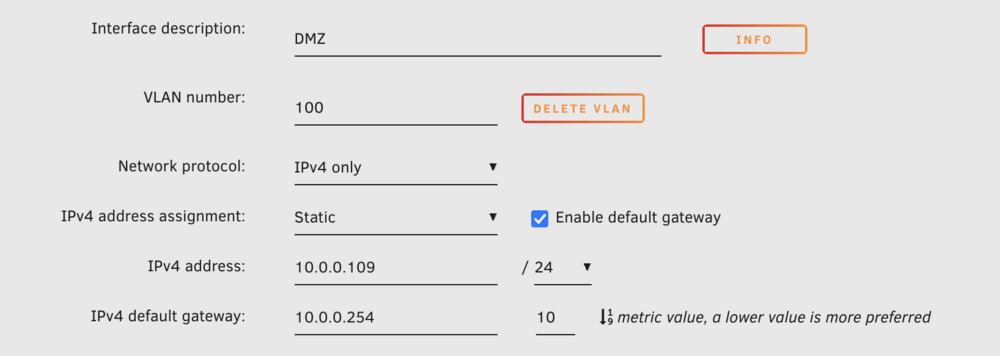
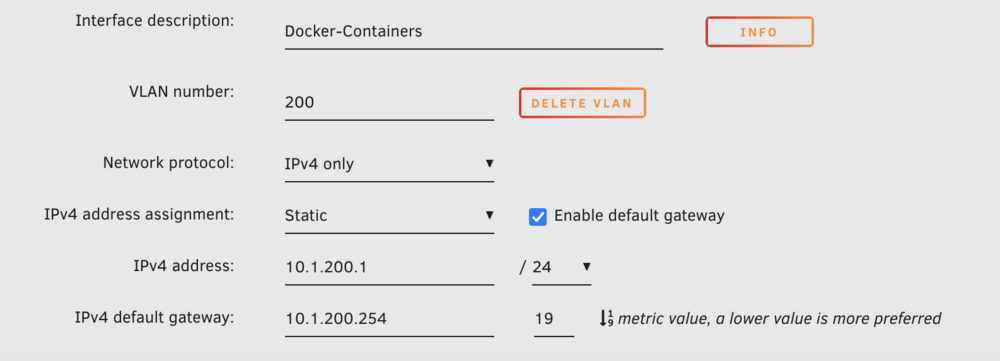

-
OK I will give that a go! Thank you so much. I had a look at the log and saw that, and thought it might be that. Hopefully it's just the USB port being fussy Thanks! Skye
-
It happened again overnight I feel like the array rebuild is causing it to happen more frequently. I'm worried because the server won't stay up long enough for the array to rebuild I have included the full syslog, but also a sample which I think probably includes the part that is causing the issue. I'm not really sure what it all means tbh Thank you Skye syslog-127.0.0.1.log Unraid-Syslog-Sample.txt
-
Oki I have done that, I will update the topic once the server dies again with the related syslog! Thank you Skye
-
I realised I attached an older diag file, this one is the latest from today Skye unraid-diagnostics-20240831-2102.zip
-
Hi everyone, I am losing my mind trying to work this one out. After the update before last, my server will just randomly stop responding. All I can really see on the server is "refused to connect" when I try and connect to the WebUI. I have two different VLANs, and I have tried to connect on both management addresses. Both refuse to connect. It is especially strange because it seems to occur completely randomly, and after a seemingly random amount of normal uptime. I have attached my most recent diagnostics, I really hope it has something useful in there. Unfortunately, the only solution I have found is to hard-reboot the server to get access to it again. Before the update before the most recent one, my server was solid as a rock! Please help 🥺 Thank you Skye unraid-diagnostics-20240828-1550.zip
-
Hi everyone I apologise if this is a dumb question. Basically, I think the Docker image has filled up, so I am now unable to update Docker images. The thing is, I don't really understand what the Docker image even is, or how to make it bigger, or why it's filling up. I haven't been able to find any helpful guides or explanations that make sense to me so I was hoping someone can help me wrap my monkey brain around this one. Thank you in advance! Skye x


