





danob312
Members
-
Joined
-
Last visited
-
tower-diagnostics-20250927-0931.zip
-
Problem: On Main → Pool Devices, the member rows (nvme…p1, sdb1, sdc1) show “Unmountable: wrong or no file system.” Pools themselves are ONLINE and mounted. Sometimes the Pool Devices table goes blank until I restart emhttp. Health checks: zpool status / zpool list -v: both pools ONLINE; usage correct. wipefs on all members: only zfs_member (no xfs/btrfs/ext4). Tried (no data changes): udevadm trigger/settle Restart emhttp/php-fpm/nginx Rebuilt /var/local/emhttp/{disks.ini,var.ini} and /var/local/emhttp/pools/ (then restart) Stopped Docker/SMB/NFS, array stop→start Full reboot Reinstall zfs.master plugin

-
Worked, Thank you!
-
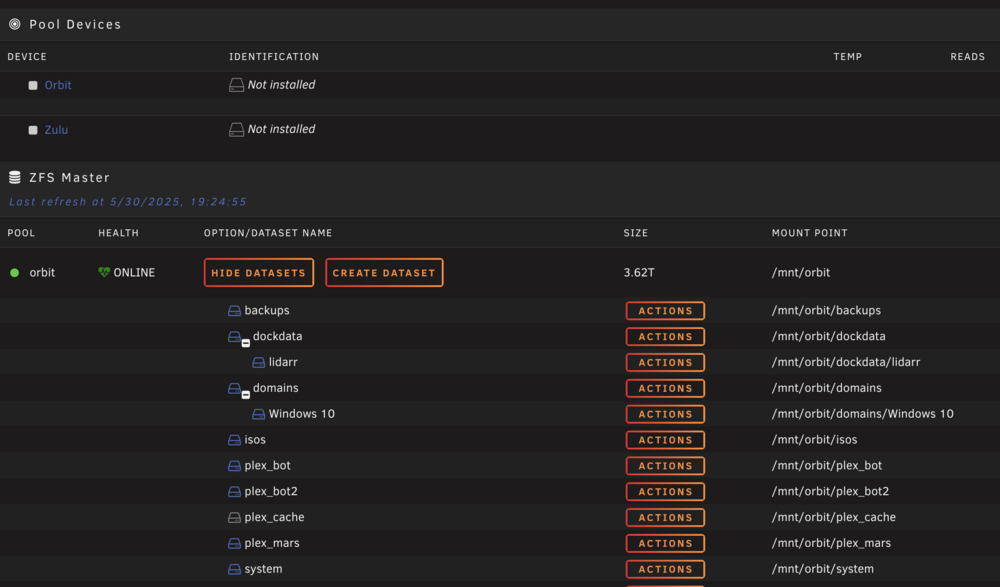
After upgrading my Unraid server to version 7.1.2, I encountered an issue where my ZFS pools (orbit and zulu) are online and healthy (as confirmed by zpool status), but the Unraid GUI shows them as “Not installed”. This issue started happening after the kernel update that came with Unraid 7.1.2. I’ve already tried several troubleshooting steps, but the issue persists. Troubleshooting Steps Taken:Confirmed ZFS Pool Health: Both pools (orbit and zulu) are ONLINE with no errors, confirmed by zpool status -v. Checked ZFS Module: The ZFS module is correctly loaded on the system, as confirmed by lsmod. Permissions for zpool.cache: I copied the zpool.cache file to /boot/config/zpool.cache and ensured correct permissions (chmod 644), then rebooted the system, but the pools are still showing as "Not installed" in the GUI. Nginx Restarted: I restarted the Nginx server to clear any potential stale data, but the issue persists. Reboots: The issue persists across multiple reboots, with the pools appearing as "Not installed" in the GUI despite being healthy and accessible via the command line. Current Behavior:Pools (orbit and zulu) are shown as “Not installed” in the Unraid GUI, despite being ONLINE and healthy (both pools are accessible and have datasets such as dockdata and plex_bot mounted). Datasets (e.g., dockdata, plex_bot) within the pools are listed and accessible, but the GUI does not properly display the pools themselves as "installed." The issue is persistent and occurs only after the upgrade to Unraid 7.1.2. tower-diagnostics-20250530-1922.zip
-
Hi unraid- I'm experiencing an issue with my Unraid setup and need some assistance. I'm currently unable to import my ZFS pool named 'dob' due to an I/O error. Here are the details of the situation: System Details: - Unraid version: [Your Unraid version] - ZFS version: [Your ZFS version] - Hardware: - NVMe devices used in the pool: - /dev/nvme1n1 - /dev/nvme0n1 Problem Description: When I attempt to import the 'dob' pool, I receive the following error: root@Tower:~# zpool import dob cannot import 'dob': I/O error Destroy and re-create the pool from a backup source. I also tried to import the pool in readonly mode to get more details, but encountered the same error: root@Tower:~# zpool import -o readonly=on dob cannot import 'dob': I/O error Destroy and re-create the pool from a backup source. Steps Taken So Far: 1. Listed available pools: root@Tower:~# zpool import pool: dob id: 10658759146814266625 state: ONLINE action: The pool can be imported using its name or numeric identifier. config: dob ONLINE mirror-0 ONLINE nvme1n1p1 ONLINE nvme0n1p1 ONLINE pool: backup id: 17684685815862398316 state: ONLINE action: The pool can be imported using its name or numeric identifier. config: backup ONLINE nvme2n1 ONLINE 2. Attempted to import the pool: root@Tower:~# zpool import dob cannot import 'dob': I/O error Destroy and re-create the pool from a backup source. 3. Attempted readonly import: root@Tower:~# zpool import -o readonly=on dob cannot import 'dob': I/O error Destroy and re-create the pool from a backup source. Next Steps: To further diagnose the issue, I need to check the health of the NVMe devices. Here are the SMART reports: SMART Report for /dev/nvme1n1: [Insert smartctl -a /dev/nvme1n1 output here] SMART Report for /dev/nvme0n1: [Insert smartctl -a /dev/nvme0n1 output here] Request for Assistance: - What steps can I take to try and recover the 'dob' pool without destroying and recreating it? - Are there any specific diagnostic commands or tools I should use to further investigate this issue? - Has anyone experienced a similar issue and found a solution? Thank you for your help! tower-diagnostics-20240616-1423.zip
-
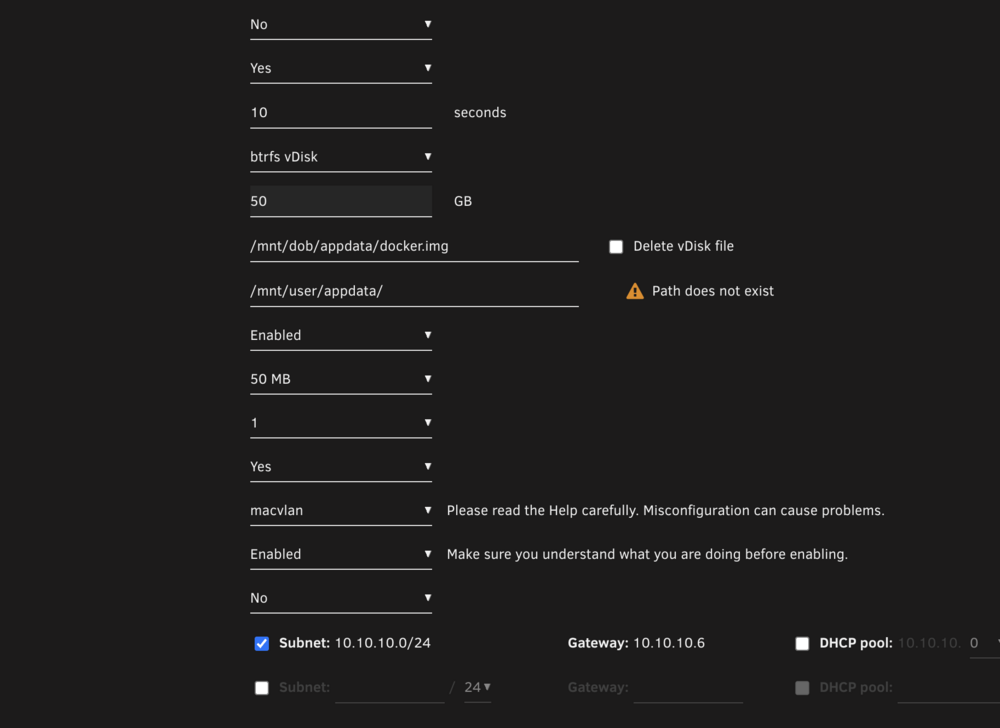
okay I did that, here are the new diags. also a screenshot /mnt/user/appdata does not exist. this again starts it right up mkdir -p /var/lib/docker mount -o loop /mnt/dob/appdata/docker.img /var/lib/docker /etc/rc.d/rc.docker start tower-diagnostics-20240612-1002.zip
-
I've done that and I'm unable to create shares or see any of my shares My go file: #!/bin/bash # Start the Management Utility /usr/local/sbin/emhttp & tower-diagnostics-20240612-0756.zip I also have to run this to get docker working- mkdir -p /var/lib/docker mount -o loop /mnt/dob/appdata/docker.img /var/lib/docker /etc/rc.d/rc.docker start
-
any advice @JorgeB?
-
Its all in here... what should be in this file because I also had to add a delay to get docker to work on reboot go_script.txt #!/bin/bash # Start the Management Utility /usr/local/sbin/emhttp & echo "Started Management Utility" >> /boot/go.log modprobe i915 echo "Loaded i915 module" >> /boot/go.log chmod -R 777 /dev/dri echo "Set permissions for /dev/dri" >> /boot/go.log # Bind mount for ZFS dataset mkdir -p /mnt/user/master mount --bind /mnt/z2/master /mnt/user/master echo "Mounted /mnt/z2/master to /mnt/user/master" >> /boot/go.log # Bind mounts for ZFS datasets mkdir -p /mnt/user/Docker mount --bind /mnt/dob/Docker /mnt/user/Docker echo "Mounted /mnt/dob/Docker to /mnt/user/Docker" >> /boot/go.log mkdir -p /mnt/user/appdata mount --bind /mnt/dob/appdata /mnt/user/appdata echo "Mounted /mnt/dob/appdata to /mnt/user/appdata" >> /boot/go.log mkdir -p /mnt/user/appdata/Nginx_Proxy_Manager mount --bind /mnt/dob/appdata/Nginx_Proxy_Manager /mnt/user/appdata/Nginx_Proxy_Manager echo "Mounted /mnt/dob/appdata/Nginx_Proxy_Manager to /mnt/user/appdata/Nginx_Proxy_Manager" >> /boot/go.log mkdir -p /mnt/user/appdata/bazarr mount --bind /mnt/dob/appdata/bazarr /mnt/user/appdata/bazarr echo "Mounted /mnt/dob/appdata/bazarr to /mnt/user/appdata/bazarr" >> /boot/go.log mkdir -p /mnt/user/appdata/kometa mount --bind /mnt/dob/appdata/kometa /mnt/user/appdata/kometa echo "Mounted /mnt/dob/appdata/kometa to /mnt/user/appdata/kometa" >> /boot/go.log mkdir -p /mnt/user/appdata/overseerr mount --bind /mnt/dob/appdata/overseerr /mnt/user/appdata/overseerr echo "Mounted /mnt/dob/appdata/overseerr to /mnt/user/appdata/overseerr" >> /boot/go.log mkdir -p /mnt/user/appdata/sabnzbd mount --bind /mnt/dob/appdata/sabnzbd /mnt/user/appdata/sabnzbd echo "Mounted /mnt/dob/appdata/sabnzbd to /mnt/user/appdata/sabnzbd" >> /boot/go.log mkdir -p /mnt/user/appdata/tautulli-1 mount --bind /mnt/dob/appdata/tautulli-1 /mnt/user/appdata/tautulli-1 echo "Mounted /mnt/dob/appdata/tautulli-1 to /mnt/user/appdata/tautulli-1" >> /boot/go.log mkdir -p /mnt/user/appdata/threadfin mount --bind /mnt/dob/appdata/threadfin /mnt/user/appdata/threadfin echo "Mounted /mnt/dob/appdata/threadfin to /mnt/user/appdata/threadfin" >> /boot/go.log mkdir -p /mnt/user/plex_bot mount --bind /mnt/dob/plex_bot /mnt/user/plex_bot echo "Mounted /mnt/dob/plex_bot to /mnt/user/plex_bot" >> /boot/go.log mkdir -p /mnt/user/vaultwarden mount --bind /mnt/dob/vaultwarden /mnt/user/vaultwarden echo "Mounted /mnt/dob/vaultwarden to /mnt/user/vaultwarden" >> /boot/go.log # Delay to ensure all services are up sleep 30 echo "Delayed for 30 seconds" >> /boot/go.log # Bind mount Docker data directory mkdir -p /var/lib/docker mount -o loop /mnt/dob/appdata/docker.img /var/lib/docker if mount | grep -q '/var/lib/docker'; then echo "Mounted /mnt/dob/appdata/docker.img to /var/lib/docker" >> /boot/go.log # Start Docker service /etc/rc.d/rc.docker start if /etc/rc.d/rc.docker status | grep -q 'running'; then echo "Docker service started successfully" >> /boot/go.log else echo "Failed to start Docker service" >> /boot/go.log echo "Output of Docker status command:" >> /boot/go.log /etc/rc.d/rc.docker status >> /boot/go.log fi else echo "Failed to mount /mnt/dob/appdata/docker.img to /var/lib/docker" >> /boot/go.log echo "Output of mount command:" >> /boot/go.log mount | grep '/mnt/dob/appdata/docker.img' >> /boot/go.log echo "Output of dmesg command:" >> /boot/go.log dmesg | tail -n 20 >> /boot/go.log fi echo "Finished go script" >> /boot/go.log
-
here are my updated diagnostics and also the go config tower-diagnostics-20240611-1313.zipgo_script.txt
-
Thank you that was it... I thought I look that line out. Any idea why I can't change the zize of any of my shares? I also can't create any new shares
-
here is what was in the go file. I rebooted the server with the default go file and attached the diag. All the pools are still saying the same thing. And yes disk one is just so I can have the zpools. Thanks! #!/bin/bash # Start the Management Utility /usr/local/sbin/emhttp & # Import and mount the dob ZFS pool zpool import -a zfs mount -a #!/bin/bash # Start the Management Utility /usr/local/sbin/emhttp & modprobe i915 chmod -R 777 /dev/dri # Bind mount for ZFS dataset mkdir -p /mnt/user/master mount --bind /mnt/z2/master /mnt/user/master # Bind mounts for ZFS datasets mkdir -p /mnt/user/Docker mount --bind /mnt/dob/Docker /mnt/user/Docker mkdir -p /mnt/user/appdata mount --bind /mnt/dob/appdata /mnt/user/appdata mkdir -p /mnt/user/appdata/Nginx_Proxy_Manager mount --bind /mnt/dob/appdata/Nginx_Proxy_Manager /mnt/user/appdata/Nginx_Proxy_Manager mkdir -p /mnt/user/appdata/bazarr mount --bind /mnt/dob/appdata/bazarr /mnt/user/appdata/bazarr mkdir -p /mnt/user/appdata/kometa mount --bind /mnt/dob/appdata/kometa /mnt/user/appdata/kometa mkdir -p /mnt/user/appdata/overseerr mount --bind /mnt/dob/appdata/overseerr /mnt/user/appdata/overseerr mkdir -p /mnt/user/appdata/sabnzbd mount --bind /mnt/dob/appdata/sabnzbd /mnt/user/appdata/sabnzbd mkdir -p /mnt/user/appdata/tautulli-1 mount --bind /mnt/dob/appdata/tautulli-1 /mnt/user/appdata/tautulli-1 mkdir -p /mnt/user/appdata/threadfin mount --bind /mnt/dob/appdata/threadfin /mnt/user/appdata/threadfin mkdir -p /mnt/user/plex_bot mount --bind /mnt/dob/plex_bot /mnt/user/plex_bot mkdir -p /mnt/user/vaultwarden mount --bind /mnt/dob/vaultwarden /mnt/user/vaultwarden # Bind mount Docker data directory mkdir -p /var/lib/docker mount --bind /mnt/dob/appdata/docker /var/lib/docker tower-diagnostics-20240611-0940.zip
-
tower-diagnostics-20240611-0814.zip okay here it is
-
I'm currently facing some issues with my Unraid setup and need your help. My array devices and pool devices are showing as unmountable with errors. Despite this, I can access the data on these pools. Below are the details: Array Devices: DEVICE IDENTIFICATION TEMP. READS WRITES ERRORS FS SIZE USED FREE Disk 1 Samsung_Flash_Drive_FIT_0362223040007072-0:0 - 128 GB (sdb) * 1 0 0 xfs Unmountable: Unsupported partition layout Pool Devices: DEVICE IDENTIFICATION TEMP. READS WRITES ERRORS FS SIZE USED FREE Backup Samsung_SSD_990_PRO_2TB_S73WNJ0TC03752F - 2 TB (nvme2n1) 120 F 5862 1664 0 auto Unmountable: Unsupported or no file system Additional Pool Devices: DEVICE IDENTIFICATION TEMP. READS WRITES ERRORS FS SIZE USED FREE Dob Samsung_SSD_990_PRO_2TB_S73WNJ0W531995P - 2 TB (nvme1n1) 111 F 54,029 8726 0 zfs Unmountable: Unsupported or no file system Dob 2 Samsung_SSD_990_PRO_2TB_S6Z2NJ0TB37533J - 2 TB (nvme0n1) 106 F 54,764 8552 0 - Unmountable: Unsupported or no file system Pool of two devices 109 F 108,793 17,278 0 - - - - More Pool Devices: DEVICE IDENTIFICATION TEMP. READS WRITES ERRORS FS SIZE USED FREE Testicle Samsung_SSD_870_EVO_2TB_S6PNNJ0RB16574D - 2 TB (sdc) 77 F 315 614 0 zfs Unmountable: Unsupported or no file system Testicle 2 Samsung_SSD_870_EVO_2TB_S6PNNS0W321387Y - 2 TB (sdd) 75 F 211 598 0 - Unmountable: Unsupported or no file system Pool of two devices 76 F 526 1212 0 - - - - Steps Taken: 1. Attempted to unmount and export the ZFS pools using zfs unmount -a and zpool export. 2. Verified the status of the ZFS pools and the mount points. 3. Performed a filesystem check and repair on the XFS filesystem using xfs_repair -v /dev/sdb. Despite these steps, the disks remain unmountable and show errors related to unsupported partition layouts or file systems. Additional Information: - The data on these pools is accessible despite the errors. - Attached is the Unraid diagnostics file for further analysis: [diagnostics.zip](link_to_diagnostics_file). Request for Assistance: Could anyone guide me on how to resolve these unmountable disk issues? Any specific steps or commands that might help in recognizing and mounting these disks correctly? Thank you in advance for your assistance! tower-diagnostics-20240611-0641.zip
-
Any idea on how I could find the container causing this?



