virgilchen
Members
-
Joined
-
Last visited
-
Problem solved. Thank you!
-
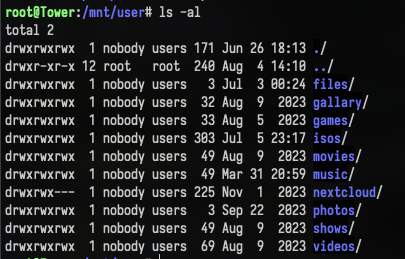
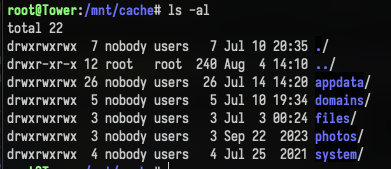
Today I fount that all my cache only share are missing from the webgui's share tab. I ssh in to my server and found out that all my 'cache only' shares are missing from /mnt/user. Here is a screen shot of content in /mnt/user and /mnt/cache appdata and domain share are missing from /mnt/user. I tried restart the system and update unraid os to newest version but none of them work, please help. tower-diagnostics-20240804-1439.zip
-
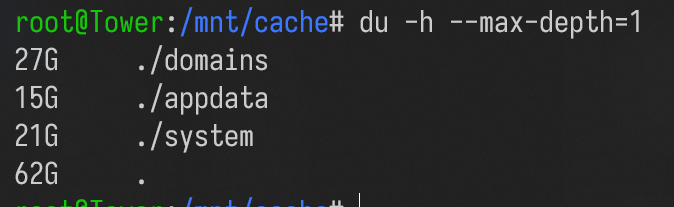
Used space seems incorrent? du shows only 62G but UI shows 348G
-
tower-diagnostics-20230824-1408.zip Diagnostic file
-
I have a 1T nvme ssd in my cache pool, around 10% of its place is used. After I added another 500GB disk to the pool. Now the UI shows 46% of usage. But du shows i only have 62GB worth of file. There are no windows vdisk on cache so i think du is reliable in such case? The cache pool is in raid1 mode. Unraid UI shows 762GB usable space. I think adding a 500GB disk should resulting in 500GB total usable space?