Skip to content
View in the app

A better way to browse. Learn more.

Unraid

A full-screen app on your home screen with push notifications, badges and more.

To install this app on iOS and iPadOS
  1. Tap the Share icon in Safari
  2. Scroll the menu and tap Add to Home Screen.
  3. Tap Add in the top-right corner.
To install this app on Android
  1. Tap the 3-dot menu (⋮) in the top-right corner of the browser.
  2. Tap Add to Home screen or Install app.
  3. Confirm by tapping Install.

linzzi

Members
  • Joined

  • Last visited

  1. It´s working and all looks good, thank you so mutch. also i feel like an idiot that i did not try to update... tower-syslog-20250713-1113.zip
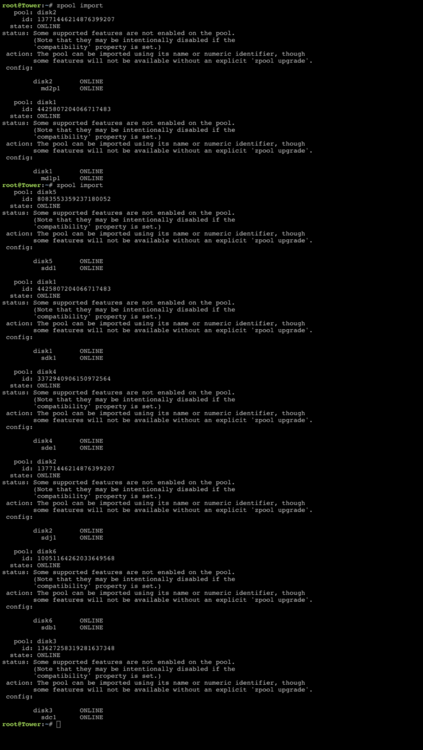
  2. thanks for the reply, i tried to copy paste but no luck md1p1,md2 and some pmd3.rtf
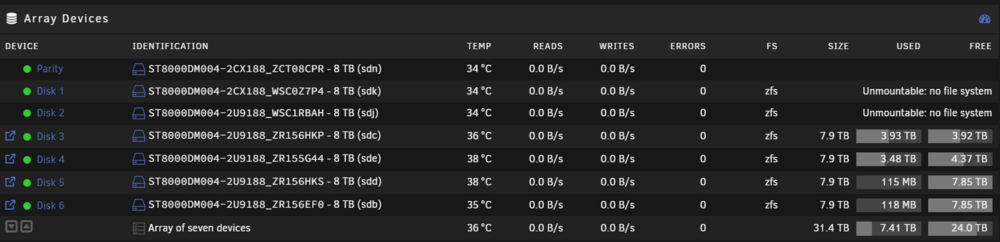
  3. Hello, so i had this diy 2u box it was an fire hasard, so when i got someting safer and changed my disks, raid card and nic, (and got it finally find my cache m.2) i was finnaly getting my hopes up then this: so naturally i build it back in it´s old home hoping to get my data back, but after i got same troubles there too, so i moved it back to tower case. i would like to get data back if possible so i didn`t just click format so what to do now? version 7.0.1 tower-syslog-20250712-1926.zip

Account

Navigation

Search

Search

Configure browser push notifications

Chrome (Android)
  1. Tap the lock icon next to the address bar.
  2. Tap Permissions → Notifications.
  3. Adjust your preference.
Chrome (Desktop)
  1. Click the padlock icon in the address bar.
  2. Select Site settings.
  3. Find Notifications and adjust your preference.