rapt
Members
-
Joined
-
Last visited
-
Thank you this worked. Just finished the parity check and all data was fine with the parity also in sync.
-
Hoping for some advice. The USB boot drive had went to read-only mode and i missed this. I added a new disk a while ago, and it already has some data i would prefer not to lose. The data and parity should be fine as a parity check was completed a while ago. Problem is after fixing the boot drive its now outdated by about a month and does not remember the new configuration. I did not mount the new disk again or rebuild parity and shut down the system. Is it possible to manually add the drive to the array without formatting it? I would appreciate any help or advice.
-
I have the same issue, i am not completely sure when it started but updates were working for sure a few weeks ago.
-
After installing everything worked perfectly. Thank you for your efforts, the new version of the plugin is more pleasant to use, and looks more clean in my opinion.
-
rapt changed their profile photo
-
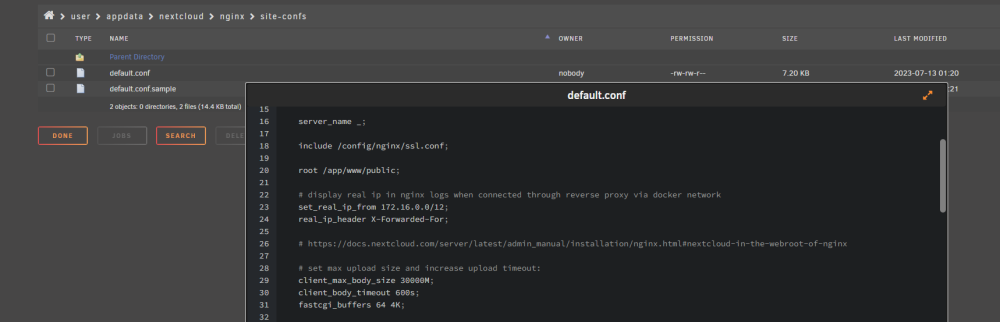
Yes i am using the Dynamix file manager plugin, it gives you a bit more traditional file manager if you arent used to using the terminal. What ever you want to use is fine. The command for editing the files in the terminal would be: nano /mnt/user/appdata/nextcloud/nginx/nginx.conf nano /mnt/user/appdata/nextcloud/nginx/site-confs/default.conf
-
Hey, i had the exact same problem with the same setup. For me the solution was: Changing the client_max_body_size values in mnt/user/appdata/nextcloud/nginx/nginx.conf and mnt/user/appdata/nextcloud/nginx/site-confs/default.conf Restart the docker and hopefully you will be good to go. I also ran in to a 504 error for gateway timed out after this fix since i was transporting pretty large files, so i changed the client_body_timeout value also in mnt/user/appdata/nextcloud/nginx/site-confs/default.conf Changing the values in the Swag instance didnt seem to do anything. I dont know what you did in the php.ini file, but maybe change it back also. After this all my files synced without problems! I still get some 504 errors after files finish syncing, but the files go through and do get synced even if the server displays errors.