tk8472
Members
-
Joined
-
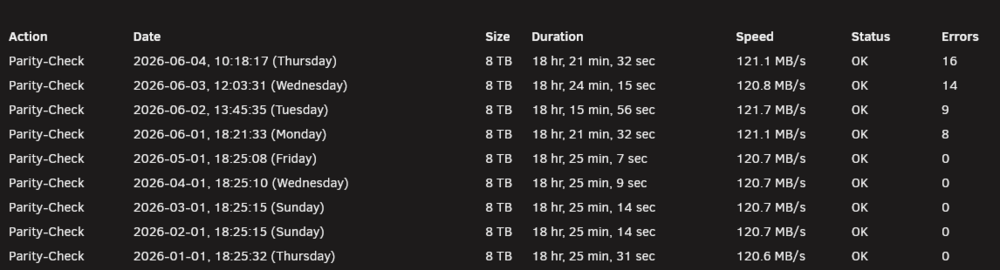
Retested both dual channel kits with memtest and both still passed. Since they're matched pairs, I ran two correcting checks with just 1 pair (32GB) and it was successful. 9 errors first pass, 0 on the second. Guess I can't fill all 4 channels. Thanks for the direction.
-
The first monthly parity check after moving everything to a new build, has started throwing parity errors. Been rock solid since 2016. Unraid 7.3.1 new Gigabyte Z890 Auros Elite WiFi 7 Intel Ultra 270K Plus 64GB DDR5 4x 16GB Kingston Fury Beast (KF560C36BBE2K2-32) 2x 1TB SN5000 NVMe (cache mirror) used Noctua NH-D15 Corsair RM850x reused Dell Perc h310 3x 8TB hdd 5x 4TB hdd 1x 2TB hdd (cache) Ran Memtes86 before adding drives and it passed. All drives have passed the SMART short-test Probably messed up, but tried one correct parity. the rest are non-correct Assistance with reading the diagnostics. Not sure how to decipher, where to look. No reboots since the first parity error Thanks tower-diagnostics-20260604-1710.zip