Skip to content
View in the app

A better way to browse. Learn more.

Unraid

A full-screen app on your home screen with push notifications, badges and more.

To install this app on iOS and iPadOS
  1. Tap the Share icon in Safari
  2. Scroll the menu and tap Add to Home Screen.
  3. Tap Add in the top-right corner.
To install this app on Android
  1. Tap the 3-dot menu (⋮) in the top-right corner of the browser.
  2. Tap Add to Home screen or Install app.
  3. Confirm by tapping Install.

magnuszirnsak

Members
  • Joined

  • Last visited

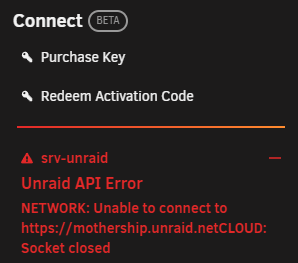
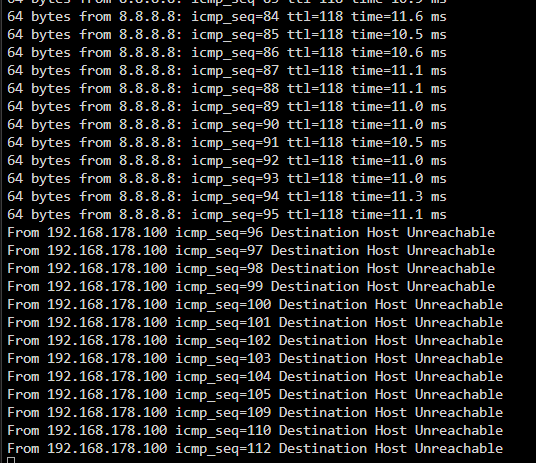
  1. Hello Unraid Community, I joined just yesterday and unfortunately, I'm already experiencing an issue with my Unraid system. As soon as I start my array, it seems like my entire Unraid system loses network connection after a short while. I noticed this because the apps in the "Store" stopped loading. Attached is a ping from my Unraid after starting the array, a screenshot of the error messages I'm receiving in the "Apps" tab and in the user dropdown. When I stop the array again, everything works again. I'm using Unraid version 6.12.2. I hope someone can help me out. If you need any further information, just let me know Best regards

Account

Navigation

Search

Search

Configure browser push notifications

Chrome (Android)
  1. Tap the lock icon next to the address bar.
  2. Tap Permissions → Notifications.
  3. Adjust your preference.
Chrome (Desktop)
  1. Click the padlock icon in the address bar.
  2. Select Site settings.
  3. Find Notifications and adjust your preference.