DadsHockeyLife
Members
-
Joined
-
Last visited
Everything posted by DadsHockeyLife
-
For anyone that is hunting for an answer to the VM update hang issue....this did it for me. I hadn't changed the location of my original vdisk, but I was trying to add a second vdisk on which to store Window Server backups. Would get the hang every time. I changed the primary disk to manual then selected the disk (vdisk1 - which was already auto selected since it hadn't changed) and BAM! It updated right away after adding the second vdisk.
-
Very unfortunate. Contacted the company (some Chinese outfit in China ... should have guessed the Amazon "deal" was too good to be true). They won't replace one drive. It's also apparent they barely speak English well enough to communicate through Amazon. Their replies are all cookie cutter cut and paste jobs. Anyway, I'll be giving them a lousy review, but in the meantime, since one of the drives is already in my system with data and a pain to pull and replace, I'll just keep them and swap one of them with another I have in another machine. I have a cloner, so I'll close one to the other, then I'll be good to go for now. So irritating. Thanks for all your help, though! I've ever run into this before, but then again, I've never purchased from a company like this either.
-
Also tried this suggestion, but it didn't work. https://forums.serverbuilds.net/t/guide-unraid-udev-rules-updates-for-white-label-drives/8918 It looks like the identifiers they are using were blank for my disk, so they both ended up using the same UUID again and thus the same problem.
-
Thanks. I'll dig in a bit on that....just used udevadm info --query=all --name=/dev/sde | grep ID_SERIAL and udevadm info --query=all --name=/dev/sdk | grep ID_SERIAL to look up what the drives are reporting....YEP! Same serial number on both! Thank you for the direction...I'll go do some digging in google and this forum to see if anyone has found a work around.
-
hmmm...I wondered if there was an issue with uniqueness on these. @itimpi Do you know of anyway to resolve this? I'm wondering if I can force them to report correctly or trick unraid into thinking they are different.
-
Sorry forgot to include diagnostics....here it is... voyager-unraid-diagnostics-20240215-1547.zip
-
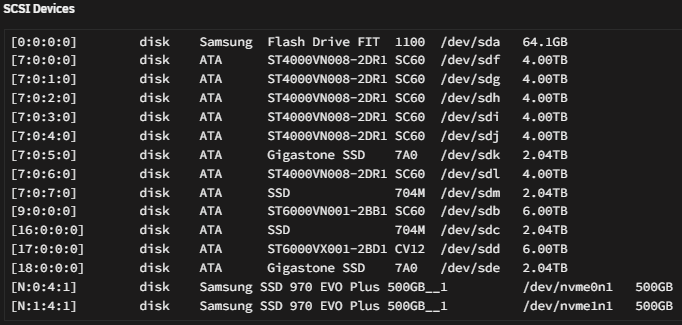
Ok, so, I'm relatively new to Unraid, but not to NAS's and networking. I've got a large homelab and host nearly all my own services...so it REALLY frustrates me that I can't figure this one out.... I just added 2 new Gigastone SSDs to my Unraid server (an AMD based server running 2 different HBA controllers). My problem is I can't get the GUI to show both at the same time. If I unplug one the other will show up and vice versa. However, as you can see below, they are both listed (sdk and sde) in the SCSI Devices (also appears in cli when I run lsblk). I just can't them both to appear in the GUI so I can add them both to the pool I have called fast_data_ssd. Any suggestions or help on this would be very appreciated.... I've searched the forums and googled the hell out of this issue, but none of the fixes seem to work. They all seem to be a slightly different problem than I'm having. I've tested both of the Gigastones in a different linux based machine and work fine there. I've plugged them in every conceivable combination between the 2 HBA controller cards and the onboard SATA controller for my motherboard. I've tested the various cables and they all work fine with other drives. I'm at a total loss here. For info... Have 2 6TB spinners (seagate nas drives) for parity, 6 4TB spinners for my more static data (also seagate nas drives) running 2 500GB nvme on the mobo for a mirrored cache pool then trying to run 4 SSD pool using the two gigastones and 2 other SSDs I had laying around, each 2TB. The 2 HBAs are a Broadcom / LSI SAS2008 PCI-Express Fusion-MPT SAS-2 and ASMedia Technology Inc. Device 1064 (rev 02), both are listed on multiple forums and working properly with Unraid (given all the other drives run beautifully, I don't think either controller is an issue). I'm also running 128GB of ECC memory, in case that should be needed to troubleshoot this. Oh, and I do have unassigned devices plugin installed. Also, sorry I took these screenshots while it was listing temp in F. Recently changed it back to C....I like that better...lol.