datatraveller
Members
-
Joined
-
Last visited
-
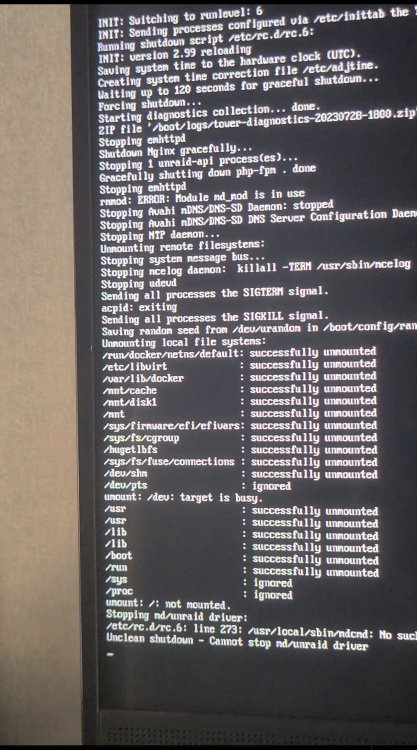
For about a year, my unraid server always starts a parity check after normal shutdown/reboot(e.g. when i shutdown through webGui). I used to think perhaps that's because i am running too many containers so the shutdown process timed out. But today i check the logs when unraid is shutting down: Stopping md/unraid driver: /etc/rc.d/rc.6: line 273: /usr/local/sbin/mdcmd: No such file or directory. Unclean shutdown - Cannot stop md/unraid driver line 273 of /etc/rc.d/rc.6 is: /usr/local/sbin/mdcmd stop here is the relevant part in /etc/rc.d/rc.6, the line 273 is the 4th line in the code block # limetech - shut down the unraid driver if started if /bin/grep -qs 'mdState=STARTED' /proc/mdstat ; then echo "Stopping md/unraid driver:" /usr/local/sbin/mdcmd stop if ! /bin/grep -qs 'mdState=STOPPED' /proc/mdstat ; then echo "Unclean shutdown - Cannot stop md/unraid driver" else # we have to mount /boot again if ! /sbin/mount -v /boot ; then echo "Unclean shutdown - Cannot remount /boot" else /bin/rm -f /boot/config/forcesync /sbin/umount /boot echo "Clean shutdown" fi fi fi The following is the auto-generated diagnostics when shutting down, and the actually photo of the screen when shutting down(which might be helpful) tower-diagnostics-20230728-1800.zip