





Mantra
Members
-
Joined
-
Last visited
Everything posted by Mantra
-
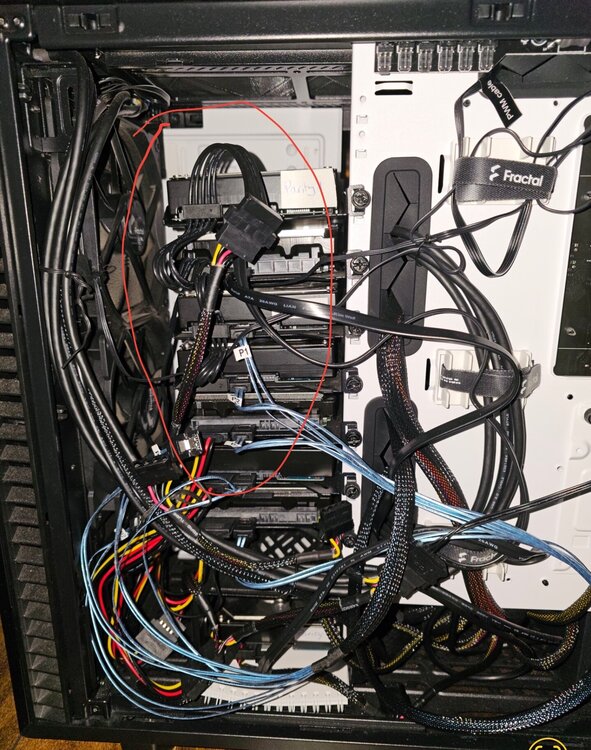
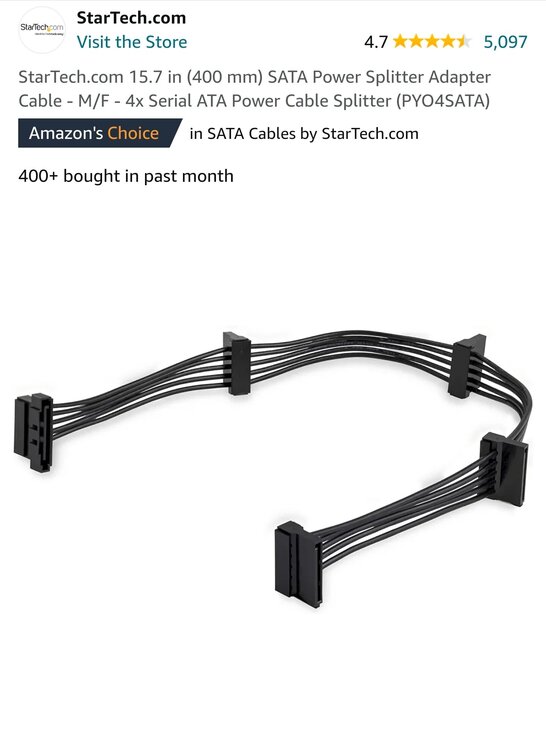
Thank you very much for your prompt response. Yes they do. Using a Startech SATA Power Splitter Cable PYO4SATA. I figured Startech was a "higher"quality one compared to other unknown brands. I can order a replacement or find a different method to power the disk with less splitting Another opinion needed, would you approve of this apparently simple and cheaper method of using a 5 Bay JBOD enclosure with 5x10TB drives that I either plug into my Mac. See it as 5 differnt drives and copy my files form the SMB share to it. I will have to find a proper way to split the folders from 42TB to 5 x 10TB drives. Do you know of a good method to sync the data to the 5 Bay JBOD I was mentioning for my Offline backup or if I could copy exactly as it from the unraid disk as they are also readable one by one.
-
Help needed My Unraid server( Version 6.12.3), which serves as my primary project archive, has encountered an issue for the 2nd time where two drives became disabled upon restart. This previously occurred and was resolved by rebuilding the disabled drive using new drives and swapping the controller. I did retest these two drives on windows and they seem to work properly. I did do a mistake of not having spare cables around (SAS to 4 x SATA). So I am placing an order for new cables to also eliminate a cable issue. So, this issue has now resurfaced after I shutdown the server to check the internals and plan for additional drives to be added(needed to check how many fans, cables, power, adapters etc I needed) The server houses 50TB pool with 42TB of valuable project data, videos, and photos, protected by two parity disks but lacking an offsite backup. My immediate concern is securing this data, and I'm ordering a 5-bay JBOD enclosure with 5 new 10TB drives. I will initiate a simple copy to those drives splitting the 42TB data across the 5 drives. Is there a recommended tool to do it via SMB access on Mac ? The server's hardware includes a Fractal Define 7 Case, MSI Z590-A Pro motherboard, Intel Core i3-10105 processor, 8GB DDR4 RAM, a 1TB NVMe SSD cache drive, 4 x 10TB Toshiba MG06 and 3 x 10TB HGST He10 and an Asus XG-C100C 10-Gigabit Adapter PCI X4 The LSI SAS HBA 9200-8i controller (which I swapped against the Dell H310 to eliminate controller error) manages the drives, and I suspect a faulty cable as this was the only thing I've not been able to replace so far. Any insights or suggestions based on the provided information and attached logs would be greatly appreciated on why these drives were disabled. If someone can detect that it's something other than the cables that caused this. Then I would know it's not just a simple fix of swapping cables and rebuilding again. tower-diagnostics-20240619-1743.zip tower-diagnostics-20240619-1800 (1).zip
-
Hi, Learned Unraid through spaceinvaderone videos on youtube and it was the perfect solution for me to back up my media files. These are all my own video/photo contents as a content creator. Current server is an archive for all finished work and I'm already at 40TB used out of 50TB available, with expected growth of 10TB yearly at minimum. All Clients are Macbooks or iMacs with 10Gb Networking. Hardware Specs: Fractal Define 7 that can accommodate up to 14 drives, Core i3 10105, 8GB DDR4 3200Mhz, Motherboard MSI Z590-A Pro, Asus 10G Network Adapter, 1 x HBA H310 IT Mode, 1x1TB NME Fast Cache(will upgrade to RAID 1 soon) 7x 10TB HDDs - Mix of Toshiba enterprise of HGST- Two for Parity I tried doing a backup to a remote site and the upload speed max out at around 20Mbps. On average would take at least a week to upload 1 TB, plus requires constant management, VPN, DNS, etc etc. This is just not worth it for me to have a remote server for replication. What I need help with is the best way to Sync my folders to a SABRENT 5 Bay 3.5" Docking Station (DS-SC5B). It's an all-in-one box with no Raid features. It's just easier to carry and manage that 5 different external drives. They will appear as 5 x separate 10TB drives where I wish to sync my main unraid server. However, I've yet to come up on how to sync a file server of 50TB to 5 x 10TB Drives correctly and have some sort of a map to know where to look for my data, on which disk etc. This seems like a fast copy and enables me to take it off-site. I'll take it about once a month to the office, sync it and go back off-site. Any recommendations appreciated. I have of course gone through the forum and videos for this kind of backup scenario, but there are so many options, and you easily get lost in all the options available and end up nowhere. I prefer GUI over CLI, but if it's simple enough will use CLI also.

