





williamtul11
Members
-
Joined
-
Last visited
-
So I am unsure if the repair worked, is there something else I can try to do?
-
Here is the copy of the file check output if you want to look it over. UD File check output.txt
-
Got the file check to finish I believe, ended with xfs_repair: rmap.c:1279: fix_inode_reflink_flags: Assertion `(irec->ino_is_rl & irec->ir_free) == 0' failed. Going to do the file check again.
-
tab that is telling me whats going on keeps crashing, also not sure if it is mounted since the mount button is still the same but it is letting me run a file system check on it. If the tab crashes does it keep on doing the repair or do I need to restart it?
-
so unmount it, start it up and see what happens?
-
Here is what I can copy and paste over since there is so many corrupted files it seems to exceed the line limit on the terminal. If you guys can share the command to maybe export or output it to a txt file let me know and I can get the whole output. Terminal XFS.txt
-
most recent back up was a month ago, even if I could just get the files back that would be a huge help.
-
Says the same thing as the GUI repair and everytime I have tried to repair it has been in maintenance mode. Anything else I can try?
-
Here you go. The GUI is a .txt and the terminal is a picture. GUI XFS repair.txt
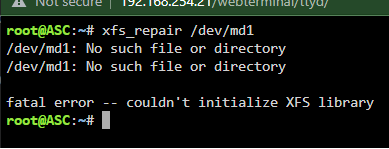
-
Updated to the latest version and ran the repair in both the GUI and in the command line both failed. Command line spit out fatal error -- couldn't initialize XFS library and the GUI stopped and spit out fatal error -- couldn't map inode 2149847950, err = 117. Will add the diagnostic files link always. asc-diagnostics-20230717-1700.zip
-
I forgot to run the repair through the GUI with -v here is that diagnostic. asc-diagnostics-20230716-1814.zip
-
So after trying both in the terminal and GUI repair as outlined in the guide linked by you I still get the same error. I will add the diagnostic after completing the repair attempt. asc-diagnostics-20230716-1354.zip
-
Ran it through the GUI and got a fatal error, fatal error -- couldn't map inode 2149847950, err = 117. The procedure I used is the same as mentioned in the repairing a file system section and it never asked for a -L. I have not tried using the command line method yet but I will have to re-sync the drive since I started it up without it selected in the drive pool. The diagnostics I posted before should have been after I tried the GUI repair, if I messed it up let me know.
-
For context this is the video I used as a guide when trying to repair the XFS issue. https://youtu.be/JVjB0ROdLBA
-
Hello While moving some files to a storage server everything came to a stop and when I logged into the server I noticed on of my drives said it was unmountable and the wrong file type. After doing some google searching I learned that it was caused by a XFS filesystem error, after trying to to the repair as stated online I have not been able to get it up and going again. Included is a diagnostic I took this morning. Thanks in advance for any support you can offer. asc-diagnostics-20230715-0946.zip
