





champ222
Members
-
Joined
-
Last visited
-
Thanks. That sounds like the perfect solution. I'll carry on and build the backup system and see if can figure out how to setup something similar.
-
Hi All When i built my new unraid server to replace the freenas box, i built it with new drives and ran them side by side for a bit. ive still got the old drives, plus a bunch of hardware, so i was thinking of building a second unraid for backup. both to backup the stuff thats on there, but also to switch over to, should i have any issues with the main unraid server. Ive googled how to do the actual file copying bit and it looks like there are some guides to follow so thats cool. I'm a linux noob really, but i get what i need to get done by reading tutorials etc. I was originally thinking of using a reasonably big SSD cache drive, to speed up the backup process * (i'll come back to this) and try and semi automate the process by using WOL to boot the backup drive, and having it copy the files over, then shutdown once done. This however doesnt give time to do the "mover" to move the data from the cache to the array. If i do both of those processes at once, then there would be no benefit to using the cache in the first place. *since the data is coming from the mechanical HDDs from the array anyway, is there much to be gained from having the SSD as a cache? It seems easier to just skip the cache on the backup unraid? For those that do this, what do you do? Thanks
-
perfect. Thanks very much for your help. can you tell from the diagnostics if the mover deleted all the files from the array successfully? Thanks again
-
Yeah, I get that the whole point is to get these shares off the array, i meant, does the mover delete the files off the array once they are on the cache, or will the files exist in both places, and the next step is to remove from the array by some other means? is this the job of the Dynamix File Manager plugin you mentioned? new diagnostics: unraid1-diagnostics-20240105-2358.zip
-
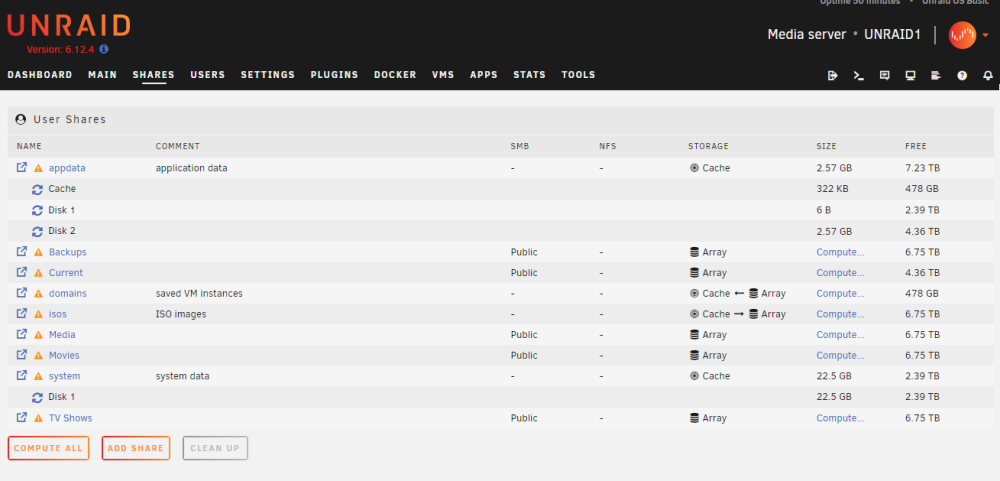
Ahhhhhh, now i see. ok cool. mover is now doing its thing. So once the mover has completed. I'll have the stuff in the cache, AND the Array at the same time? At that stage, do i then set appdata, domains, and system shares to Cache only? Thanks, i appreciate the help
-
Diagnostics attached. Thanksunraid1-diagnostics-20240105-2302.zip
-
Well obviously your right, but could you help me? what do i need to do? Ive searched on here/google etc and the suggestions got me this far. Changing where something should be stored and clicking "Move" doesnt seem so illogical to me, clearly Unraid is different, but why?
-
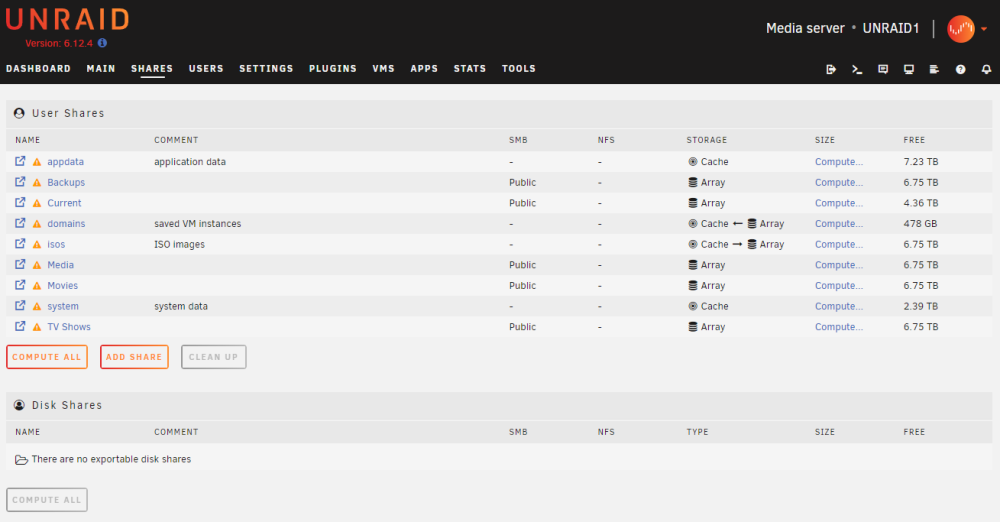
Ok, i'm now trying to set this up. Ive added my SSD. Ive added as a cache pool ive set Appdata and System to be on the Cache drive. If i "compute": Are the file still on the Array and not the cache? I went to the main screen and click "Move" but nothing happened. the screen updates, but nothing seems to change. What am i doing wrong? Thanks guys
-
ok great, i'll do that. thanks
-
So i stopped "all dockers" and the HDDs have gone into standby. Hopefully if i can figure out how to move plex to the SSD, that will resolve the issue.
-
Hi All Unraid noob, ive set eveything up and all is working fine. On Friday evening i installed plex into unraid, and it went about adding movies and TV shows to the library. The HDDs have been clonking away ever since. If i log into plex from my PC, it shows no activity there. Using "Disk Activity" i see no share or disk activity, that isnt me. Using "Open Files" i see: shfs has 49 Plex related files open dockerd has 6 files open A bunch of things all have "working directory" open "Plex Media serv" also has 49 files open. I'm not using an SSD yet, but it is my plan to (and perhaps i should have done this first) but is the plex server running thats causing the disks to clonk away and not spin down? If thats not it, any other ideas? Thanks
-
Great, thanks for that, good to know i wasnt about to do something stupid.
-
Hi All Ive been setting up a new NAS using Unraid, and so far, really good. My old NAS had 5 HDDs of all different sizes, all shared as individual "drives". For unraid, i bought one big HDD that could hold everything and ive been moving everything over to there. All done, all good, and much better organised. So the stuff on the new big HDD is largely backups of files and documents etc and Media. Its a 12TB drive, and its a bit noisy when it starts up. The last of the data to move across is all the stuff i use day to day, so downloads, music, emulators i might be messing about with etc. So ive just added a new HDD and i'm about to setup my new share. I wondered if i should set only the new quieter drive for the share. and leave the other shares able to use this new drive also. The idea being, for my day to day stuff, it wouldnt spin up the noisier drive. Does this seem like a good idea? or am i likely to run into problems doing this? The stuff in the downloads folder may eventually be moved into the main media shares, and they might be on the main large disk, or the new smaller one, (or any other disks added later). When ive searched regarding "included disks" for shares, i read something suggesting that moving files on a disk to the same disk can be problematic... though i dont really see why... perhaps ive misunderstood... Anyway, some guidance on this would be great. Thanks
-
Hi Darrell Thanks for your help. Having thought a bit more about the backups. for media. so far, i fill the drive with media, once its full up, i then move onto the next. I could easily do this in folders. For example, "Movies 1" can be, say 5TB big, this can be backed up onto the 5TB backup drive. then i can create a new folder "Movies 2" i can fill this until its big enough to fill another backup drive, then create "movies 3" etc. Kodi/plex etc doesnt care. I have an Ad-Hoc approach to backups anyway. Its only Media, so only inconvenient if i lose it, not the end of the world. so i just power on the USB drives, and run a robocopy batch file. I can still do this with folders on the NAS, so i dont think it will be a problem. Is there much to be gained from an SSD cache when not using a parity drive? The SSD would be SATA drive, if i go with the motherboard i have in mind. Thanks again.
-
Hi All I currently run a home server which is largely used for media, with some general storage etc. Its currently on an HP microserver running a very old version of freenas. Its currently 4 HDDs of various sizes, and there is an SMB share for each drive. I havent "pooled" the drives, ive just left them as individual drives, each shared separately. This is partly because i didnt need to pool them as Kodi can except various locations for sources anyway, and also, i back these up to a bunch of external drives. if i had one big storage pool, i'd need one big pool for backup too (unless i'm missing something?) So can i use unraid in this way? with separate drives and separate shares, so i can back these up to separate drives? or is there a better way to handle backups? or is the whole idea of Unraid to have one large storage pool? I was going to run without a parity drive, since its largely media, and its backed up.... to expand on this a bit, 2 of the four HDDs just have media on them, the data never changes, and the backup of those drives exists. The third drive gets updated with new media being added, and the forth drive is more general storage. I'm going to build a new system. Probably based on an ASROCK J5040 motherboard. i have some old HDDs i can use for testing, then once i'm happy, i'll move the drives across to the new system and copy all the data on from the backups. I might renew a drive or two while i'm at it, i havent decided yet. I want the system to do the following: Ideally have the separate shares on separate drives as it is at the moment, unless someone can suggest another way to handle the backups Run Plex server including DLNA. I dont use plex server much for video, but it runs a DLNA server for my media streamer. the J5040 should (if i understand correctly) handle hardware transcoding on unraid anyway, which might prove useful in the future. Be easy to setup and maintain Be reliable Run off a USB flash drive, the proposed motherboard only has 4 sata connectors that i'd like to use for storage. it does have a PCIe slot which i could use to add more sata ports if need be. While i could do this in windows, i dont want to, as updates etc are a faff. I dont "know" linux, so i'd need a VERY detailed guide on how to set it up on a linux distro, so something like this seems ideal. Freenas has been great, as i set it up a decade ago and have barely touched it since, except for swapping the odd drive for a bigger one. Thanks

