





LabonSky
Members
-
Joined
-
Last visited
-
Thank you very much! <3
-
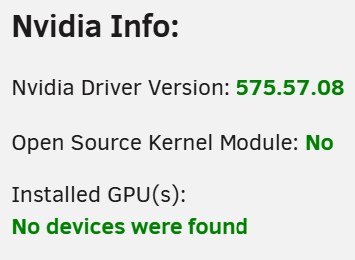
Hi, I have a 5060 Ti inside my UNraid. I've installed the driver from limetech Sadly my GPU is not detected I've restarted my server after driver installation. Lspci sees the device: 07:00.0 VGA compatible controller [0300]: NVIDIA Corporation GB206 [GeForce RTX 5060 Ti] [10de:2d04] (rev a1) Subsystem: ASUSTeK Computer Inc. Device [1043:8a06] Kernel driver in use: nvidia Kernel modules: nouveau, nvidia_drm, nvidia 07:00.1 Audio device [0403]: NVIDIA Corporation Device [10de:22eb] (rev a1) Subsystem: NVIDIA Corporation Device [10de:0000] I've attached the diagnostics. nas-diagnostics-20250607-2210.zip
-
Hi, I've run into some networking problems with my UNraid and I don't really want to troubleshoot them. I want to make a fresh config, but keep the Array and Shares config. Possible to do?
-
Hi, I have bought an HDD for my UNRAID but it turned out that the seller was trying to scam me with 3 years of warranty instead of manufacturer's 5 years. I have already bought another drive, copied my data and started a new array. Issue is that I want to erase the 1st drive, preferably only the used part (around 4TB) instead of the entire drive (16TB) before I return it to the seller. I've read that on Linux (so UNRAID) I can do it with shred command or dd. Can someone recommend a n00b friendly GUI tool that can be used on UNRAID that does the same and will work on UNRAID?
