





discreet-booby4798
Members
-
Joined
-
Last visited
Everything posted by discreet-booby4798
-
Yes, ti's the old disk... It was actually a Seagate 2tb disk... but either way I do feel more comfortable that I will be able to recover things next time. My next concern is the bad parity. Other than the steps above, and setting parity-check to run frequenlty Is there anything else I can do?
-
Ok, It did xfs_repair -e, then it asked me to try and mount it, and it mounted. I unmounted, and ran the check again, and got this... FS: xfs Executing file system check: /sbin/xfs_repair -n '/dev/sdh1' 2>&1 Phase 1 - find and verify superblock... Phase 2 - using internal log - zero log... - scan filesystem freespace and inode maps... - found root inode chunk Phase 3 - for each AG... - scan (but don't clear) agi unlinked lists... - process known inodes and perform inode discovery... - agno = 0 - agno = 1 - agno = 2 - agno = 3 - process newly discovered inodes... Phase 4 - check for duplicate blocks... - setting up duplicate extent list... - check for inodes claiming duplicate blocks... - agno = 1 - agno = 0 - agno = 2 - agno = 3 No modify flag set, skipping phase 5 Phase 6 - check inode connectivity... - traversing filesystem ... - traversal finished ... - moving disconnected inodes to lost+found ... Phase 7 - verify link counts... No modify flag set, skipping filesystem flush and exiting. No file system corruption detected! Nothing is in there as expected... I am recalling that it has been complaining about disk tempature, and then the new disk has been complaining about disk temp... I think my last question is how do I put this disk back in as disk 3, and fix the parity? So I am planning on picking up 1. an extra case fan 2. ups 3. ecc ram Any plugins to "stress test" unraid to find the source of these parity issues?
-
This is what I found. FS: xfs Executing file system check: /sbin/xfs_repair -n '/dev/sdh1' 2>&1 Phase 1 - find and verify superblock... Phase 2 - using internal log - zero log... ALERT: The filesystem has valuable metadata changes in a log which is being ignored because the -n option was used. Expect spurious inconsistencies which may be resolved by first mounting the filesystem to replay the log. - scan filesystem freespace and inode maps... sb_fdblocks 484728573, counted 488140140 - found root inode chunk Phase 3 - for each AG... - scan (but don't clear) agi unlinked lists... - process known inodes and perform inode discovery... - agno = 0 - agno = 1 - agno = 2 - agno = 3 - process newly discovered inodes... Phase 4 - check for duplicate blocks... - setting up duplicate extent list... - check for inodes claiming duplicate blocks... - agno = 0 - agno = 2 - agno = 3 - agno = 1 No modify flag set, skipping phase 5 Phase 6 - check inode connectivity... - traversing filesystem ... - traversal finished ... - moving disconnected inodes to lost+found ... Phase 7 - verify link counts... No modify flag set, skipping filesystem flush and exiting. File system corruption detected!
-
So pop in the original disk 3 and try to repair that disk?
-
Ok I ran the check filesystem. (I stripped out the dots) Phase 1 - find and verify superblock bad primary superblock - bad magic number !!! attempting to find secondary superblock Sorry, could not find valid secondary superblock Exiting now
-
I understand what you are saying about so many errors on the parity disks, but I don't understand why you are talking about disk 4, I only have 3 data disks. I am now more concerned about the large number of errors, because I was trying to use these machines as redundant backup. Do you have any resources on how can I track down the source of these errors?
-
I guess I just want to "rebuild from parity", "forget disk", then "rebuild"; or something like that. "reformatting" will probably delete the disk in parity now that I think about it.
-
As far as what cause the original parity problem. - possibly power loss, that went out shortly before these problems but the machine is ancient so who knows, my newer machines are on UPS. If I suspected I had data on the disk how might we go about this? - How can I trouble shoot the bad parity? - How might I rebuild from parity again? - What were the 132 errors? My real plan is to disable the network and fire up my main app, resilio sync, and reformat disk 3 and rebuild the parity, then see if it want's to write data to my other offsite fail overs.
-
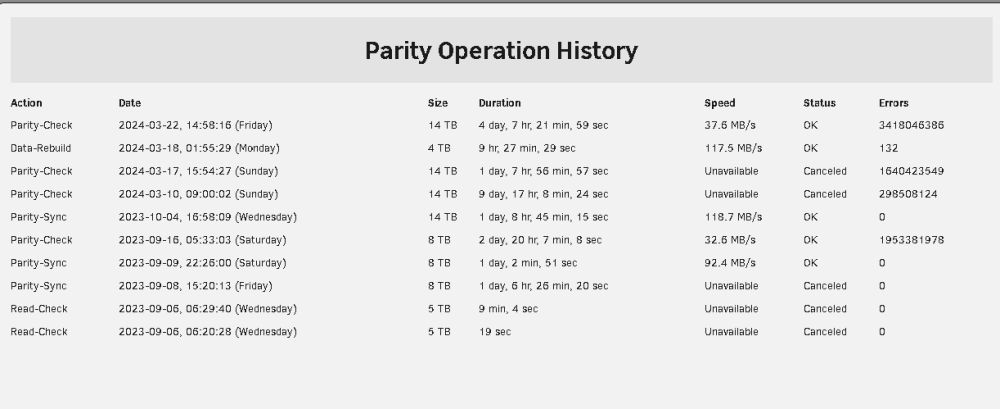
I was looking to encrypt my drives, so I believe I had migrated everything off of my Toshiba 1tb disk. That's to say this failing disk that I am trying to rebuild, shouldn't have anything on it. But I would like to know I know how to rebuild failed disks correctly before the next emergency... For some reason my Toshiba 1tb disk started failing, it was mounted directly on a pcie card with two sata ports. A second disk (my seagate 2tb) on that card did not fail, so it couldn't be a cable issue, but could be a card issue, I digress... My two parity drives emulated the failing Toshiba disk, so I ordered a new Samsung 4 tb disk, popped it in, read through https://docs.unraid.net/unraid-os/manual/storage-management/. I am 99% certain I went through the https://docs.unraid.net/unraid-os/manual/storage-management/#normal-replacement Normal replacement process. As I recall there were 132 errors in the rebuild process, and I through that was weird/bad. (See screen shot) I thought I would run a parity-check, now I am getting 3418046386 errors, and my 4tb Samsung is showing as unmountable or no file system. What am I doing wrong? At some point I rebooted, so I hope that didn't reduce the chance of resolving this. servernas2-diagnostics-20240323-0740.zip servernas2-syslog-20240323-1136.zip

-
I am just looking for verification that I should toss out this disk and get a new one. I am toying around with unraid on the trial period, so I scraped together every random USB drive I have lying around stuck them in an array and also took this 1TB SSD I have lying around and set it as the parity drive. I have been using resilio-sync to clone some data to this setup, which has gone well. The only hang up is unraid keeps complaining about the 1TB SSD. I recycled this disk from an ubuntu machine. So anyways none of that matters too much. What matters is I am new to unraid, and don't know if I am overlooking something simple, or is the drive really failing. I know SSDs will loose their write endurance, and I am just going to have to accept less and less space on this disk? I am fine with that, but label it as not reliable on only good for testing. Seems like I should use it as a read cache in that case. Here's the diagnostics file that seems to be the first troubleshooting step. Now that I think about it, I do have the SSD plugged into a janky usb-to-sata adapter. It's definitely worth it to take that out of the equation. So now I guess my next step is to test the disk again once I do that. I'll run an extended smart self-test. Any other thoughts? servernas1-diagnostics-20230802-0942.zip

