kmob
Members
-
Joined
-
Last visited
-
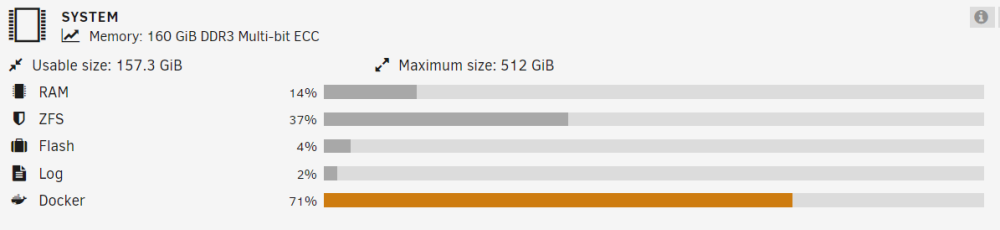
That's really unclear that the Docker entry in the Dashboard System RAM section doesn't actually refer to RAM at all but rather the current disk utilisation of the docker.img. It's useful information to know, but I would say it's displayed in the wrong dashboard section. It also means that the dashboard doesn't show the total RAM utilisation of all docker containers. Ah well, forewarned is forearmed!
-
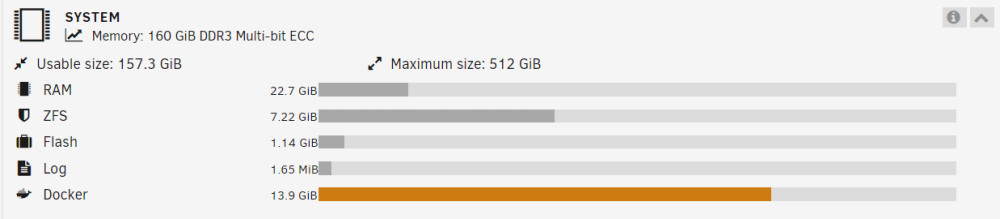
Thanks for that, the orange colouring is what concerned me. I realise now that I wasn't seeing the option to alter the docker.img settings as I had it running. Though after looking at the settings they're all for the storage settings for the vDisk which is where the 20GB is from. Is there a relationship between overall Docker RAM usage and the vDisk storage allocation for docker.img? Or is the Docker reporting in the dashboard RAM system section actually showing the docker.img storage allocation? <edit> Ok I just checked the Container size report and indeed the total container size is 13.9GB/20GB which is what the System RAM dashboard is showing. So it's definitely showing the on-disk allocation of the docker.img. Unless the whole docker.img is being cached in RAM..
-
I've got a question about the dashboard RAM display of the overall Docker RAM uitilisation. I'm running Unraid v6.12.8 and basically my Docker RAM allocation is showing in orange even though I have quite a bit of unallocated RAM available. I guess my question ultimately is, how do I increase the overall RAM allocation for the Docker engine? If I'm interpreting the display correctly it seems there's a 20GB RAM allocation for Dockers set somewhere and I'm using about 13.9GB of it? But I've got 100GB or so of free RAM hanging about that I could use. Any info would be appreciated. Cheers.