




Skip to content
View in the app

A better way to browse. Learn more.

Unraid

A full-screen app on your home screen with push notifications, badges and more.

To install this app on iOS and iPadOS
  1. Tap the Share icon in Safari
  2. Scroll the menu and tap Add to Home Screen.
  3. Tap Add in the top-right corner.
To install this app on Android
  1. Tap the 3-dot menu (⋮) in the top-right corner of the browser.
  2. Tap Add to Home screen or Install app.
  3. Confirm by tapping Install.

armed-purple2352

Members
  • Joined

  • Last visited

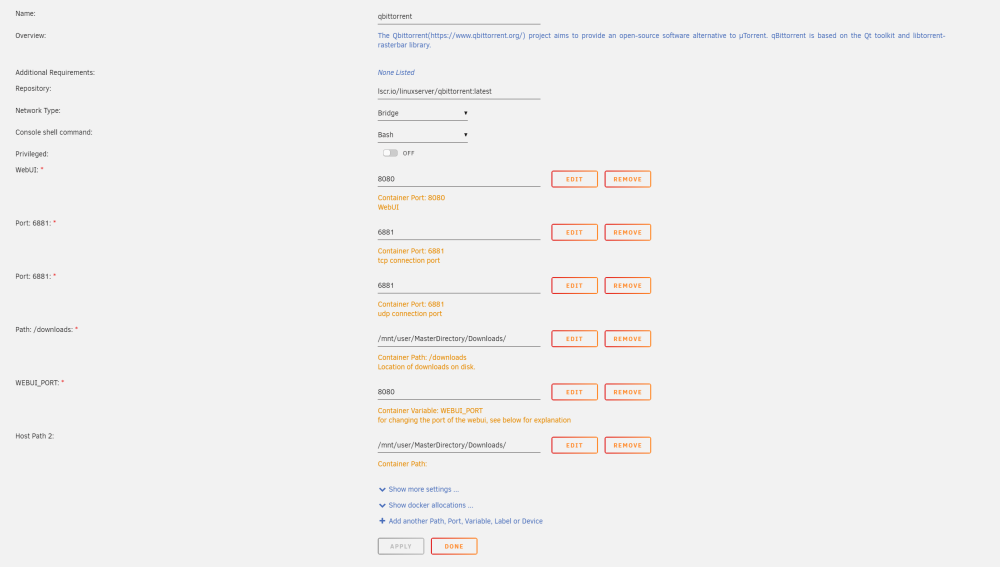
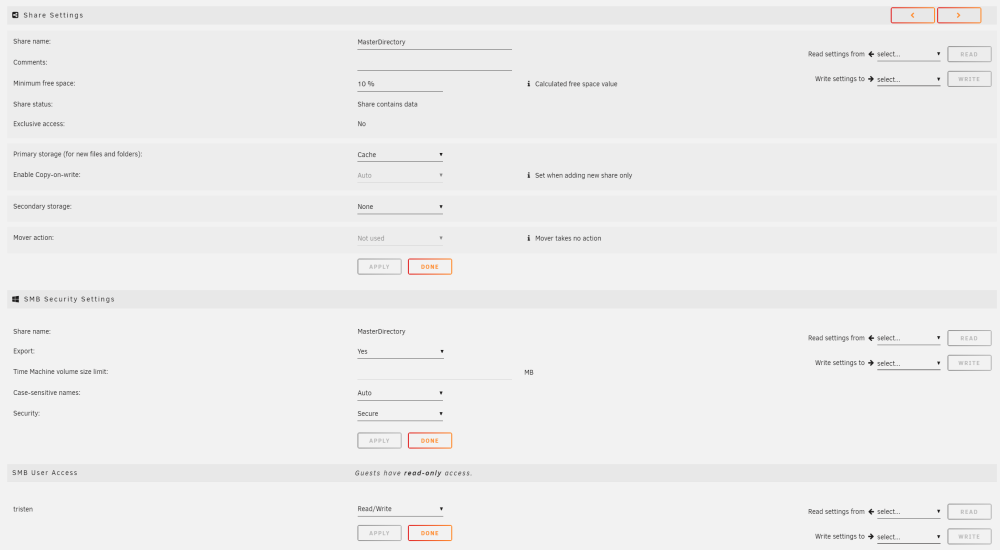
  1. G'day, just to give some context to anyone willing to bhelp, please be patient, I'm extremely new to unraid and have little experience with linux etc. I've been running plex, sonarr, radarr and jackett on windows for a while now. I'm currently trying to setup qBittorrent with the hope of making my main folder for downloading a Share folder I created (So I can access it across my network). How ever I cannot for the life of me figure out how to give the docker container (QBittorrent) access to the folder. My current settings are located in the picture. Any assistance would be greatly appreciated!!!
Account

Navigation

Search

Search

Configure browser push notifications

Chrome (Android)
  1. Tap the lock icon next to the address bar.
  2. Tap Permissions → Notifications.
  3. Adjust your preference.
Chrome (Desktop)
  1. Click the padlock icon in the address bar.
  2. Select Site settings.
  3. Find Notifications and adjust your preference.