





democratic-favour2351
Members
-
Joined
-
Last visited
-
Beautiful, thank you! MainFrezzer!
-
everything except fix common problems and my nvidia driver. Is there anyway that I can use cmd line to check status?
-
I don't have an option to stop the preclear either....
-
All up to date yes. All
-
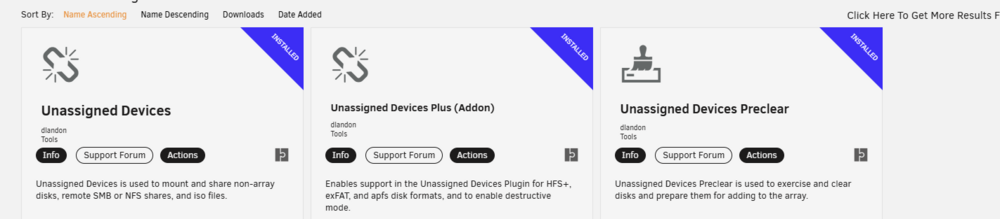
Hey, I just got two new drives and starting a preclear on them. In Unraid 7, I no longer see the Pre Clear Status? I can't click on the little status icon on where it is in the process. Am I missing something?

-
Well, I did try repairing the remaining partitions, unfortunately I mixed up one of the drives and it damaged a good partition, which seemed to screw me. In the end, I gambled on Klennet ZFS Recovery, took many days of scanning and paid a lot of money for the software. But in the end, I was able to recover my important files and I will be rebuilding the pool inside Unraid. Now onto making a proper cloud backup of important files. Can't put it off anymore. Thanks you for the help @JorgeB on this one! I very much appreciated it.
-
I unfortunately am getting an I/O error. zpool import -o readonly=on zfs cannot import 'zfs': I/O error Destroy and re-create the pool from a backup source.
-
Seemed to work, but unfortunately, the ZFS pool says faulted. Guess thats it then? zpool import pool: zfs id: 6938928784629722333 state: FAULTED status: One or more devices contains corrupted data. action: The pool cannot be imported due to damaged devices or data. see: https://openzfs.github.io/openzfs-docs/msg/ZFS-8000-5E config: zfs FAULTED corrupted data raidz3-0 DEGRADED sdg1 UNAVAIL sdj ONLINE sdi ONLINE sdb1 UNAVAIL sdc ONLINE sde ONLINE sdd ONLINE sdf ONLINE sdn1 UNAVAIL invalid label sdq ONLINE sdo ONLINE sdh ONLINE
-
Even one that detects that zpool import says is online doesn't have that ZFS partition...
-
Seems like I have missing partitions. Anyway to restore the ZFS ones? So perplexed that they disappeared on a reboot.
-
It was not, brought into Unraid post 6.12. Was created with the community plugin. cannot open '/etc/zfs/zpool.cache': No such file or directory Disk /dev/sdj: 9.1 TiB, 10000831348736 bytes, 2441609216 sectors Disk model: HUH721010AL42C0 Units: sectors of 1 * 4096 = 4096 bytes Sector size (logical/physical): 4096 bytes / 4096 bytes I/O size (minimum/optimal): 4096 bytes / 4096 bytes Disklabel type: gpt Disk identifier: 54F2203C-3B45-D64C-A263-C5C3A0D5F6A2 Device Start End Sectors Size Type /dev/sdj1 2048 2441590783 2441588736 9.1T Solaris /usr & Apple ZFS /dev/sdj9 2441590784 2441607167 16384 64M Solaris reserved 1
-
How would I "fix" one? I know I haven't had 4 devices fail. root@Tower:~# fdisk -l /dev/sdi Disk /dev/sdi: 9.1 TiB, 10000831348736 bytes, 2441609216 sectors Disk model: HUH721010AL4200 Units: sectors of 1 * 4096 = 4096 bytes Sector size (logical/physical): 4096 bytes / 4096 bytes I/O size (minimum/optimal): 4096 bytes / 4096 bytes Disklabel type: gpt Disk identifier: 126BEC7F-4B6C-47FE-B1D5-B1C8613A8F3D Device Start End Sectors Size Type /dev/sdi1 8 2441609210 2441609203 9.1T Linux filesystem root@Tower:~# fdisk -l /dev/sdf Disk /dev/sdf: 9.1 TiB, 10000831348736 bytes, 2441609216 sectors Disk model: HUH721010AL42C0 Units: sectors of 1 * 4096 = 4096 bytes Sector size (logical/physical): 4096 bytes / 4096 bytes I/O size (minimum/optimal): 4096 bytes / 4096 bytes Disklabel type: gpt Disk identifier: FB57F290-5124-44C3-94D0-E788DC47A715 Device Start End Sectors Size Type /dev/sdf1 8 2441609210 2441609203 9.1T Linux filesystem Disk /dev/sde: 9.1 TiB, 10000831348736 bytes, 2441609216 sectors Disk model: HUH721010AL4200 Units: sectors of 1 * 4096 = 4096 bytes Sector size (logical/physical): 4096 bytes / 4096 bytes I/O size (minimum/optimal): 4096 bytes / 4096 bytes Disklabel type: gpt Disk identifier: C60CE8CA-1314-4D95-A489-E0D2575A22D1 Device Start End Sectors Size Type /dev/sde1 8 2441609210 2441609203 9.1T Linux filesystem Disk /dev/sdo: 9.1 TiB, 10000831348736 bytes, 2441609216 sectors Disk model: HUH721010AL4200 Units: sectors of 1 * 4096 = 4096 bytes Sector size (logical/physical): 4096 bytes / 4096 bytes I/O size (minimum/optimal): 4096 bytes / 4096 bytes Disklabel type: gpt Disk identifier: 569DFBDA-AE5A-48BF-B986-B0D773E7D1F0 Device Start End Sectors Size Type /dev/sdo1 8 2441609210 2441609203 9.1T Linux filesystem
-
Please help, I am thinking I am screwed, but I don't understand some of these errors. Trying to reimport a pool, but get an "invalid label" How do I correct that error? Any chance of importing this pool in a read only state? Ive been unsuccessful thus far. status: One or more devices contains corrupted data. action: The pool cannot be imported due to damaged devices or data. see: https://openzfs.github.io/openzfs-docs/msg/ZFS-8000-5E config: zfs UNAVAIL insufficient replicas raidz3-0 UNAVAIL insufficient replicas sdg1 ONLINE sdj ONLINE sdi UNAVAIL invalid label sdb1 ONLINE sdc ONLINE 6707043850538251454 UNAVAIL invalid label sdd ONLINE sdf UNAVAIL invalid label sdn1 ONLINE sdq ONLINE 8010871872874012596 UNAVAIL invalid label sdh ONLINE root@Tower:~# zpool import -d /dev/disk/by-id pool: zfs id: 6938928784629722333 state: UNAVAIL status: One or more devices contains corrupted data. action: The pool cannot be imported due to damaged devices or data. see: https://openzfs.github.io/openzfs-docs/msg/ZFS-8000-5E config: zfs UNAVAIL insufficient replicas raidz3-0 UNAVAIL insufficient replicas wwn-0x5000cca26a9b1d64-part1 ONLINE wwn-0x5000cca26a3f4e04 ONLINE sdi UNAVAIL invalid label wwn-0x5000cca26a98c70c-part1 ONLINE wwn-0x5000cca25159d4b8 ONLINE 6707043850538251454 UNAVAIL invalid label wwn-0x5000cca2513d58b0 ONLINE sdf UNAVAIL invalid label wwn-0x5000cca26a8546a8-part1 ONLINE wwn-0x5000cca26a3d1844 ONLINE 8010871872874012596 UNAVAIL invalid label wwn-0x5000cca26a3fa138 ONLINE root@Tower:~# tower-diagnostics-20240719-0853.zip
-
Thanks for the replay, it turned out to be my memory, it was no longer stable at the speed it was running at. Reduced my CAS latency, memtest passed and no more checksum errors.
-
Hey everyone, So recently I upgraded my Unraid array, to a 12 core 5900X from an old i7, everything appeared to be going fine after some docker.img issues. However, my monthly scrub came around and, 2 checksum errors (1 each) appeared on each drive. I cleared the errors and ran another scrub, the checksum error (1 was not present on two different drives. Did it again, then it was a different drive again, but 1 X drive. Did another clear and then scrub and now it’s on 3 of the other drives. Different each time, but only ever 1 checksum error on each, no more. I am running 12 X 10Tb Hitachi SAS drives in a 16 port LSI HBA in RAIDZ3 I never had these issues in my old setup, any thoughts onto what’s happening? Why only 1 Checksum error each time? If it was a cable issue, would there not be more? Smart comes back fine on each drive. Any suggestions?


