




Skip to content
View in the app

A better way to browse. Learn more.

Unraid

A full-screen app on your home screen with push notifications, badges and more.

To install this app on iOS and iPadOS
  1. Tap the Share icon in Safari
  2. Scroll the menu and tap Add to Home Screen.
  3. Tap Add in the top-right corner.
To install this app on Android
  1. Tap the 3-dot menu (⋮) in the top-right corner of the browser.
  2. Tap Add to Home screen or Install app.
  3. Confirm by tapping Install.

Jord8

Members
  • Joined

  • Last visited

  1. Thank you, disk 4 was corrupted, but after the fix everything was back to normal.
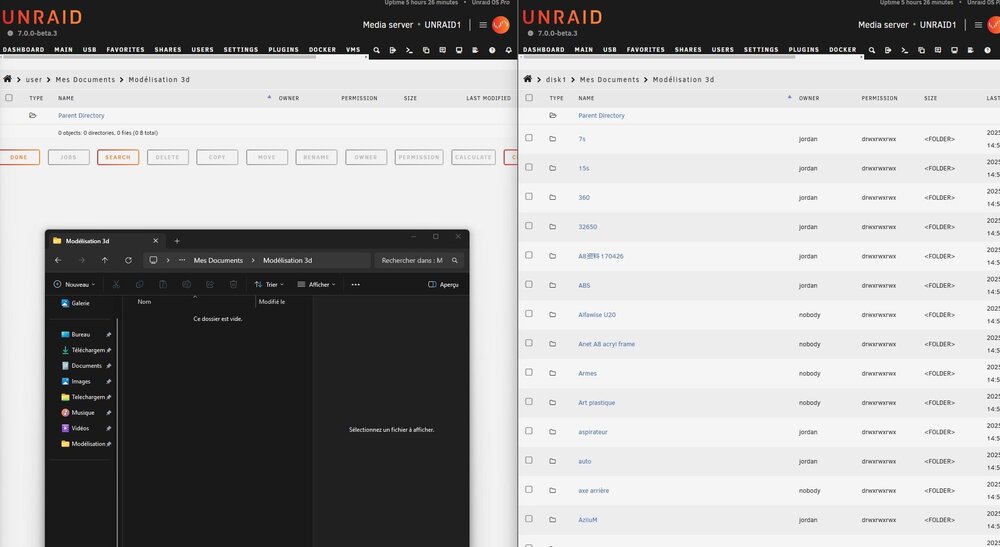
  2. Hello I had a problem with a failed disk and when I replaced it, I don't know how I must have made a mistake. The disk was rebuilt empty. I have a large disk that clones my unraid and I decide to send back the missing data via syncback but strangely my data doesn't appear in the windows file explorer. I notice that when I create a file in the windows file explorer, it disappears. After using the mover, the data is in my disk but not in my shares. Do you know what the problem is? unraid1-diagnostics-20250113-1856.zip

Account

Navigation

Search

Search

Configure browser push notifications

Chrome (Android)
  1. Tap the lock icon next to the address bar.
  2. Tap Permissions → Notifications.
  3. Adjust your preference.
Chrome (Desktop)
  1. Click the padlock icon in the address bar.
  2. Select Site settings.
  3. Find Notifications and adjust your preference.