griben
Members
-
Joined
-
Last visited
-
It worked, everything is back, thank you.
-
I should I've seen this. It allowed me to format my new cache drive. library-diagnostics-20230910-1336.zip
-
Unraid refuse to start without the disk 7 assigned even in maintenance mode, the button is greyed so I started in maintenance mode with it. library-diagnostics-20230909-1115.zip
-
Ok, I've upgraded unraid, unassign disk7 and rebooted. Here the logs. library-diagnostics-20230906-2252.zip
-
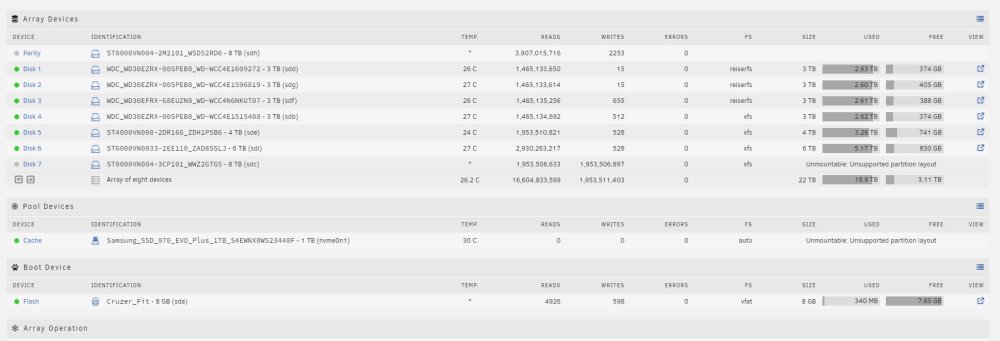
Here the diagnostic. The drive was shown unmountable before the rebuild began. I was tempted to format it but the message was pretty clear that format is not part of the process of rebuild so I assumed the rebuild process would create a FS. library-diagnostics-20230830-2018.zip
-
It's the first time I had to replace a faulty drive. I replaced it for a larger disk (6To to 8To) and I also improved my setup by adding a SSD for cache but when the rebuild finished, the new drive is still unmountable and the data that was on the faulty drive missing. Is there still a possibility to retrieve it somehow? At the very least I have to understand what went wrong in order to avoid this in the future. I schedule a parity check every week and I let the faulty drive in, is it possible that the parity check corrected the parity by substracting the data that it was unable to read because of the faulty drive ? Here below the situation at this moment.