





branislav91
Members
-
Joined
-
Last visited
-
I created something, can you please check is it what you meant? For example, did I choose right disks for right and did I choose right file systems. Thanks a lot
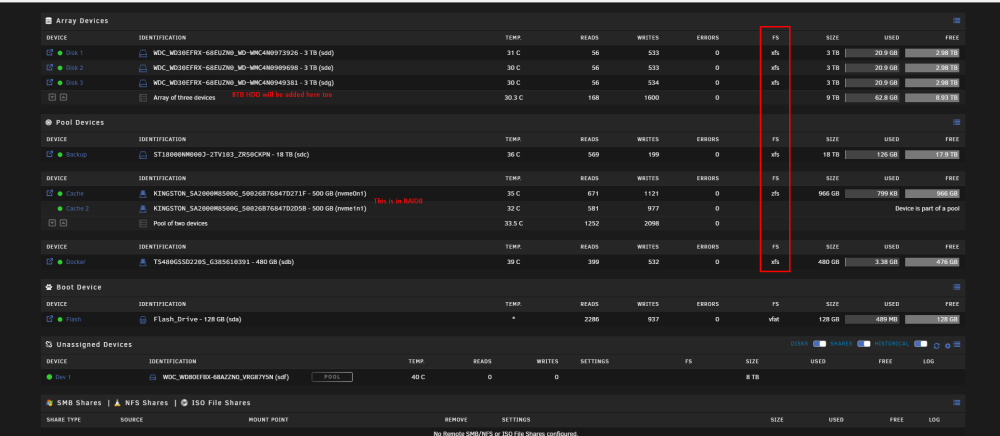
-
I think you are right about wasting 18TB and using that disk for backup would probably be a good idea. But is there any preferred way to do that backup or I should do it by my own? I am not sure that I understood what you mean by "external". Do you mean as cache pool? No, I don't need VMs, just Docker containers.
-
branislav91 changed their profile photo
-
Hi to all, I am first time using UNRAID as I decided to create some kind of home lab. Watched some videos and read forums but still not sure I can create the best array from existing HDDs so I need your help. Disks I already own: 1x 18TB HDD 1x 8TB HDD 3x 3TB HDD 1x 480GB SSD 2x 500GB NVME My plan is to use UNRAID mostly for Plex and NextCloud, but also for other Docker container services as Pi-Hole and who knows what else That is why I need somebody to suggest me how to configure array(s), cache, where to store files, where configuration, etc.... P.S. I have 32GB of RAM if it is important. Thanks

