





domisturz
Members
-
Joined
-
Last visited
-
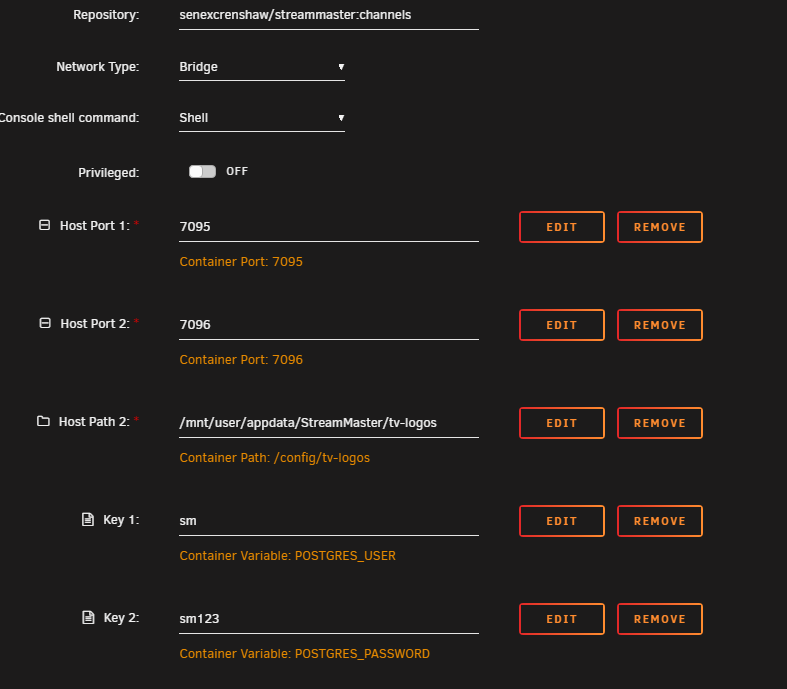
Hi, unfortunately I still have the Postgres Error. fixing permissions on existing directory /config/DB ... ok creating subdirectories ... ok selecting dynamic shared memory implementation ... posix selecting default max_connections ... 100 selecting default shared_buffers ... 128MB selecting default time zone ... Europe/Berlin creating configuration files ... ok running bootstrap script ... Attempt 2: PostgreSQL is not yet ready on 127.0.0.1:5432. Retrying in 5 seconds... Attempt 3: PostgreSQL is not yet ready on 127.0.0.1:5432. Retrying in 5 seconds... Attempt 4: PostgreSQL is not yet ready on 127.0.0.1:5432. Retrying in 5 seconds... Attempt 5: PostgreSQL is not yet ready on 127.0.0.1:5432. Retrying in 5 seconds... Attempt 6: PostgreSQL is not yet ready on 127.0.0.1:5432. Retrying in 5 seconds... Attempt 7: PostgreSQL is not yet ready on 127.0.0.1:5432. Retrying in 5 seconds... Attempt 8: PostgreSQL is not yet ready on 127.0.0.1:5432. Retrying in 5 seconds... Attempt 9: PostgreSQL is not yet ready on 127.0.0.1:5432. Retrying in 5 seconds... Attempt 10: PostgreSQL is not yet ready on 127.0.0.1:5432. Retrying in 5 seconds... Attempt 11: PostgreSQL is not yet ready on 127.0.0.1:5432. Retrying in 5 seconds... Attempt 12: PostgreSQL is not yet ready on 127.0.0.1:5432. Retrying in 5 seconds... Attempt 13: PostgreSQL is not yet ready on 127.0.0.1:5432. Retrying in 5 seconds... Attempt 14: PostgreSQL is not yet ready on 127.0.0.1:5432. Retrying in 5 seconds... Attempt 15: PostgreSQL is not yet ready on 127.0.0.1:5432. Retrying in 5 seconds... Attempt 16: PostgreSQL is not yet ready on 127.0.0.1:5432. Retrying in 5 seconds... Attempt 17: PostgreSQL is not yet ready on 127.0.0.1:5432. Retrying in 5 seconds... Attempt 18: PostgreSQL is not yet ready on 127.0.0.1:5432. Retrying in 5 seconds... Attempt 19: PostgreSQL is not yet ready on 127.0.0.1:5432. Retrying in 5 seconds... Attempt 20: PostgreSQL is not yet ready on 127.0.0.1:5432. Retrying in 5 seconds... Error: PostgreSQL on 127.0.0.1:5432 is not ready after 20 attempts. Error: PostgreSQL is not ready. Anything i can do? Kind regards Edit: Added Config
-
Heres the extended smart log tower-smart-20230927-1442.zip
-
Thanks for the fast reply. Yeah SMART test is running, but will probably just build some RAIDs to secure my system.
-
Here they are, tried reinstalling Unraid again, didnt fix the problem either tower-diagnostics-20230926-2246.zip
-
Hey, just added a 4 TB Parity Drive and when tried to Sync it dropped to 300 kb around 1.4TB. Tried again with the same Drive and another 6 TB Drive, the Error sadly still occurs. Anybody knows what my problem could be. Both parity drives are new. Thanks in advance
