Zitrone
Members
-
Joined
-
Last visited
-
Thank you immensely! Everything is back in order, and the cache is running smoothly. I've taken the precaution of backing up all essential files. Tomorrow, I'll embark on the adventure of installing the new SSD. Fingers crossed that I won't encounter the same issue. Given my newfound caution, is there a recommended, "proper" way of installing a new drive? My intention is to dedicate it solely to lancache, which was the source of the initial hiccup. Any guidance or tips would be greatly appreciated!
-
I did what u said but no changes. Here are new diagnostics unraid-diagnostics-20240109-1851.zip
-
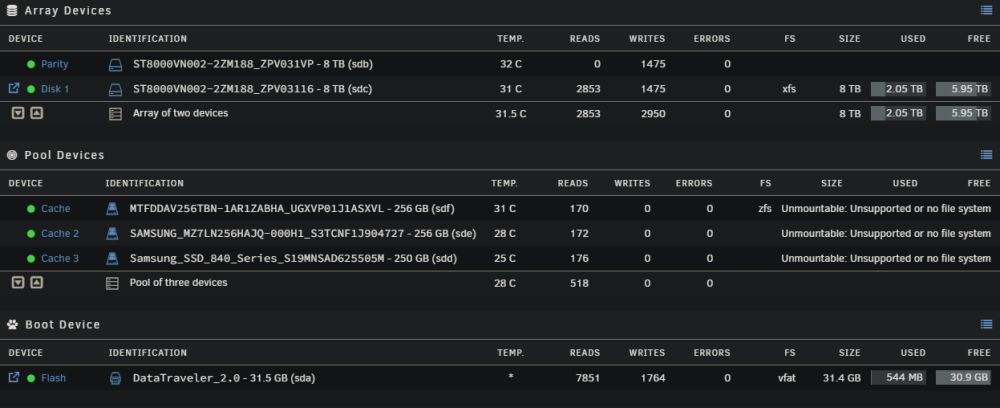
Hello everyone, I'm facing an issue with my cache drives, and I could really use some assistance. All of them are displaying "unmountable: Unsupported or no file system cache." Here's the backstory: I encountered this problem after shutting down my system and installing an additional SSD. Unfortunately, I forgot to wipe the SSD. As a result, without changing any BIOS settings, the system booted from the new SSD (Truenas). Realizing my mistake, I promptly adjusted the BIOS settings to exclusively boot from my Unraid USB. However, the problem persisted after the reboot. I went ahead and added the new SSD to a new pool, but it still showed the "unmountable: Unsupported or no file system cache" error. I attempted to resolve the issue by removing the new SSD, but to my dismay, the problem persisted after the next boot. For additional context, my cache drives are running in ZFS in a RAID 5 configuration. Given that there are crucial files on the cache drives and my Docker and VMs rely on them, I'm reaching out for help. While I understand that Unraid is not a backup, I unfortunately don't have a backup for these specific files. I'm new to the forum, and I hope I've posted this in the right place. If not, I apologize. Any insights or guidance would be greatly appreciated. If there's any crucial information I've missed, please let me know. Thank you! unraid-diagnostics-20240109-1830.zip