bemiliog
Members
-
Joined
-
Last visited
-
Great, thanks so much for your reply. I'm running the parity check at the for the second time now - hopefully the first one will have corrected the errors! I'll let you know how things go. Thanks, Ben
-
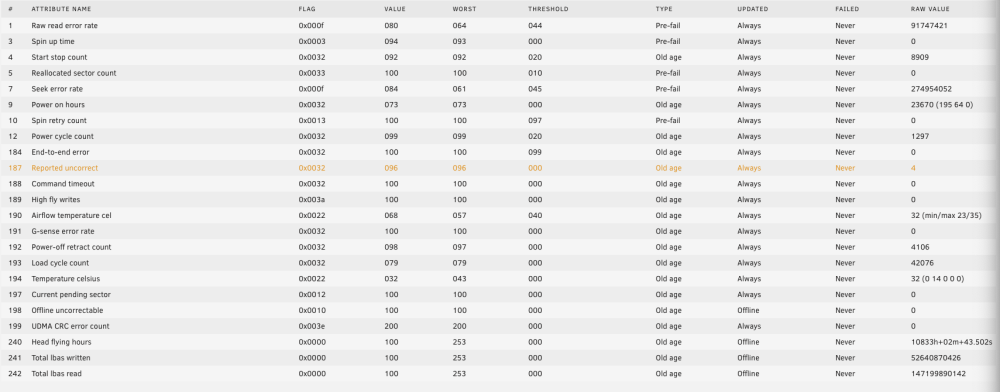
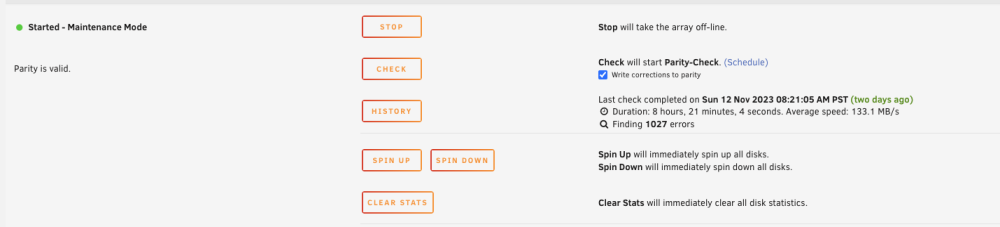
Hi there, I'm new to Unraid, and it's only been a few weeks since I've setup my server. Unfortunately, I've noticed that I'm getting 1027 errors on my last parity check - I've turned write corrections off as it seems to be the consensus to turn this off without investigation. Yesterday I got an error that one of my drives (this one is an older drive), has a recently increased 'reported uncorrect' SMART attribute. I assume this is what has caused the parity errors. I've since run a full SMART self-test on the drive, tested it with SeaTools, and looked at the SMART data in CrystalDiskInfo. All of these tests came back as fine, and CrystalDiskInfo reports the drive to be 'good' without Reallocated Sectors. What is everyone's thoughts on this situation? Is the drive safe to keep using, with monitoring? What should I do about the parity errors? Should I write the corrections, or is that a bad idea? See screenshots for clarification. Thanks for your help. Ben