xShirae
Members
-
Joined
-
Last visited
-
Will do thanks!
-
Hi JorgeB, No problem; thank you for your help. However, in the end, I tried pretty much everything without success. I ended up formatting my drives to XFS. I tested a few reboots after, and everything now runs smoothly. And for the information, nothing changed. I literally just pressed "stop all docker" and "stop array." Once the array was stopped, I got a wrong disk error, and the partitions were corrupted.
-
Hi! Indeed it's not normal haha. Here's diagnostic:gungnir-diagnostics-20231124-0844.zip Here's the result of the command: root@Gungnir:~# zpool import no pools available to import
-
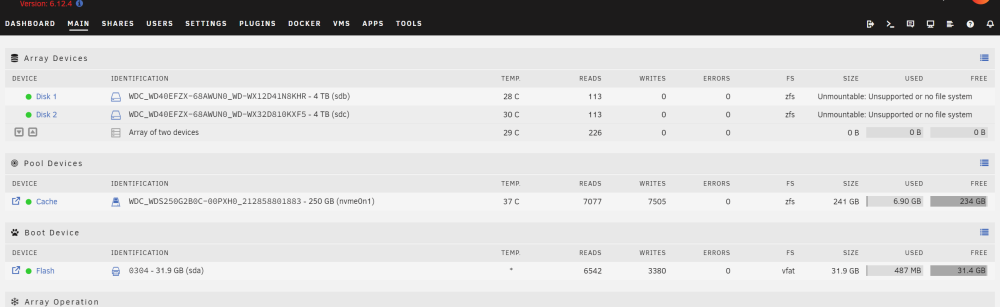
Hi everyone! I recently stopped my array that was running for a good month without any issue. Right after, I couldn't start it back and I had a "wrong disk" error. I saw online that this sometimes happen after stopping the array and all you have to do is to start a new config. Which I did but now i'm facing a new issue; my drives are unmountable and it says that there's no filesystem or it's unsupported. I have 2 drives in an array with ZFS. I tried to mount them manually via the command line but I get: root@Gungnir:/mnt# mount /dev/sdb /mnt/temp/ mount: /mnt/temp: wrong fs type, bad option, bad superblock on /dev/sdb, missing codepage or helper program, or other error. dmesg(1) may have more information after failed mount system call. I then tried by specifying ZFS as the filesystem but I get: root@Gungnir:/mnt# mount -t zfs /dev/sdb /mnt/temp/ filesystem 'disk1' cannot be mounted, unable to open the dataset Any idea how I can save my drives without wiping? I do have a lot of data on them that I would really like to keep. I still don't get why I'm facing this issue. I simply stopped all my running docker and stopped the array. Thanks!