





Jetro
Members
-
Joined
-
Last visited
Everything posted by Jetro
-
There are two backplanes on that Supermicro server, one to the back (12 Disks) and one to the front (24 disks). I have to take them off to read the P/N, I think I could do that in the afternoon. 01:00.0 RAID bus controller: Broadcom / LSI MegaRAID SAS-3 3108 [Invader] (rev 02) Subsystem: Broadcom / LSI MegaRAID SAS-3 3108 [Invader] Control: I/O+ Mem+ BusMaster+ SpecCycle- MemWINV- VGASnoop- ParErr- Stepping- SERR+ FastB2B- DisINTx+ Status: Cap+ 66MHz- UDF- FastB2B- ParErr- DEVSEL=fast >TAbort- <TAbort- <MAbort- >SERR- <PERR- INTx- Latency: 0, Cache Line Size: 32 bytes Interrupt: pin A routed to IRQ 24 NUMA node: 0 IOMMU group: 64 Region 0: I/O ports at 6000 [size=256] Region 1: Memory at c7300000 (64-bit, non-prefetchable) [size=64K] Region 3: Memory at c7200000 (64-bit, non-prefetchable) [size=1M] Expansion ROM at c7100000 [disabled] [size=1M] Capabilities: [50] Power Management version 3 Flags: PMEClk- DSI- D1+ D2+ AuxCurrent=0mA PME(D0-,D1-,D2-,D3hot-,D3cold-) Status: D0 NoSoftRst+ PME-Enable- DSel=0 DScale=0 PME- Capabilities: [68] Express (v2) Endpoint, MSI 00 DevCap: MaxPayload 4096 bytes, PhantFunc 0, Latency L0s <64ns, L1 <1us ExtTag+ AttnBtn- AttnInd- PwrInd- RBE+ FLReset- SlotPowerLimit 0W DevCtl: CorrErr- NonFatalErr- FatalErr- UnsupReq- RlxdOrd- ExtTag+ PhantFunc- AuxPwr- NoSnoop+ MaxPayload 256 bytes, MaxReadReq 512 bytes DevSta: CorrErr+ NonFatalErr- FatalErr- UnsupReq- AuxPwr- TransPend- LnkCap: Port #0, Speed 8GT/s, Width x8, ASPM L0s, Exit Latency L0s <2us ClockPM- Surprise- LLActRep- BwNot- ASPMOptComp+ LnkCtl: ASPM Disabled; RCB 64 bytes, Disabled- CommClk+ ExtSynch- ClockPM- AutWidDis- BWInt- AutBWInt- LnkSta: Speed 8GT/s, Width x8 TrErr- Train- SlotClk+ DLActive- BWMgmt- ABWMgmt- DevCap2: Completion Timeout: Range BC, TimeoutDis+ NROPrPrP- LTR- 10BitTagComp- 10BitTagReq- OBFF Not Supported, ExtFmt- EETLPPrefix- EmergencyPowerReduction Not Supported, EmergencyPowerReductionInit- FRS- TPHComp- ExtTPHComp- AtomicOpsCap: 32bit- 64bit- 128bitCAS- DevCtl2: Completion Timeout: 50us to 50ms, TimeoutDis- LTR- 10BitTagReq- OBFF Disabled, AtomicOpsCtl: ReqEn- LnkCap2: Supported Link Speeds: 2.5-8GT/s, Crosslink- Retimer- 2Retimers- DRS- LnkCtl2: Target Link Speed: 8GT/s, EnterCompliance- SpeedDis- Transmit Margin: Normal Operating Range, EnterModifiedCompliance- ComplianceSOS- Compliance Preset/De-emphasis: -6dB de-emphasis, 0dB preshoot LnkSta2: Current De-emphasis Level: -6dB, EqualizationComplete+ EqualizationPhase1+ EqualizationPhase2+ EqualizationPhase3+ LinkEqualizationRequest- Retimer- 2Retimers- CrosslinkRes: unsupported Capabilities: [d0] Vital Product Data Not readable Capabilities: [a8] MSI: Enable- Count=1/1 Maskable+ 64bit+ Address: 0000000000000000 Data: 0000 Masking: 00000000 Pending: 00000000 Capabilities: [c0] MSI-X: Enable+ Count=97 Masked- Vector table: BAR=1 offset=0000e000 PBA: BAR=1 offset=0000f000 Capabilities: [100 v2] Advanced Error Reporting UESta: DLP- SDES- TLP- FCP- CmpltTO- CmpltAbrt- UnxCmplt- RxOF- MalfTLP- ECRC- UnsupReq- ACSViol- UEMsk: DLP- SDES- TLP- FCP- CmpltTO- CmpltAbrt- UnxCmplt- RxOF- MalfTLP- ECRC- UnsupReq- ACSViol- UESvrt: DLP+ SDES+ TLP- FCP+ CmpltTO- CmpltAbrt- UnxCmplt- RxOF+ MalfTLP+ ECRC- UnsupReq- ACSViol- CESta: RxErr+ BadTLP- BadDLLP- Rollover- Timeout- AdvNonFatalErr- CEMsk: RxErr- BadTLP- BadDLLP- Rollover- Timeout- AdvNonFatalErr+ AERCap: First Error Pointer: 00, ECRCGenCap+ ECRCGenEn- ECRCChkCap+ ECRCChkEn- MultHdrRecCap- MultHdrRecEn- TLPPfxPres- HdrLogCap- HeaderLog: 00000000 00000000 00000000 00000000 Capabilities: [1e0 v1] Secondary PCI Express LnkCtl3: LnkEquIntrruptEn- PerformEqu- LaneErrStat: 0 Capabilities: [1c0 v1] Power Budgeting <?> Capabilities: [148 v1] Alternative Routing-ID Interpretation (ARI) ARICap: MFVC- ACS-, Next Function: 0 ARICtl: MFVC- ACS-, Function Group: 0 Kernel driver in use: megaraid_sas Kernel modules: megaraid_sas
-
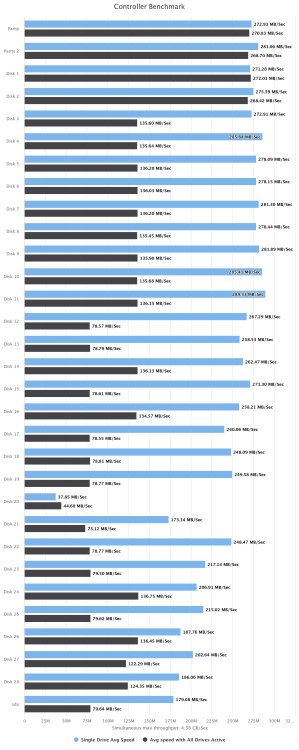
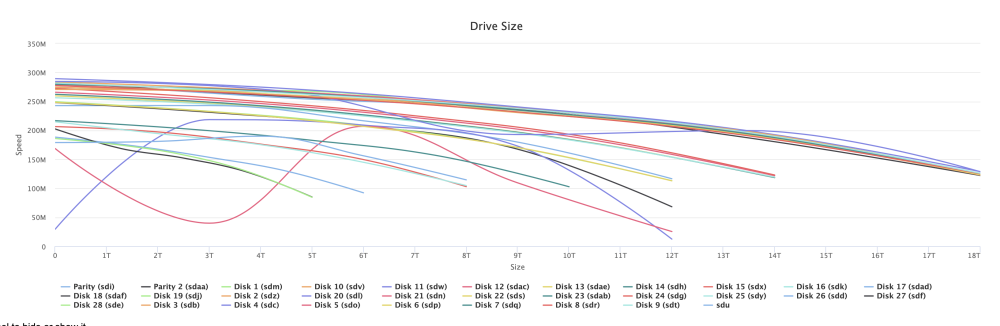
How can I understand where's the controller bottleneck? Basing on 18 TB drives (which I'm using now) speeds seem to be much higher. Also, I'm reading/writing to 3 disks only, CPU usage is < 7 %, is it normal I'm getting these speeds? If it is, is there any suggestion for an HBA controller which wouldn't cause bottleneck? He's okay if there are some slow disks, but I prefer getting full speeds when working on new disks
-
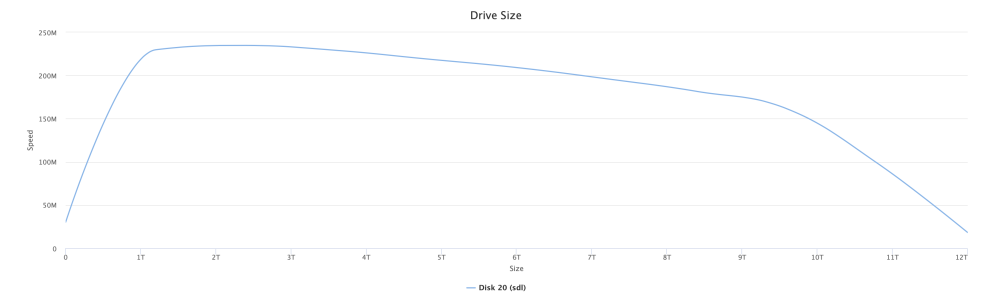
Thank you for your reply, It looks like I have some really slow disk, which are the already filled ones. As I'm now working on the fastest drives, maybe it's better to keep turbo write off. For example I was copying to disk 2, which is rated > 250 MB/s like also the parity drives, is it normal I was writing at < 50 MB/s? Controller Benchmark: Disk benchmark: Disk 20 detail: Speed after resuming transfer: Tomorrow I'll update with transfer speed Edit: here's what hapens: FIle are only videos.


-
Hello everyone, I'm moving a lot of files for a friend, from 6 Truenas devices to 2 Unraid. Now only the first is "alive", with following hardware: - Supermicro X10DRi motherboard - Supermicro controller in HBA mode (don't remember exact model) - 416 GB RAM ECC (has to be 512GB but we've got some defective modules. Will go down to 256GB with the second unraid) - 2 x CPU E5-2690 v3 - 36 Disk of various capacity, that will be moved during transfer. (actually only 28 + 2 parity in use) - 10 Gbit SFP+ dual port network card - 1 Gbit dual port integrated network card I've set up the 1 Gbit network for OOB management, while 1 x 10 Gbit goes to LAN and 1 x 10 Gbit goes to the Truenas moving files. First Truenas has been moved at approx. 145 MB/s, which is the limit of destination hard drive on unraid. Parity was disabled. Write mode was "reconstruct write". Now, I've formatted first truenas Segate Exos HDDs (18TB) and installed them on unraid, and I'm transferring second NAS. Speed start at 145 MB/s then drop after some times to 50 MB/s, which means more than a month of transfer instead of 2 weeks. As the speed was slow, I integrated parity, let the parity set and then restarted transfer with the exactly same speed. Tried moving from reconstruct write to "auto", and speed increased from 50 to 60 MB/s. Attached the diagnostics Many thanks mmpl-2-diagnostics-20240124-2003.zip
-
Edit: installed the Supermicro branded LSI 9207-8i and it works like a charm. With 32GB of RAM it's okay as home media server now, and I'm planning to install some more containers in it. So the big differences was: - Switching back to btrfs instead of using zfs (which prevent files copy) - Enabling turbowrite (eliminated the stalls after 3 GB of copy) - Installing a dedicated PCIe SAS/SATA controller (improved general transfer speed)
-
I noted there was only the empty folder left on "disk1", deleted it and now everything seem ok!
-
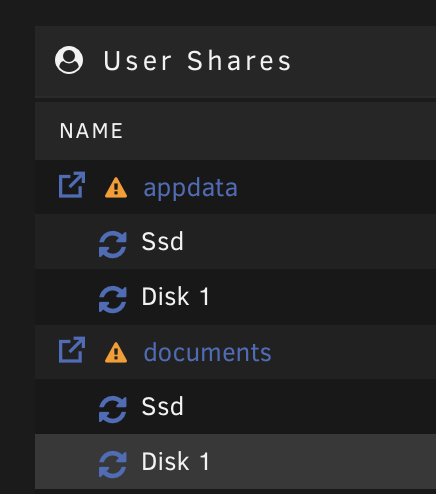
Another question: I see two shares which have some bytes left on Disk 1. How can I remove residual data from disk 1?
-
I'll try that way, Thank you so much
-
I can live with that Last question, if I ever wanted to backup SSD cache to Array data, is there a FAQ on how to do that i a correct manner? I've read about setting HDD Array as secondary storage and run Mover daily, or also about a plugin. In this way every time the mover runs it copy data from ssd to hdd, but I'm working on SSD only except if it fills up? So, if SSD ever fail I can set the Array as primary storage for that shares, change the SSD and move everything to the new disk? Sorry for dumb questions, posts on forum mixed to other sources and os help sections sometimes drives me crazy
-
Thank you Jorge, Procedure done. Now I see system which is totally on SSD, but have a warning symbol telling me "Some or all file are unprotected". Also "appdata" and another share of mine have the same warning. They're on SSD with some bytes left on Array, how can i delete that? What does that warning mean? If it mean the files are only on the single cache SSD i'm okay with that, how can i disable that?
-
Hello everyone, I was browsing the forum searching how to move system data to ssd pool, but I'm seeing everyone talking about cache option, which I don't see. I have primary storage / secondary storage options. If I specify the secondary storage, mover option is enabled. So, what's the correct procedure to move files to SSD? It's a new install so nothing to keep Also, I have a warning saying some or all files are unprotected, how can I solve that? Edit: I assume that assigning only a pool as primary storage is equal to cache: only and assigning also a secondary storage is the same as "prefer"?
-
Edit: replaced the 4x1TB Ironwolf with 4 x 4 TB WD Red Pros. Added a 2 TB Samsung 870 EVO for containers/VM Tried to create a new array: parity sync at 250 MB/s, but the old Fujitsu D2507-D11 only permit to use 2.2 TB out of 4 TB drives, so I switched back to integrated Marvell controller and it's syncing at 120 MB/s. Ordered an LSI 9207-8i controller because all I have is really old controllers which doesn't support 4 TB disks or overkill controllers like Dell Perc HBA330 w/BBU. I'll keep you updated. Plans are to use this as a Plex server (tried transcoding and seem acceptable)
-
With turbo write I'm now at 103-105 MB/s for the whole transfer. I'm gonna do some other test (i.e. with onboard controller)
-
Recreated the array with xfs: copy starts at 103-105 MB/s then goes down to 44-50MB/s after 4-5 GB transferred to the end of the transfer, which is successful with xfs. I used 55 GB of video files. Transfer from the same PC to another NAS starts at 112-113 MB/s and end without variations.
-
Edit: Testing from linux allow me to copy the file without errors, but it's really slow: - Copy start at Gigabit speed, then stop at around 3 GB with 2 core (random one, real or HT) at 100% - After a minute or so copy restart at gigabit speed and copy around 2 GB, then stops with 2 core (out of 4) at 100% - The copy restart after a minute and copy the last 3-400 MB. From Windows behaviour's the same but copy end with that error. I'll do a test also with NFS
-
Here it is, Thank you test-microg10-diagnostics-20231028-1414.zip
-
I've already tried: same behaviour. Only difference is that without card it tops out near 80 MB/s, with card about 106 MB/s (limited by gigabit connection i guess) Tried also from a linux system and got the same problem: stop after 3 GB Copy of smaller files seem fine. Is there a way to see any log and investigate?
-
Hello everyone, My name is Davide and after an upgrade to a client I just got for free an HPE Microserver Gen 10, the worst one, with this hardware configuration: AMD Opteron™ X3421 APU @ 2100 MHz 32GB PC4-19200E 4 x 1TB Segate Ironwolf 7200rpm I tried installing proxmox in it, but the CPU is really awful, so I'm going to try Unraid and use it for backup purposes. I'm quite familiar with enterprise solutions, I'm also using OMV but never used Unraid. To improve SATA performances I also installed an LSI MegaRAID PCIe Card which pass directly drives to OS. System boot, array start, everything seem fine until I try to use it: it copy around 3 GB then stops for a while, then restart and while at the end of the transfer Windows throw out "Error 0x8007010B The Directory Name is Invalid". Do you have any ideas on how to solve this? I know even a raspberry might be more powerful than this useless box, but it's free and I'd like to keep it on for something. Just data backup would be fine, for VMs there's the Proxmox cluster Thank you


