





analytic-painkiller6167
Members
-
Joined
-
Last visited
Everything posted by analytic-painkiller6167
-
I don't think I installed that plugin is that in my unraid by default ?
-
So I've seen lately that lsof was taking more and more of my CPU. But right now I wasn't able to play anything on plex or access my camera system (all on unraid) so I went to my server to see what was happening and after 5 min of waiting i've been able to access unraid ui and see that my cpu was at 100%. I ran a quick top command on the terminal to see what was taking that much resources and saw this (attached to the post). Could someone help me with that ?
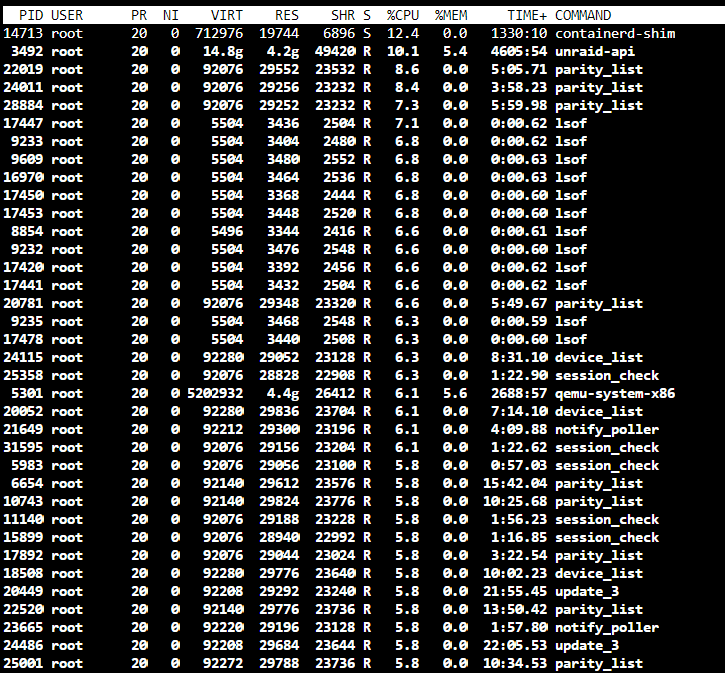
-
So turns out my motherboard is broken. That is what caused internal drives to fails. I don't think that will solve the first issue but I will test it with a new board later. If the issue remain I will try an other PSU. I have a spare corsair RM 850 which would be a waste on this but I want it to work.
-
So my sata drives are detected in the bios which removes the hardware issue. Still digging up
-
That is what I have right now. What part of the diagnostics make you believe that ? It's an old 450w PSU from an unknown brand if I remember correctly. I can try to switch if you think that might help... But right now I have an other weird problem. I have 4 sas drive in a custom external enclosure (one of which was the one I started the post for) connected via an HBA. But now for some reasons all of my internal drives are not detected. WTH is happening lol. That one seems like a hardware issue...
-
You think that the drives does not have enough power ?
-
I had before but the hard drives were not spinning now they are all connected to the same power rail on the power supply. I can use the second one to split the load...
-
One of my disk get disabled after parity test. I rebuild the HDD from parity twice now but every time I run a parity check it gives errors. Can someone advise me ? Thanks tower-diagnostics-20240104-1106.zip
-
Thanks for the help. I think I will buy new drives to replace them just not right now.
-
Is there a way to remove disk2 without adding a new one ?
-
I don't at the moment. I could probably buy an other one but not short term.
-
There: tower-diagnostics-20231031-2026.zip
-
It just finished. Could it be because I use a PIKE card on my ASUS motherboard to have 6gbps on some of my sata ports ? What do you want me to do next ?
-
There: Thanks tower-diagnostics-20231031-0852.zip
-
Hi all, So I've run my array with two hdd (3 &4 tb) with no parity for long but not long enough so it cause significant damage. I bought 4 6tb this summer. Installed it, added parity and I felt safe. A drive disabled itself this week after having an error and the other drive have 128 at the moment. I saw that the content was being emulated not sure about the old drives status right now. I removed it and readded it but I doubt this will fix anything (currently rebuilding). What should I do right now ? Is it possible ton simply transfer everything off the old disks on the new ones ? Let me know. Thanks
