



Skip to content
View in the app

A better way to browse. Learn more.

Unraid

A full-screen app on your home screen with push notifications, badges and more.

To install this app on iOS and iPadOS
  1. Tap the Share icon in Safari
  2. Scroll the menu and tap Add to Home Screen.
  3. Tap Add in the top-right corner.
To install this app on Android
  1. Tap the 3-dot menu (⋮) in the top-right corner of the browser.
  2. Tap Add to Home screen or Install app.
  3. Confirm by tapping Install.

characteristic-retiree3667

Members
  • Joined

  • Last visited

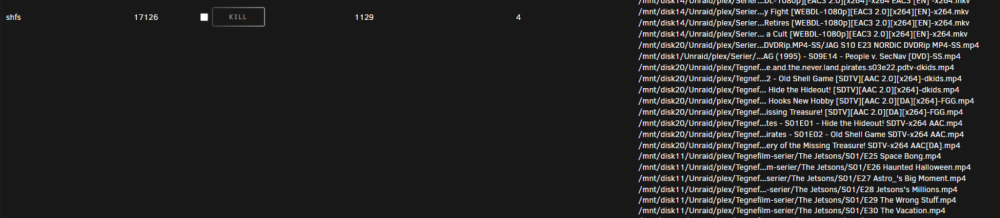
  1. Hi again. sorry for the long wait, I just tried open files, but the only thing that "sticks out" is shfs having alot of files accessed. could it be that? snippet of some of the files. Its still wierd that the SAS disks will spin down tho, even parity drives(also sas) but sata disks wont?
  2. Here you go tower-diagnostics-20231103-0009.zip
  3. I moved the system folder , but same issue. Sas disks spin down fine but sata disks won't
  4. Hi there. I can't figure out why the array won't spin down. The sas disks do spin down fine, but sata won't.. It have been working before, not sure if it was in 6.11 or what. The won't spin down in either 6.12.3 or 6.12.4 tower-diagnostics-20231102-2246.zip

Account

Navigation

Search

Search

Configure browser push notifications

Chrome (Android)
  1. Tap the lock icon next to the address bar.
  2. Tap Permissions → Notifications.
  3. Adjust your preference.
Chrome (Desktop)
  1. Click the padlock icon in the address bar.
  2. Select Site settings.
  3. Find Notifications and adjust your preference.