






itsmemac
Members
-
Joined
-
Last visited
-
You have the incorrect path sixones/update-expat -> plex/main the error message is asking for plex/main and not sixones/update-expat
-
Update : it seems the plex image was update and libdrm path is changed If you are facing issue with AMD GPU HW Transcoding, update the path to the path from the container log file Error will be something like this So the container path will be /home/runner/actions-runner/_work/plex-conan/plex-conan/.conan/data/libdrm/2.4.120-0/plex/main/build/73ee780ba6ea3ef381da6e7f229c475bfaf477ca/meson-install/share/libdrm/ Monitor your plex log and see if there is error in future and update it accordingly
-
Its your subtitles and audio Both are still encoded using CPU hence there will be CPU usage even though HW encoding is used where just video encoding is offloaded to GPU Use better subtitles format Turn off subtitle and see the CPU usage going down
-
Hi, Yes, this error fix was not documented anywhere since not many tried using AGPU for transcoding in Plex I had to do multiple trial and error fix (including building my own plex container from scratch) before arriving at this solution libdrm was present already in host system and simply mounting the library fixed this error and transcoding started to work without any further issues. Though this is a temp fix for the error until image creators include this in their future images
-
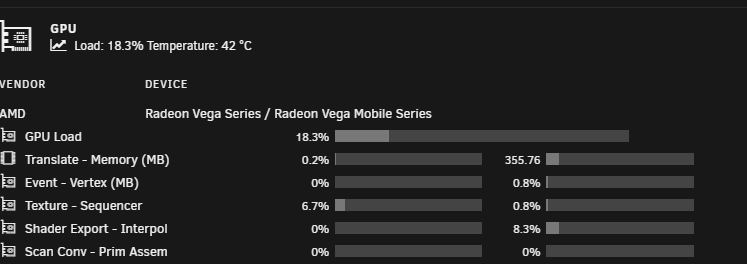
Hi everyone, After long search of forums, reddit, discord and github finally have a working method to get AMD iGPU to work with Plex Container for HW Transcoding. Thanks to multiple unraid members in different channels as this is a consolidated working solution from different sources. Requirements Plex Pass (Important) AMD Processor with iGPU Radeon-TOP plugin by ich777 (Enables AMD GPU for unraid) GPU Statistics plugin by b3rs3rk (Helps monitoring GPU usage) Unraid version 6.9.x and above Steps Go to Apps > Search for Plex > Select binhex-plexpass app > Click Install Add the following variables by clicking + Add another Path, Port, Variable, Label or Device option Variable 1 Config Type : Device Name : /dev/dri Value : /dev/dri Variable 2 Config Type : Path Name : /usr/share/libdrm Container Path : /home/runner/actions-runner/_work/plex-conan/plex-conan/.conan/data/libdrm/2.4.120-0/plex/main/build/73ee780ba6ea3ef381da6e7f229c475bfaf477ca/meson-install/share/libdrm/ Host Path: /usr/share/libdrm Access Mode: Read Only 3. Click Apply and wait for the docker container to be created 4. Open plex server page by slecting webui option 5. Go to Settings > Transcoder 6. Enable Use hardware acceleration when available & Use hardware-accelerated video encoding options 7. Select Cezanne [Radeon Vega Series / Radeon Vega Mobile Series] option in Hardware transcoding device drop-down menu 8. Click Save Changes (Maybe a restart of Container can also be done after applying changes) 9. Tada.! HW Encoding works Was able to run 4 4k HDR/DoVi -> 1080p SDR @ 20Mbps streams or 8 1080p -> 720p streams with 5700G before Memory was full System Spec of the test server which is used for the guide Processor : AMD Ryzen 7 5700G Motherboard : MSI B550M PRO-VDH WIFI RAM : Team Group 16 GB @ 3200 MHZ x 4 (64 GB) Storage : 2 x 1 TB Samsung 980 4 x 4 TB WD Blue 5400 RPM Power Supply : Cooler Master G800 GOLD
-
Hi everyone, New to unraid and need some advice on power loss Currently has a unraid setup up and running for few hours My place is prone to power loss so have a apc ups with usb connect to initiate auto shutdown What status should i keep "Restore after AC power loss " setting in bios ? I want the server to automatically turn on when power is restored Current Server Spec Processor : AMD 5700G Motherboard : MSI B550M PRO-VDH WIFI RAM : 4 x 16 GB DDR4 @ 3600 Mhz Storage : 1 x 128 gb SSD (Cache) 4 x 4TB WD ( 1x Parity + 3x Array) PSU : Cooler Master G800 - 80 Plus Gold


