versatile-dive3293
Members
-
Joined
-
Last visited
-
Thank you. I didn't think of it. In this case, I'm turning off parity.
-
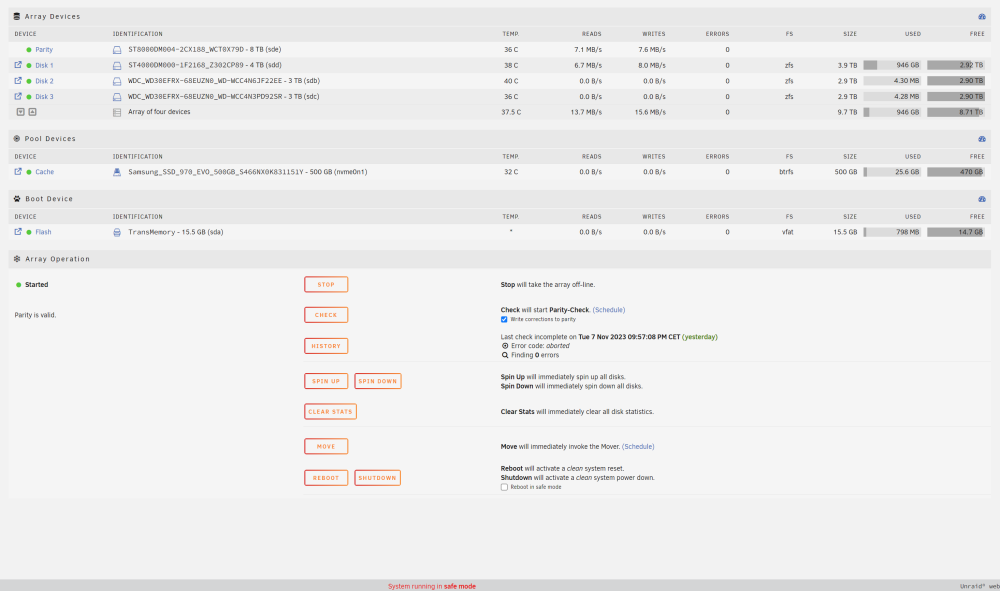
I'm using Unraid trial for now and want it to be my additional backup of my photos and also for some dockers. Unfortunately, the speeds I get are really low and I'm wondering what's wrong with my setup. This screenshot was taken while sending images to SMB share on Unraid server (1 Gbps network). Sometimes the speeds are higher (if I turn on "turbo mode"), but then the transfer almost stops for a moment. As you can see, this is in safe mode with dockers, plugins and vms turned off completely. Cache isn't used at all for this (I use it for dockers only now), as I found that Mover makes it all even slower and less responsive. My diagnostics: tower-diagnostics-20231108-1546.zip What can I try to improve my write speeds? I don't need much, even 20 MB/s of constant speed would be enough, I guess. I'm thinking of turning off parity as a last resort. TYIA, Adam