gavgaddis
Members
-
Joined
-
Last visited
Everything posted by gavgaddis
-
And just like magic, everything's back. Here's what the process looked like, for edification's sake. Phase 1 - find and verify superblock... Phase 2 - using internal log - zero log... ALERT: The filesystem has valuable metadata changes in a log which is being destroyed because the -L option was used. - scan filesystem freespace and inode maps... clearing needsrepair flag and regenerating metadata sb_icount 128, counted 33920 sb_ifree 14, counted 243 sb_fdblocks 2417496215, counted 2315457246 - found root inode chunk Phase 3 - for each AG... - scan and clear agi unlinked lists... - process known inodes and perform inode discovery... - agno = 0 - agno = 1 - agno = 2 - agno = 3 - agno = 4 - agno = 5 - agno = 6 - agno = 7 - agno = 8 - agno = 9 - process newly discovered inodes... Phase 4 - check for duplicate blocks... - setting up duplicate extent list... - check for inodes claiming duplicate blocks... - agno = 0 - agno = 4 - agno = 1 - agno = 2 - agno = 3 - agno = 5 - agno = 6 - agno = 7 - agno = 8 - agno = 9 clearing reflink flag on inodes when possible Phase 5 - rebuild AG headers and trees... - reset superblock... Phase 6 - check inode connectivity... - resetting contents of realtime bitmap and summary inodes - traversing filesystem ... - traversal finished ... - moving disconnected inodes to lost+found ... Phase 7 - verify and correct link counts... Maximum metadata LSN (1:244048) is ahead of log (1:8). Format log to cycle 4. done Any ideas as to what might have caused this issue, or is the simplest answer (I'm running my dockers on the array instead of cache) most likely the one?
-
Just did and it returned this: Phase 1 - find and verify superblock... Phase 2 - using internal log - zero log... ERROR: The filesystem has valuable metadata changes in a log which needs to be replayed. Mount the filesystem to replay the log, and unmount it before re-running xfs_repair. If you are unable to mount the filesystem, then use the -L option to destroy the log and attempt a repair. Note that destroying the log may cause corruption -- please attempt a mount of the filesystem before doing this. My instinct is since I can't mount the disk all of this lives on anyway, all I really could do is run the process again with -L
-
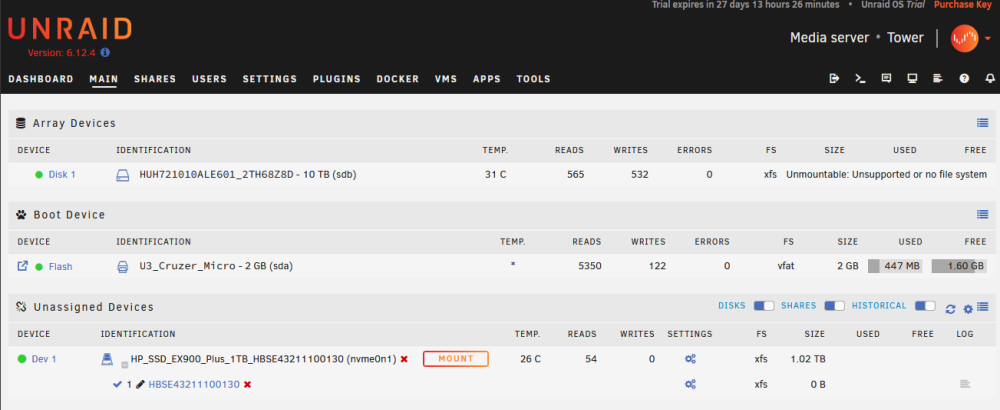
Some brief details to establish this is 1: a newb's server and 2: it's no surprise something went wrong. I am currently running without parity or a cache, as this is a brand new server and I have 4tb of files to transfer off an old NAS. From what I've seen the common wisdom is to run without a cache (as I only have a 1tb NVMe for that) and without building parity until I finish everything up. The array in its entirety is a 10tb HDD (for now, at least. I plan to add at least one more array drive and my 12tb parity drive will arrive in a day or so). In an effort to not generate a ton of heat in the case (my actual CPU cooler with a beefy fan doesn't get here until this afternoon) I set up Krusader using the Spaceinvader One tutorial and started toying with transferring files from my Synology NAS mounted as an SMB. The first couple small transfers worked, so I got cocky and started a 200-ish gb transfer of a bunch of files and left the browser running in the background while I goofed around in a game for an hour. At some point during that hour the transfer failed, and when I came back the tab for Krusade was offline. For a split second I saw a notification in the file transfer about there being a better version of a file at the destination already, but that might not be relevant. All shares are gone. All dockers are gone. Like a fool, my first instinct was "restart and this will fix everything" so I don't have diagnostics from that. I do have diagnostics from the period after that first reboot, and I've attached those. I ran Check System File Status test on the drive and it spat this out: Phase 1 - find and verify superblock... Phase 2 - using internal log - zero log... ALERT: The filesystem has valuable metadata changes in a log which is being ignored because the -n option was used. Expect spurious inconsistencies which may be resolved by first mounting the filesystem to replay the log. - scan filesystem freespace and inode maps... sb_icount 128, counted 33920 sb_ifree 14, counted 243 sb_fdblocks 2417496215, counted 2315457246 - found root inode chunk Phase 3 - for each AG... - scan (but don't clear) agi unlinked lists... - process known inodes and perform inode discovery... - agno = 0 - agno = 1 - agno = 2 - agno = 3 - agno = 4 - agno = 5 - agno = 6 - agno = 7 - agno = 8 - agno = 9 - process newly discovered inodes... Phase 4 - check for duplicate blocks... - setting up duplicate extent list... - check for inodes claiming duplicate blocks... - agno = 0 - agno = 2 - agno = 4 - agno = 5 - agno = 1 - agno = 3 - agno = 6 - agno = 7 - agno = 8 - agno = 9 No modify flag set, skipping phase 5 Phase 6 - check inode connectivity... - traversing filesystem ... - traversal finished ... - moving disconnected inodes to lost+found ... Phase 7 - verify link counts... No modify flag set, skipping filesystem flush and exiting. Now, it should be noted: nothing on the array was particularly precious to me as I am fully in the "learning how to live here" phase and nothing on the server is 'in production' so to speak. It's destined to be a Jellyfin machine that's constantly hooked up and left on like a "real" server, but in these early days I'm still tinkering, adding parts, and it's getting shut down for most of the day. If the solution is "wipe everything and start over" I am totally fine with that, all I'll have lost is the electricity burned copying files for an hour-ish. That said, I do want to hopefully figure out exactly what went wrong and how to fix the situation so I don't accidentally do it again while copying 4tb of media over. Thank you for your time, and thanks for maintaining this incredibly well-designed forum! Edit: I have since installed and run the Fix Common Problems plugin and it returned no errors. Just some suggestions for enabling automatic plugin updates. tower-diagnostics-20231108-2307.zip