matthewmalek
Members
-
Joined
-
Last visited
-
I'm having issues getting the ThunderboltEX 4 and mobo to play nicely on a bare metal Win 10 installation, so I think I'm going to call it quits. I'm going to return some of my recent hardware purchases and instead build two separate systems.
-
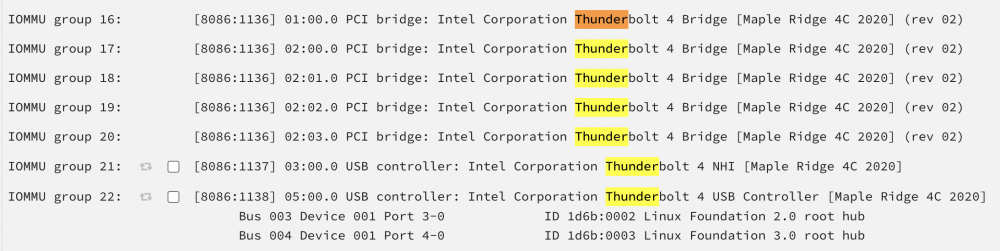
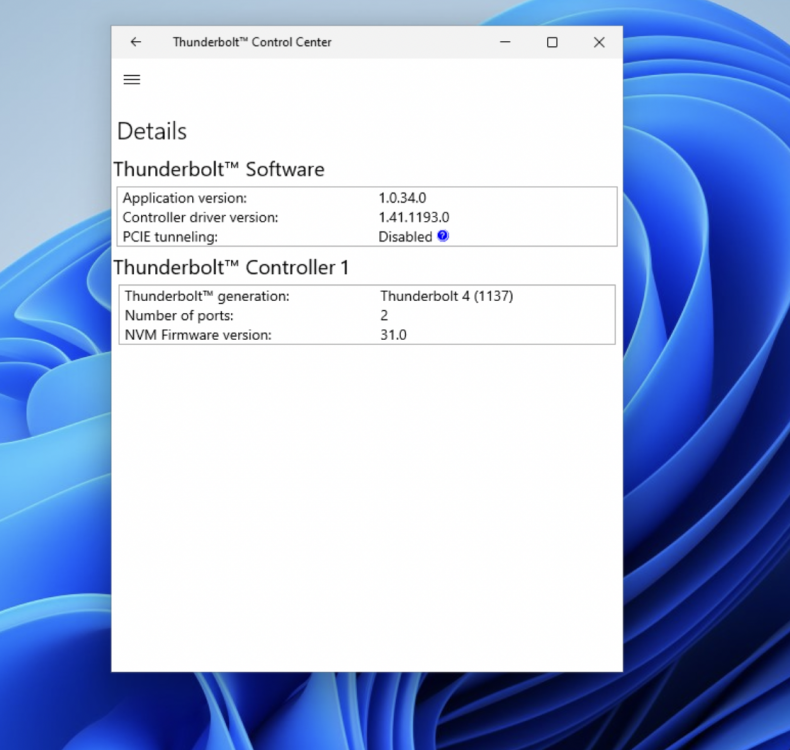
Update: I now believe the IOMMU configuration above is OK. The NHI is what a VM is going to talk to, and the system will use PCIe over USB 4 to implement Thunderbolt (hence why it's a USB controller). I made sure PCIe tunneling over USB4 was enabled in my BIOS (it was by default), I attached the two Thunderbolt devices to my Windows 11 VM, and booted it up. Note that when booting with the IOMMU groups bound to vfio, there is no longer a 'security' file for the device because it is no longer being mounted by unraid. I had one unrecognized device in Windows so I installed this Intel Thunderbolt software (https://www.intel.com/content/www/us/en/download/19402/thunderbolt-3-and-4-dch-driver-for-windows-10-for-intel-nuc.html) which has an overview page (attached). It seems to think that PCIe tunneling is disabled and the tooltip says it can be enabled in the BIOS. Why would both Unraid and the Windows VM think that PCIe tunneling is disabled and how can I troubleshoot this further? Thanks! multivac-diagnostics-20220601-1847.zip
-
Hi all, I have an ASUS motherboard with a Thunderbolt 4 header: https://www.newegg.com/p/N82E16813119540?Item=N82E16813119540 as well as this Thunderbolt 4 PCI expansion card, the ThunderboltEX 4: https://www.newegg.com/asus-90mc09p0-m0aay0-pci-express-to-thunderbolt/p/N82E16815293048?Description=thunderboltex 4&cm_re=thunderboltex_4-_-15-293-048-_-Product&quicklink=true running under Unraid 6.10.2 . The motherboard bios has been updated. I plugged the card into the first PCIe slot on the motherboard, and connected both the Thunderbolt 4 and USB headers to the mobo (I didn't connect the molex power b/c I believe it is optional for enabling quick charging Power Delivery, which I don't need). In unraid's System Devices I can see a lot of "Thunderbolt" items, but only the USB controllers have checkboxes next to them. I've tried booting with all 4 ACS modes and it always looks the same (see attached image). Why am I unable to select the PCI bridge IOMMU groups to bind to VFIO at boot? EDIT: The command cat /sys/bus/thunderbolt/devices/domain0/security outputs "nopcie". I couldn't find any Thunderbolt security settings in the motherboard bios to change this. But perhaps this is part of the reason? Thanks for the help, -- Matt