Junway
Members
-
Joined
-
Last visited
-
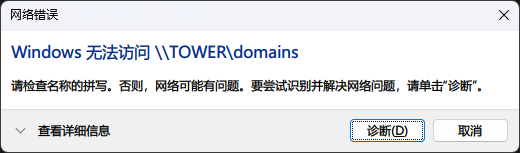
如题,用IP却可以正常访问,系统环境Windows11
-
Yes, /mnt/cache/system/libvirt/libvirt.img is correct, the virtual machine is back, thank you Should /mnt/disk2/system/libvirt/libvirt.img.bak be deleted? By the way, I have a question. After upgrading to 7.0, I want to change the file system of the cache device pool from btrfs to zfs. Will this cause data loss?
-
root@Tower:~# find /mnt -name libvirt.img /mnt/disk2/system/libvirt/libvirt.img /mnt/cache/system/libvirt/libvirt.img /mnt/user0/system/libvirt/libvirt.img /mnt/user/system/libvirt/libvirt.img
-
Please help me check.
-
here tower-diagnostics-20250111-2116.zip
-
After upgrading to version 7.0, why did I lose my docker and VMs? How do I recover them?
-
升级后,刚开始池设备无法启动阵列,后来根据搜索论坛,移除池,重新添加后可以正常启动阵列,阵列和Cache的数据都在,但是docker和虚拟机都没了,虚拟机的img文件(cache/domains)都在,难道要手动一个一个重新添加虚拟机是docker容器吗?
-
重启一下系统就有了。
-
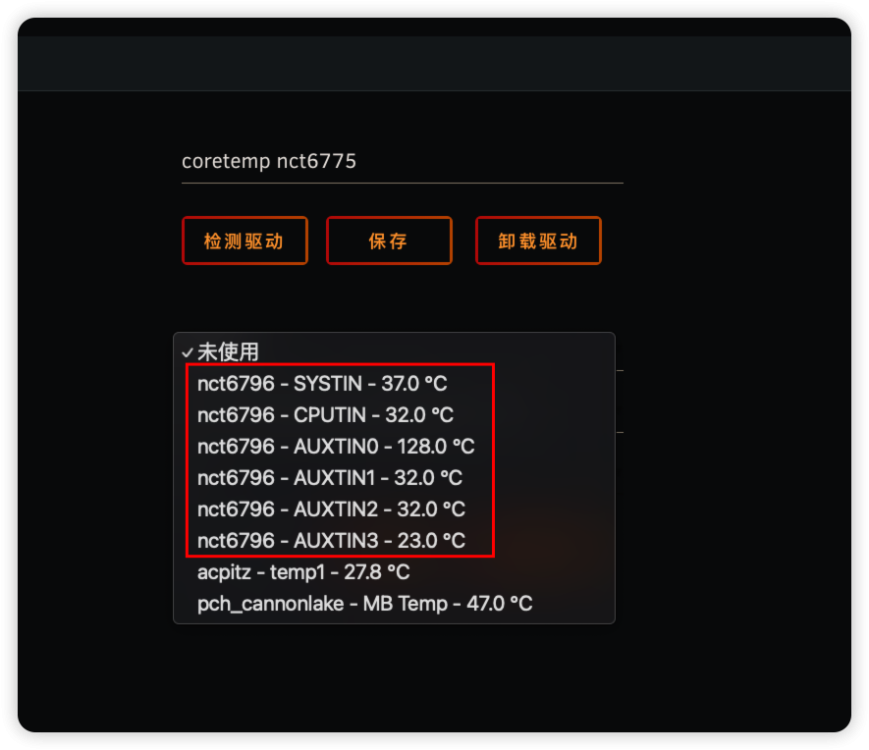
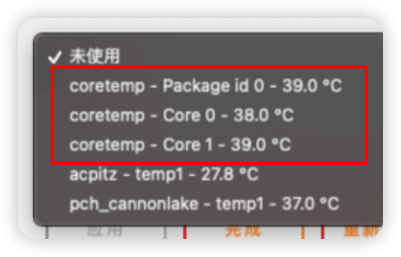
保存后没有,只有加载驱动后,会多出来一些列表项,但温度都是不正确的。
-
没有前辈回复一下吗?
-
OS: 6.12.4 最初只是在商店安装了Dynamix System Temp插件,然后在设置里,没有点击“检测驱动”,也没有点击“加载驱动”。 直接在传感器里列表里就能正确选择CPU各核心温度。 随后,点了检测驱动,再加载驱动,发现加载的驱动温度,反而显示不正确,于是就手欠卸载驱动了。 卸载后,本身正确的coretemp列表项都没有了。重装插件也无果,请大神指点。