





tubleuf
Members
-
Joined
-
Last visited
-
Update: I have changed the docker folder for an image and changed my SSD in a pool. For the moment everything works fine. hope that all will be okay 🤞 Thx @JorgeB and @itimpi
-
To adapt my setup according to the recommandation, I tried to : start Unraid without starting Docker or VM services moove “share” with the Unbalanced plugin I notice that Unbalanced plugin stops the test process during the plan step without any further details. So I forced the plugin to stop. The Array can't be stopped because Unraid can't unmount this disk: Array Stopping•Retry unmounting disk share(s)... Apr 25 17:24:03 groot-server root: umount: /mnt/disk5: target is busy. Apr 25 17:24:03 groot-server emhttpd: shcmd (151): exit status: 32 Apr 25 17:24:03 groot-server emhttpd: Retry unmounting disk share(s)... I checked the file system status of the disk5 : passed. I don't underdstand the problem... New diagnostic in attachment. groot-server-diagnostics-20250425-1720.zip
-
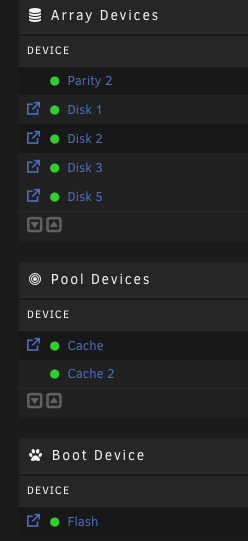
Thank you. @JorgeB for your feedback. Do you mean that the docker image should be on a cache pool or just an SSD pool? Today I have this disk structure (see screenshot) -> what is your recommendation?
-
New day, new (same) problem. Docker is down again: very slow and impossible to delete a container without error -> "execution error". I add that is not possible to stop the array: stopping service still in progress... You can find a new diagnostic in attachment. Do you have some ideas on this problem ? groot-server-diagnostics-20250425-0957.zip
-
I don't know why there's so much SSH activity. I've just shut down the service as it's not necessary at the moment. I wonder if it isn't the Tailscale SSH service...
-
Everything seems to work fine after the reboot. Is it possible to reduce the verbosity of ssh logs?
-
tubleuf changed their profile photo
-
@JorgeB here, the new diagnsotic after a restart. groot-server-diagnostics-20250424-1348.zip
-
Hi everyone, For a few days now, my docker service has been very slow and no longer responds correctly. Impossible to delete containers / impossible to restart them. I've also tried to stop docker, but the Unraid loading bar keeps running. Ditto on the server restart attempt. I've attached the diagnostic. Do you have any ideas? Thx groot-server-diagnostics-20250424-0948.zip
-
Ok. I'm trying this and hoping that the OOMs don't reappear.
-
Thx for the feedback! The only recommandation would be to increase the RAM in this case ?
-
Hi everyone, I got a new message from “Fix Common Problems” with an alert about several “out of memory”. I've already had this problem with Immich, because I had clamped its memory. Here I have several problems like: kernel: out_of_memory+0x3b3/0x3e5 I'm posting the diagnosis at the same time. Can you help me with the potential problem? Thank you all and have a nice Sunday. groot-server-diagnostics-20241124-0928.zip


