Howard3
Members
-
Joined
-
Last visited
Everything posted by Howard3
-
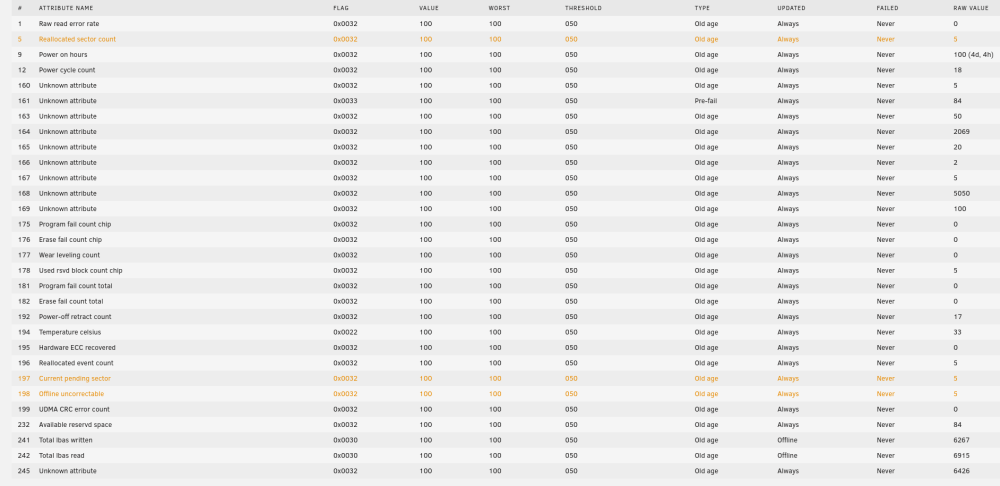
Thanks! I'll shoot PNY an e-mail directly and see what they say. It feels odd on a new drive, not sure what their quality control is like. It's funny because the other drive is kingston. The logic being two cheap SSD's in a raid 1 btrfs allows for cheaper drives to be used, no samsung needed for example. I'm guessing that at this current time there is no data at risk because the system avoids using those sectors... but I could be wrong on that.
-
Hi, I read through the forums and found posts like the following but am not sure how to best interpret it for my situation. Basically, I have a new SSD (PNY) and am using it as a cache drive in a BTRFS Raid 1 configuration with an equal sized drive from another manufacturer. Both are new. Today the PNY drive reads off as 5 Reallocated sector count, 5 current pending sector, 5 offline uncorrectable. It's been increasing about once per day, approx but like I said, they're very new. Should I continue using the drive and see if they stabilize? 5 isn't a huge number of failed sectors as I can tell and in this configuration shouldn't prove to be an issue, I believe? Any guidance would be appreciated! SMART attributes attached.