





Krevos
Members
-
Joined
-
Last visited
-
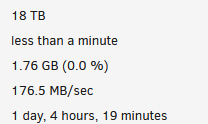
Thanks itimpi, i took out the disk1 and now its working fine. How does the Disk1 affect the parity check? I dont get it Now its on the normal time.... over 1 Day but thats normal
-
tower-diagnostics-20231215-1105.zip
-
Disk1 - 6TBHDD isnt the Problem, The Problem is the Parity Disk.... I checked all the Cables and Switched theme in all ways nothing that Works fine. I dont get it yesterday the Parity was normal working and on dec 1 there was the last Parity check made without a problem.. I do a new diagnostics and post the Result
-
tower-diagnostics-20231214-2345_before_newconifg.zip
-
Krevos joined the community
-
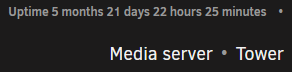
Hi guys, I moved my Unraid disks + USB to new hardware today. All previous disks were recognized and can be used again. Disk 1 has several errors but that's not too bad. Now when I start the parity sync it has really very long - over 3000 days and I can't explain why. The disk was previously running as a parity disc for about 1 year without any problems, attached is the screenshot from today, almost 6 months without any incidents. I thawed the Sata connector with a working disk, the power connector too, but this didn't help. I connected it to the additional Sata card with the same result as on the mainboard. Attached are my diagnostics, thank you very much for your help.
