





pacmancoder
Members
-
Joined
-
Last visited
-
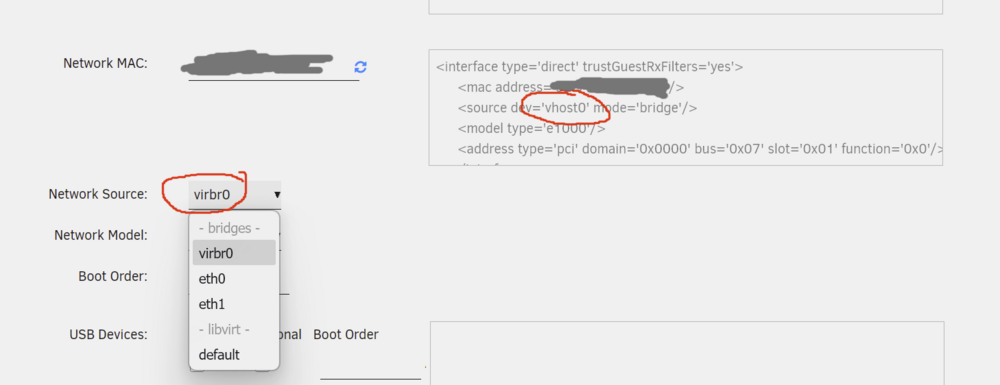
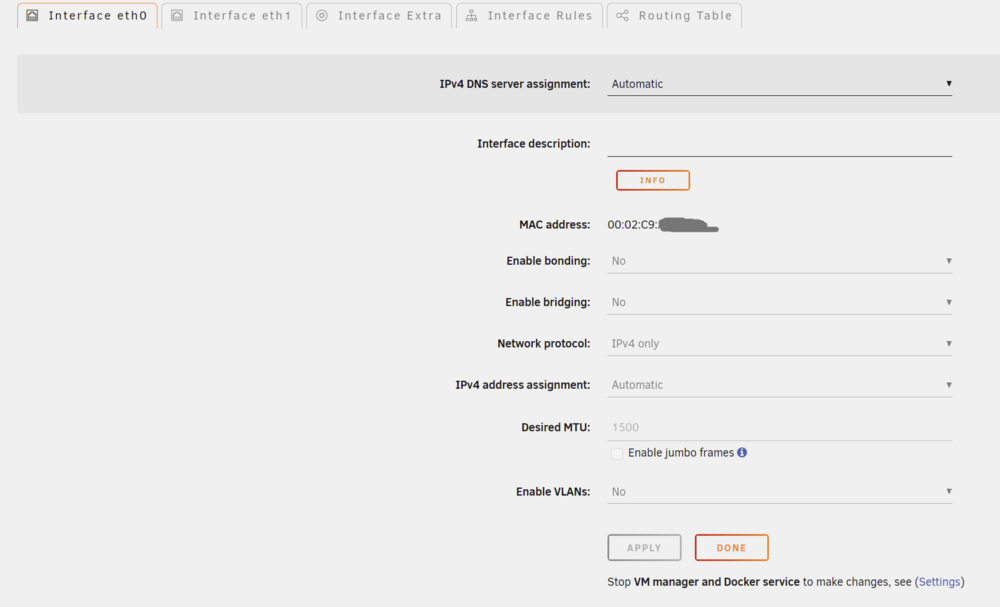
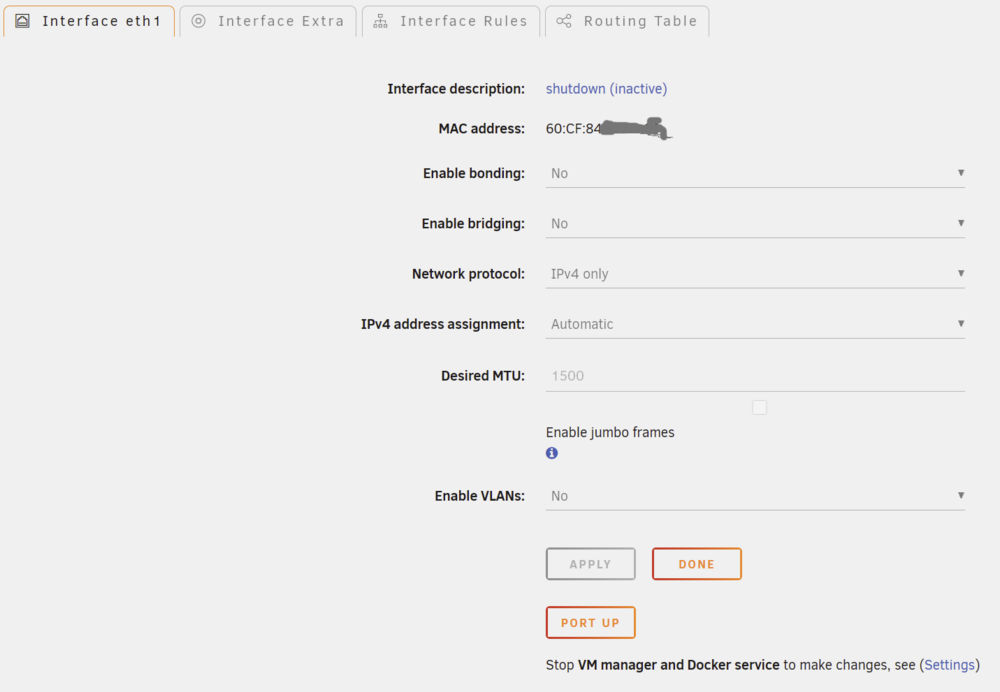
vhost network interface suddenly gone missing in edit VM GUI. This bug reproducing even on VMs with vhost0 still active (and working!) in XML view: Unraid version: 7.3.1 /boot/config/network.cfg # Generated settings: IFNAME[0]="eth0" DHCP_KEEPRESOLV="no" DHCP6_KEEPRESOLV="no" PROTOCOL[0]="ipv4" USE_DHCP[0]="yes" USE_DHCP6[0]="yes" IFNAME[1]="eth1" DESCRIPTION[1]="Mellanox 10G" PROTOCOL[1]="ipv4" USE_DHCP[1]="yes" SYSNICS="2"/boot/config/domain.cfg SERVICE="enable" IMAGE_FILE="/mnt/user/system/libvirt/libvirt.img" IMAGE_SIZE="1" DEBUG="no" DOMAINDIR="/mnt/user/domains/" MEDIADIR="/mnt/user/isos/" VIRTIOISO="/mnt/user/isos/virtio-win-0.1.240-1.iso" BRNAME="eth0" VMSTORAGEMODE="auto" TIMEOUT="60" HOSTSHUTDOWN="shutdown" CONSOLE="web" DISABLE="no" RDPOPT="no" USAGE="N" USAGETIMER="3"Something is definitely messed up - network.cfg reports Mellanox as interface with index 1, but in GUI its definitely eth0: eth1 is inactive (1 Gbe NIC) So, any ideas how do I bring back vhost0 to my VM GUI? editing XML works too, but not ideal.
-
So, I basically spent my whole weekend but got it working the way I like, maybe someone would find these crude scripts useful: prepare_drive.sh make_pool.sh open_luks.sh close_luks.sh start_pool_maintenance.sh stop_pool_maintenance.sh README.md
-
@JorgeB Well... it is definitely an option, but more like last resort - I came to Unraid because of usability/user friendliness, so but it is not ideal to manually manage zpool, re-partition, luks encrypt/open, re-import pool in UI etc. each time disaster struck... It just wastes a lot of my time and makes me want to try other options like TrueNAS saddly ☹️. I'll try to update to latest 7.3.1, maybe things have changed, changelogs mentioned custom partitioning on array drives, maybe pool drives were affected too? UPD: No, update to 7.3.1 didn't help
-
Hello! I stumbled upon the following issue -- I am using customer-grade NVME drives for my cache pool in Unraid (HP EX950); not so long ago my pool one of the drives died and I was struggling to replace my raidz2 array drive with ssd from a different vendor (WD SN750). The problem is that new WD SN750 has slightly smaller size which causes normal zfs replace procedure to fail. (Old drives - 2048408248320 bytes, new drive - 2000398934016 bytes) I wanted to solve this with over-provisioning - do not allocate partition on a whole drive, to keep leeway for different drive vendors. I tried to manually partition drives prior to zfs pool creation in unraid UI, eg: parted -s /dev/nvme3n1 unit s mklabel msdos mkpart primary 2048 3900000000 # ~1.99TBBut the problem is, unraid unconditionally overrides partition table: sfdisk --quiet --label dos /dev/nvme1n1 <<< 'start=2048' # from logs; uses WHOLE drive for zfs diskIs there any way to force unraid to keep disk in pre-partitioned state prior to zfs pool initialization / replacement disk resilvering? P.S. nvme namespaces is not a solution, as my customer drives simply do not support namespace management. P.P.S. I also use luks encryption on drives Edit: Unraid version: 7.2.4; redundancy mode is raidz1
-
UPD: Somehow, when running Windows 11 inside VM with raw vfio partition, I am getting full performance, which I could expect from raidz1 array. Maybe I am just testing speed on unraid incorrectly? UPD2: Aha, I think I got it. My testing method was really bad. That was the only single-thread performance. I tried to run tests via fio utility -- and I got the numbers I expected for 12 threads. Sick! fio --name=test --rw=read --size=1G --numjobs=12 > READ: bw=12.8GiB/s (13.7GB/s), 1092MiB/s-1410MiB/s (1145MB/s-1479MB/s), io=12.0GiB (12.9GB), run=726-938msec fio --name=test --rw=write --size=1G --numjobs=12 > WRITE: bw=4625MiB/s (4849MB/s), 385MiB/s-404MiB/s (404MB/s-424MB/s), io=12.0GiB (12.9GB), run=2535-2657msec
-
pacmancoder changed their profile photo
-
Hi, I made a cache array with 4 x HP EX950 2TB (pcie 3.0), formatted in ZFS (raidz1, compression on, encryption on), connected dirrectly to Ryzen 9 5900x cpu (pcie x16 -> 4x pcie x4 bifurcation card), 64GB 3200MHz RAM. The problem is, I am getting really slow write/read speeds from this array, even though when testing beforehand on windows, I could achieve ~8.6GB/s write speeds and 10.4GB/s read speeds from windows raid array. I know that with zfs's raidz1 I could expect raw write speeds only up to single drive write speeds (that's should be around 2900MB/s), and the read speeds should be around 3x read speed of a single drive (that is, up to 9.45GBs). Also, I expected a drop from compression + encryption, but not that big! Here is my test results: Transfering 10gb video file between 2 cache-only shares resulted in 600MB/s, that really shocked me a bit. First thought - maybe shares overlay fs having a huge overhead, so I opened terminal and transfered file manually between 2 cache folders: pv /mnt/cache_nvme/share1/test.mkv > /mnt/cache_nvme/share2/test.mkv => 1.12GiB/s Second thought - mabe only the write performance is terrible, let's try read from nvme to RAM pv /mnt/cache_nvme/share1/test.mkv > /tmp/test.mkv => 1.29GiB/s That's like 1/7 of the theoretical max read speed and a bit more than 1/3 of theoretical write speed - And that's for a big sequential write of 10GB. What could be wrong with my setup?


