





bitstoprint
Members
-
Joined
-
Last visited
Everything posted by bitstoprint
-
well I moved my appdata and system folders onto a different disk and so far everything seems ok
-
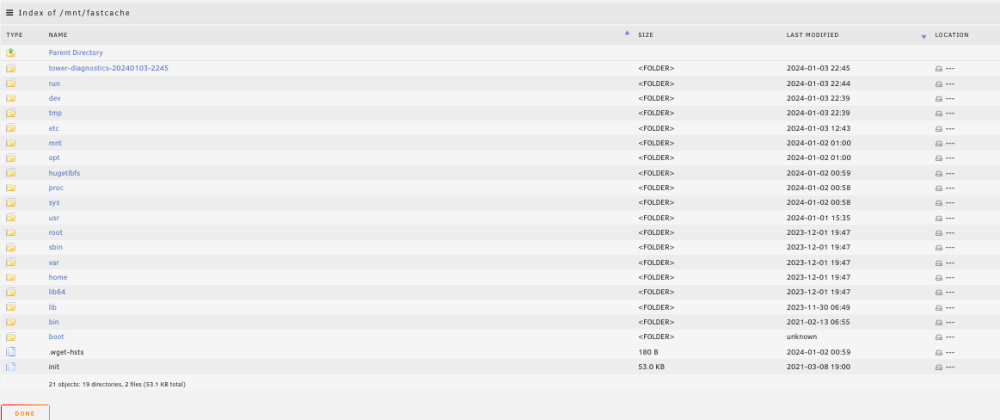
My server has been running a large amount of downloads with nzbget. The final destination for these downloads is a cache - then my sonarr/radarr moves them onto the array. This cache drive also has my system and appdata folders on it. I have come back to my server twice now with failure. The docker service has stopped completely. The cache drive looks like it has erased everything that was on there and now has a long list of new folders (photo attached). Last time I restarted the server and did xfs repair on all drives and everything seemed ok, but it has come back I want to know if anyone can help identify what the problem actually is. tower-diagnostics-20240103-2245.zip
-
will do - but I think it's fixed - I want to say a big thanks to you. Unraid is so useful but hard to learn - you do a great job!!
-
so basically the share disappears - and then when you click to browse the disk files on the main page - no files are shown and it says "no listing: too many files" Are you an individual person or a mod team? I just realised I've seen you on almost every thread I've browsed
-
Ok nothing so far ... and I'm hitting it very hard... it seems to maybe be fixed. I did also remove all other shares from the cache drive. I did this because I read somewhere that the "too many files" might have been an issue with SMB shares - so I removed them all from the cache drive leaving just the non-SMB exported nzbget download share. I would like to ask you - do you know what "too many files" message can mean if it's NOT disk corruption? Does it actually mean what it says? Have I fixed it with removing other shares?
-
sorry - more detail. While doing lots of file downloads with nzbget - after a few hours of queing up downloads the cache drive that nzbget unzips complete downloads to - an nvme cache drive goes offline - the message when i try to browse the cache contents on the main page was "no listing: too many files". I completed a restart and disk repair - but it came back gain twice. This time I have slowed the pace of downloads and it seems ok. Previously I have seen this with a corrupt disk - but this time the disk seems ok - so is it maybe actually "too many files"? I would like to understand if it something I can fix or a behaviour I should modify...
-
I have had the "too many files" message a few times today - have tried repairing the filesystem and suceeded in using the cache again - but it keeps coming back. Any ideas?
-
sorry yes - 28 disks. How long do you think a parity would take to create for 108TB? Is there any chance it might be faster to create a parity and then rebuild rather than all this transferring time emptying 5 x 4TB drives? EDIT - just thought it probably won't allow me to add a 14TB drive to an array with 4TB parity...? so I guess this isn't an option
-
no parity
-
I have no parity - files are replaceable - just a plex server So you're saying each new drive needs to be in its own cache pool - they can't be in a combined cache pool? - new config yes I'm familiar
-
I have 30 x 4TB drives - all my sata/sas slots are filled right now. I have bought a few 12TB and 14TB drives and want to replace a bunch of the 4TB drives. Right now I am using unbalance to empty individual drives - then replace with the new larger drives. I have to do this one by one as all my sas/sata slots are filled. I have the option of installing another sas pcie card so I have more drive slots. However my array has maximum drives - so if I did this, I believe the new drives would have to be added as a cache pool. So... If I add the new 14TB & 12TB drives as a new cache pool... then transfer files from the array to this new cache pool... then remove the now empty array drives... will I then be able to simply reassign the new cache pool disks as array disk replacements and have the files accessible?


