Skip to content
View in the app

A better way to browse. Learn more.

Unraid

A full-screen app on your home screen with push notifications, badges and more.

To install this app on iOS and iPadOS
  1. Tap the Share icon in Safari
  2. Scroll the menu and tap Add to Home Screen.
  3. Tap Add in the top-right corner.
To install this app on Android
  1. Tap the 3-dot menu (⋮) in the top-right corner of the browser.
  2. Tap Add to Home screen or Install app.
  3. Confirm by tapping Install.

SonOfWidsom

Members
  • Joined

  • Last visited

  1. SonOfWidsom changed their profile photo
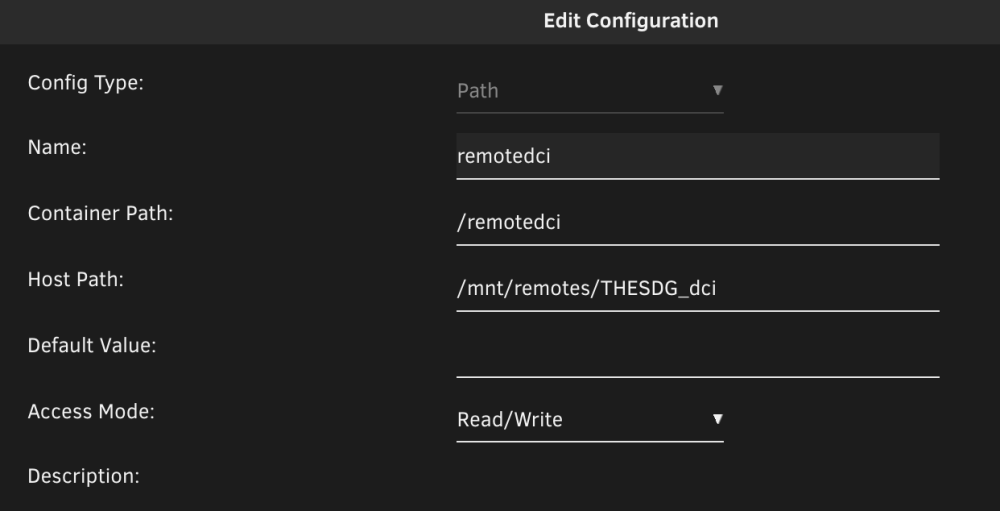
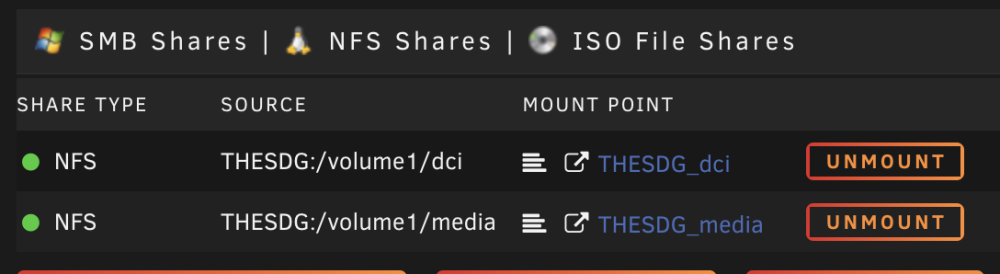
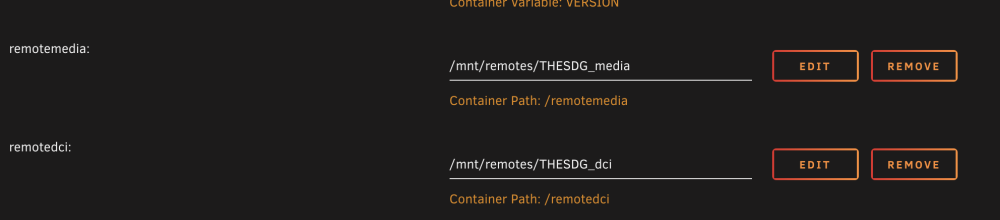
  2. I know this is very old, but it helped me a bunch (thanks @bombz), so I thought I'd elaborate just a bit. My plex media is on a different server, a synology NAS - sitting on the same network as my Unraid (which I'm only using for the Plex Server. When setting up Unraid, I added a few remote NFS shares. From the Main panel, they look like this: Even though these shares have a path on my unraid server (/mnt/remotes/THESDG_dci), my Docker Plex install can't see them until I add these paths to the Plex Docker config: (and the create/edit view) Once those were in place, the files were browsable by plex so I could re-link my libraries (I was relocating my plex server from the synology to the unraid).
Account

Navigation

Search

Search

Configure browser push notifications

Chrome (Android)
  1. Tap the lock icon next to the address bar.
  2. Tap Permissions → Notifications.
  3. Adjust your preference.
Chrome (Desktop)
  1. Click the padlock icon in the address bar.
  2. Select Site settings.
  3. Find Notifications and adjust your preference.