Skip to content
View in the app

A better way to browse. Learn more.

Unraid

A full-screen app on your home screen with push notifications, badges and more.

To install this app on iOS and iPadOS
  1. Tap the Share icon in Safari
  2. Scroll the menu and tap Add to Home Screen.
  3. Tap Add in the top-right corner.
To install this app on Android
  1. Tap the 3-dot menu (⋮) in the top-right corner of the browser.
  2. Tap Add to Home screen or Install app.
  3. Confirm by tapping Install.

radicale

Members
  • Joined

  • Last visited

  1. Not for me. Firefox 144.0
  2. radicale started following Order Upgrade
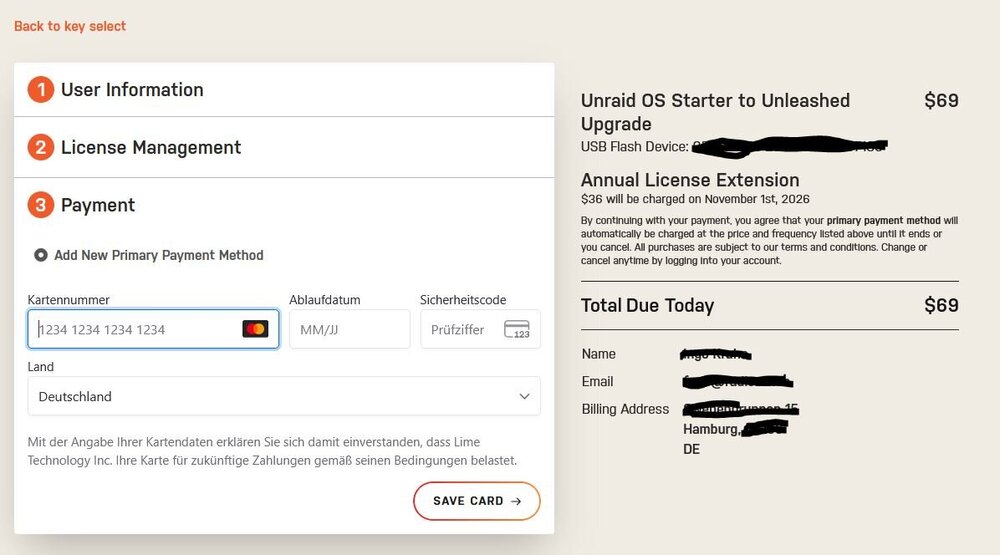
  3. When I buy UnRaid, whether Start Pro or Lifetime, payment via PayPal works without any problems. When trying to upgrade from Starter to Pro, the only payment option available is by credit card. Is this an attempt to entice customers to buy a new version in order to boost sales?
  4. radicale posted a topic in Forum Feedback
    It's great that there is supposed to be a trial version with a duration of 30 days, but it's not so great when after flashing the stick and when starting the computer / server (both on the same day) the error message: Error: {"error": "The maximum trial period has expired, please consider purchasing a license"} Then you can save yourself the 30 days. There is probably no free trial here, although it is stated. Even if I have a license, I might want to test it on another computer.

Account

Navigation

Search

Search

Configure browser push notifications

Chrome (Android)
  1. Tap the lock icon next to the address bar.
  2. Tap Permissions → Notifications.
  3. Adjust your preference.
Chrome (Desktop)
  1. Click the padlock icon in the address bar.
  2. Select Site settings.
  3. Find Notifications and adjust your preference.