



Skip to content
View in the app

A better way to browse. Learn more.

Unraid

A full-screen app on your home screen with push notifications, badges and more.

To install this app on iOS and iPadOS
  1. Tap the Share icon in Safari
  2. Scroll the menu and tap Add to Home Screen.
  3. Tap Add in the top-right corner.
To install this app on Android
  1. Tap the 3-dot menu (⋮) in the top-right corner of the browser.
  2. Tap Add to Home screen or Install app.
  3. Confirm by tapping Install.

nzmje

Members
  • Joined

  • Last visited

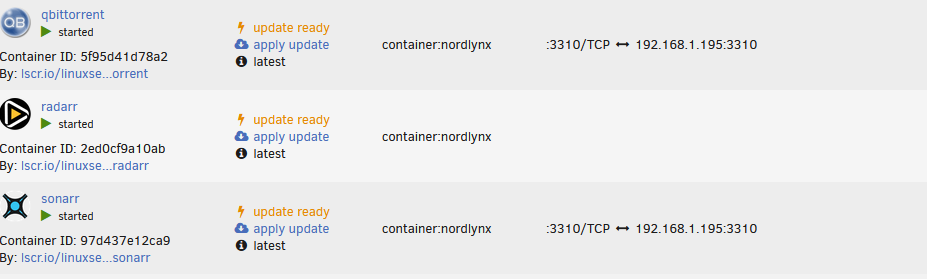
  1. Have just updated some other containers (this is since upgrading UnRaid OS to 6.12.6) and have now noticed all these port mappings have disappeared. Is this no longer supported or needed?
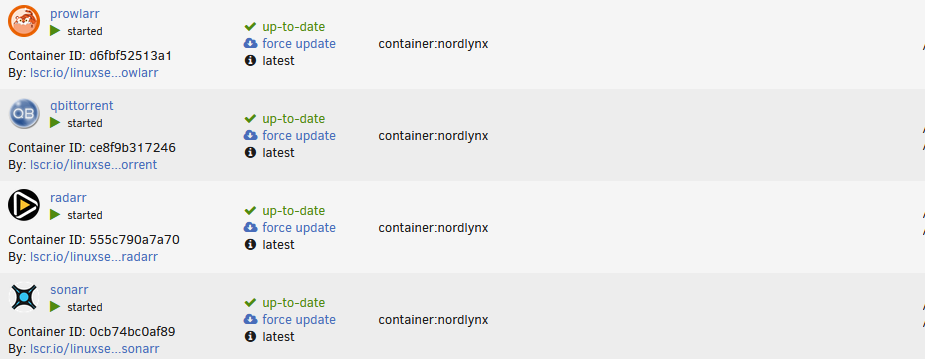
  2. I recently had some issues with my radarr container configuration, so had to revert to an older image to resolve. My *arr's are all using nordlynx vpn container for networks. As you can see there are port mappings for qbt and sonarr for :3310 but not for radarr. Can anyone assist with where/how I configure these? Second screenshot shows the docker allocations within the container settings. Thanks in advance.

Account

Navigation

Search

Search

Configure browser push notifications

Chrome (Android)
  1. Tap the lock icon next to the address bar.
  2. Tap Permissions → Notifications.
  3. Adjust your preference.
Chrome (Desktop)
  1. Click the padlock icon in the address bar.
  2. Select Site settings.
  3. Find Notifications and adjust your preference.